Automated Messages on LinkedIn: What to Automate and When a Person Takes Over

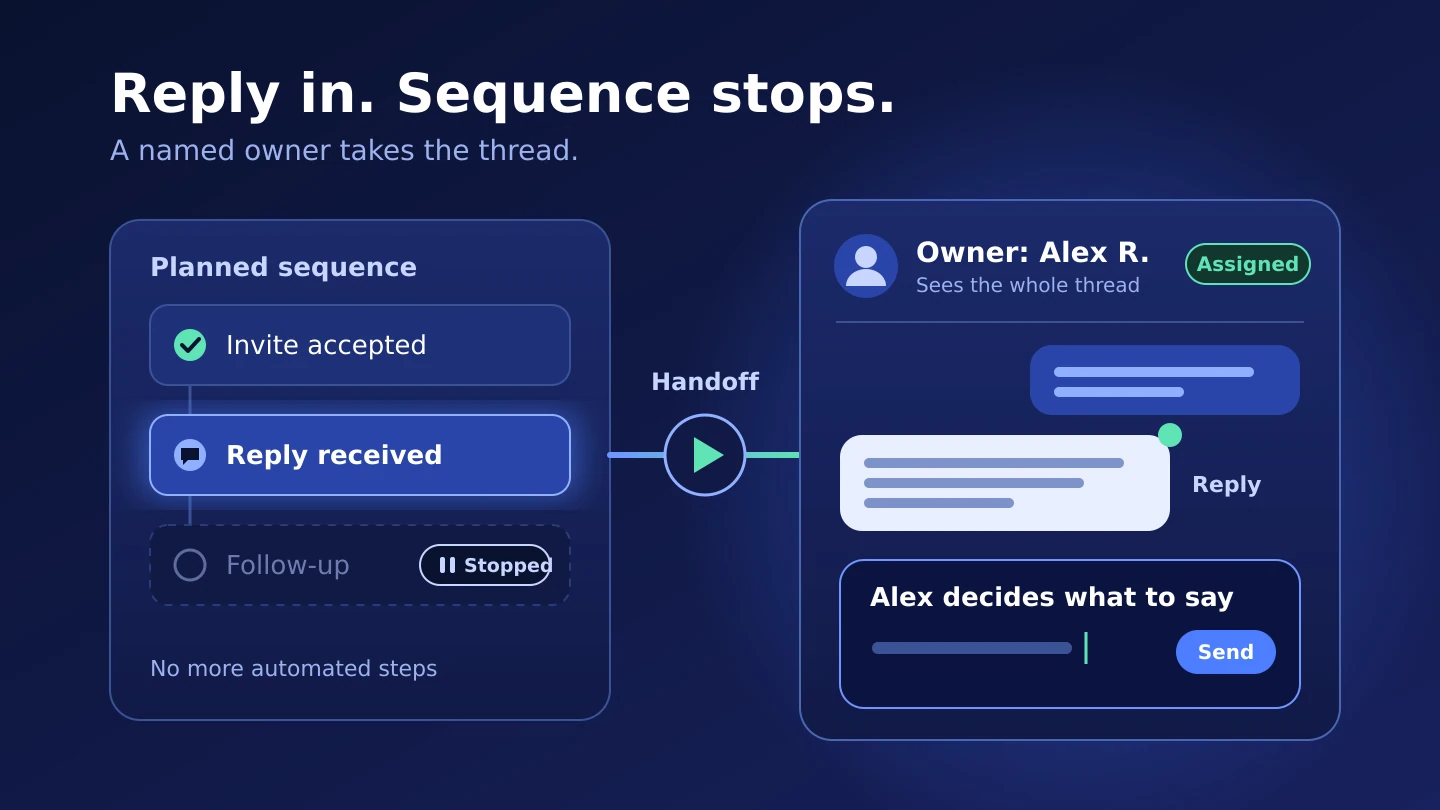
Automated messages on LinkedIn are connection notes, follow-ups and replies that software sends from your account according to rules you set. The parts worth automating are predictable: the invitation note, the first message after acceptance and one follow-up. Replies belong to a person, and LinkedIn's rules on third-party tools deserve a read before you start.
This guide is for the person who decides how a sales team uses LinkedIn. It covers which messages a tool can send on its own, how to build a short sequence that stops at the right moment, where AI drafts need human approval, and what account risk you accept when you use third-party automation.
What counts as an automated message on LinkedIn
Two different things share the name, and they carry different risks.
Messaging aids built into LinkedIn. LinkedIn's Help Center documents its own features, such as smart replies in LinkedIn Messaging, and it ranks for this search with a page titled Message Content Automation. These are LinkedIn features, used inside LinkedIn. Read those pages for what LinkedIn currently offers and how it describes it.
Third-party automation. This is software outside LinkedIn that sends invitations and messages from your account, to people you select, at times you set. It is what most sales teams have in mind when they talk about automating LinkedIn messages, and it is the kind of activity LinkedIn's rules on automation concern (more on that below).
Within third-party automation, each message type plays a different role:
| Message | Who receives it | Automate it? | What to watch |
|---|---|---|---|
| Connection request note | Someone you are not connected with yet | Yes, from a template with one checked, specific reason to connect | LinkedIn limits personalized invitations; Expandi's guide notes a monthly allowance and a short note length on free accounts. Limits change, so check LinkedIn's current pages before launch |
| Message after acceptance | A new first-degree connection | Yes | It must refer to the reason you connected, not pitch your whole offer |
| Follow-up | A connection who has not answered | Yes, once, then stop | It must never be sent after the person has replied |
| InMail | People outside your network | Possible, but keep it for a few prospects | It uses InMail credits from paid LinkedIn plans such as Sales Navigator; see our LinkedIn Premium price breakdown |
| Reply to a prospect | Someone who answered you | No, a person decides | AI can prepare a draft; a person reads the thread, approves and sends |
The table shows the main rule. Automation is useful before a conversation starts, when the work is repetitive and the content is predictable. Once someone answers, the right content depends on what they said, and a message written in advance cannot know that.
Why automate LinkedIn messages, and where it goes wrong
The real benefit is consistency. Expandi's guide puts it in one line: most manual outreach stumbles on the follow-up. A sequence sends the planned follow-up to everyone who has not answered, on time, without anyone keeping a spreadsheet of who is due.
That consistency only helps if the work around it is sound. Five failures are worth preventing before you launch anything:
- A follow-up fires after a reply. The prospect answered yesterday, and today they get "Just bumping this up". It tells them nobody read their answer, and it is preventable with a stop-on-reply rule you have tested.
- The message has no reason to exist. A broad imported list gives you no context, so the copy falls back on generic praise and a pitch. Narrow, warm audiences give each message a specific reason.
- Unedited AI copy goes out. A model can write a fluent draft, but it does not know what you know about the prospect, and it can get details wrong.
- Volume rises too fast. A sudden jump in invitations and messages from one account is the pattern you least want. Start low and increase gradually.
- Nobody owns the replies. Answers land in an inbox that nobody checks every day, and warm conversations go cold.
None of these is a tooling problem first. They are process decisions, and a manager can settle them before choosing any software. If you are still deciding how outreach fits your sales process, our overview of how LinkedIn prospecting works, from targeting to follow-up covers the groundwork.
How to build a short automated LinkedIn sequence
A good sequence is short and ends cleanly. Expandi, a LinkedIn automation vendor, recommends sending three messages in the full sequence and then stopping, with the connection note able to count as the first. We agree with the principle: three touches give a busy person two chances to notice you, and more starts to feel like pressure.
Step 1: Start from a warm, narrow audience
Pick a source that already explains why you are reaching out:
- People who engaged with a relevant post, yours or a peer's, filtered to your ideal customer profile. The post gives you a shared topic.
- Qualified profile visitors. A visit is a light signal, so check that the person fits your target before adding them.
- A narrow Sales Navigator search built around one buyer role and one live reason to reach out. Our step-by-step Sales Navigator tutorial shows how to build those searches.
A small, well-matched list with a shared context is easier to learn from than a large, loosely matched one: you can read every reply and fix the copy before you scale.
Step 2: Write the connection note
Keep it to one reason and no pitch. For example:
Hi [first name], I read your comment on [post topic] about [specific point]. I work on the same problem with [type of team]. Happy to connect.
Replace every bracket with something you have checked. If you cannot fill a bracket for a given person, that person probably does not belong in this sequence.
Step 3: Send one message after acceptance
This message turns the shared context into a small question:
Thanks for connecting, [first name]. You mentioned [specific point]. How does that show up for your team today: more [option A] or more [option B]?
A question with two concrete options asks for an opinion, not a commitment, which makes it lighter to answer than "Would you be open to a call?".
Step 4: One follow-up, then stop
The last message offers something small and closes the sequence without fake urgency:
[First name], one last note from me. Here is how [similar team] handled [problem], in one line: [example]. If it is not a priority right now, no problem, I won't follow up again.
Leave several days between steps. The exact interval matters less than consistency and sending during the prospect's working hours.
Step 5: Set the stop rules before launch
Before anything goes out, decide and configure:
- Stop on reply: any answer ends the sequence for that person, whatever its tone.
- Sending hours in the prospect's time zone, on working days.
- Daily limits per LinkedIn account, starting below the level you eventually want.
- Exclusions: current customers, open deals and people a colleague is already talking to.
Then test it. Add a colleague as a test prospect, reply to the first message, and confirm that the follow-up never arrives. A ten-minute test prevents the first failure in the list above.
Templates and AI drafts: where a person approves
Templates and AI do different jobs, and confusing them is how generic messages get sent.
Templates give structure. A person writes the template once: the order of the ideas, the tone, the question at the end. The variables carry the specific, verified detail for each prospect. Plan a fallback for empty fields, so that a missing first name does not produce "Hi ,".
AI gives a starting point. Use it to propose an angle or a first draft for a segment, or to draft an answer to a reply. Then edit the draft with what the model cannot know: your offer, the context of the conversation, and what is actually true about the prospect.
The rule that keeps both safe is simple: AI may draft, a person decides what is sent. For the first messages of a sequence, that means a person approves the template before launch. For replies, it means a person reads the thread and approves each answer.
What should happen when someone replies
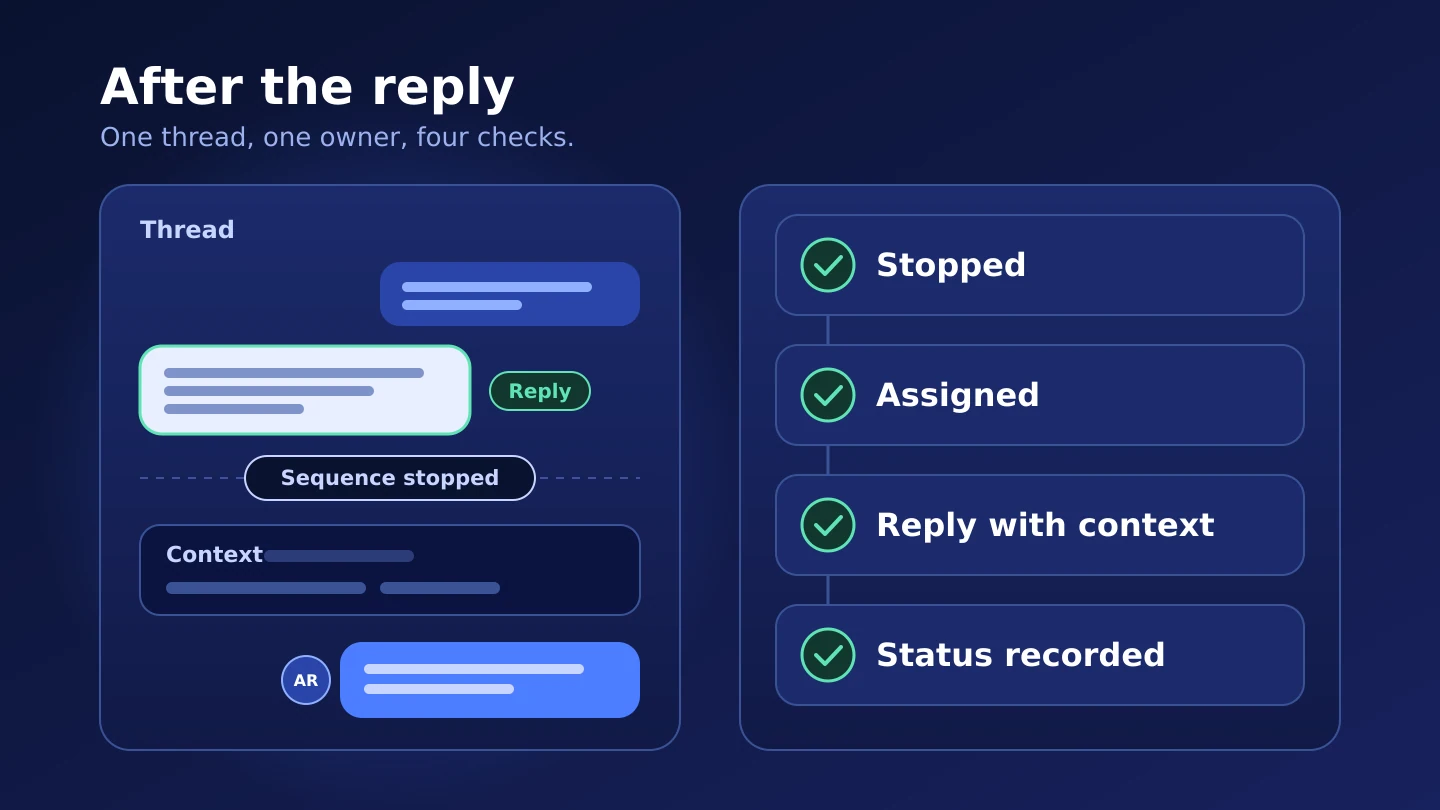
A reply is the moment the sequence has done its job. From there, four things should happen:
- The sequence stops for that person, automatically.
- The conversation moves to a named owner. That is usually the person whose LinkedIn account sent the messages. In an agency, it is the manager of that client account.
- The owner answers with context. They need the full thread and the campaign that produced it, so they know what the prospect has already received.
- The status is recorded in your pipeline or CRM, so the conversation does not depend on someone's memory.
Some tools offer AI replies in two modes: an assistant that prepares a draft for you to review, and an autopilot that answers on its own. For prospect conversations, start with the assistant mode. A wrong answer sent automatically to an interested buyer costs more than the minutes saved, and you may not see it until the conversation is lost.
LinkedIn's rules and account risk
Here is what is on record, stated plainly. Expandi, which sells LinkedIn automation software, writes in its own guide to LinkedIn message automation that LinkedIn's User Agreement restricts unauthorized automation. The same guide says that LinkedIn's automated activity policy does not allow third-party software or browser extensions that scrape or automate activity on the site, and concludes that every third-party automation tool carries account risk. It also notes that pacing controls can reduce sudden activity but do not give a tool LinkedIn's approval.
When a vendor states this about its own category, take it seriously. Read LinkedIn's User Agreement and Help Center yourself before you decide, because LinkedIn's wording, not a vendor's summary, is what applies to your account.
For a decision-maker, this means three things:
- Automation is a risk you accept and manage, not one a vendor can remove. No tool, including the one we work on, can promise that an account will not be restricted.
- Manage the risk with behaviour, not with promises. Use conservative daily limits, increase them gradually, send during working hours, and pause the account if messages start failing or LinkedIn displays a warning.
- Decide whose account carries the risk. A rep's personal profile, a founder's profile and a client's profile in an agency are different exposures. Make that decision explicitly with the account owner before you launch.
Tools for automated messages on LinkedIn
LinkedIn automation tools differ first in where they run. Expandi's guide sorts them into browser extensions, which work inside your browser and usually need your computer to stay on, desktop applications and cloud tools. Beyond that, the questions that matter for messaging are the same whichever vendor you look at:
| Question to ask | Why it matters |
|---|---|
| Does the sequence stop on reply, and can I test it before launch? | It prevents the most visible automation mistake |
| Can I set daily limits and sending hours for each LinkedIn account? | Pacing is your main lever on account risk |
| Where do replies land, and who can see and answer them? | A reply nobody owns is a lost conversation |
| Are AI drafts previewed and approved before sending? | It keeps a person in charge of what prospects read |
| With several accounts, does each campaign stay tied to its sending account? | You always know which identity a conversation belongs to |
| What does the tool not do? | Missing functions matter more than long feature lists |
Several of the guides ranking for this search, including Expandi's, Salesforge's tool list, Linked Helper's and La Growth Machine's, are written by vendors. They are useful for understanding workflows; check feature claims and limits in each vendor's own documentation.
Kanbox, the LinkedIn automation tool we work on, handles this workflow account by account. Campaigns combine actions and follow-ups, with time zone, days, sending windows and daily limits for invitations and messages. Replies arrive in the messaging space of the selected LinkedIn account, which also shows conversations outside campaigns, and each campaign has its own Kanban pipeline. On the Pro and Agency plans, AI conversation runs either in assist mode, where you preview the draft and edit it in the composer, or in autopilot, and a lead magnet can turn comments on a post into a connection request, then a message after acceptance. Agencies switch between client accounts by clicking an avatar, without logging out. Limits to know: Kanbox does not natively rotate several senders in one campaign, show several accounts' inboxes at once, combine several accounts in one client report, or run A/B tests.
FAQ
Can you send automated messages on LinkedIn without a third-party tool?
LinkedIn offers messaging aids inside its own product. Its Help Center documents smart replies in LinkedIn Messaging and has a page on message content automation; those pages are the best reference for what LinkedIn provides natively today. Running a prospecting sequence, meaning invitations, a message after acceptance and a timed follow-up sent to a list of people you selected, is what third-party automation tools are used for. That is the activity LinkedIn's rules on unauthorized automation concern, so read those rules before you choose that route.
Is automating LinkedIn messages against LinkedIn's terms?
According to Expandi, a vendor of LinkedIn automation software, LinkedIn's User Agreement restricts unauthorized automation, and LinkedIn's automated activity policy does not allow third-party software or browser extensions that automate activity on the site. Expandi concludes that every third-party tool carries account risk, and that pacing controls do not amount to LinkedIn's approval. Read LinkedIn's current User Agreement yourself, because it is the text that applies to your account. In practice, treat automation as a risk you accept and manage, and be wary of any tool that promises your account cannot be restricted.
How many automated messages should a LinkedIn sequence include?
Three is a sound default: the connection note, one message after acceptance, and one follow-up, then stop. Expandi recommends the same three-message structure in its guide, with the connection note able to count as the first message. Longer sequences mostly add pressure on people who have already chosen not to answer, and they raise your sending volume without improving the conversation. If a segment does not respond to three well-targeted messages, change the audience or the reason for reaching out before you add steps.
Can I send an automatic welcome message when someone accepts my connection request?
Yes, if your tool supports a message-after-acceptance step, and it is a common request, for example in this r/GrowthHacking thread asking for a tool that auto-sends a welcome message. Expandi's guide, for instance, treats the first post-connection message as the second message of its connector campaigns. Make it specific: refer to the reason you connected and ask one easy question, rather than a generic "thanks for connecting" followed by a pitch. It is still third-party automation, with the account risk described above, and it should stop as soon as the person replies.
Should AI reply to LinkedIn messages automatically?
For prospect conversations, use AI as an assistant, not as the sender. Let it draft an answer from the thread and your offer, then have the account owner read the conversation, edit the draft and decide whether to send it. A reply is where buying interest shows up, and a wrong or generic answer sent automatically at that moment costs more than the time it saves. If you test an autopilot mode, limit it to a small, low-stakes segment, and review what it sent every day.
Can people tell a LinkedIn message is automated?
They tend to notice the signs rather than the software. A message feels automated when it has no specific reason for reaching that person, when a variable fails and leaves a gap or a wrong detail, or when a scheduled follow-up ignores a reply they already sent. Each of these is avoidable: use narrow audiences with a real shared context, check every variable you rely on, edit AI drafts, and test the stop-on-reply rule before launch.
Next steps
Automated messages on LinkedIn work when they stay small: a narrow audience, three messages, a stop on reply, and a person who owns every conversation that follows. The decisions that matter most are about process and risk, and you can make them before comparing any tool.
If you want to go further on targeting and follow-up before you automate anything, start with our guide to building a LinkedIn prospecting routine. If you are ready to set up a first sequence with per-account limits and sending windows, you can compare Kanbox plans and start the 15-day free trial, which requires no credit card.
Import your prospects from LinkedIn or Sales Navigator, run your sequence and follow every reply in a Kanban pipeline.