

Kanbox vs Meet Alfred: Which LinkedIn tool is best for you?
Compare pricing, features, and user experience to pick the right LinkedIn prospecting tool. Kanbox focuses on LinkedIn-first automation with AI messaging, while Meet Alfred adds multichannel outreach.
15-day free trial - No credit card required




Meet the Contenders
LinkedIn-focused prospecting platform with AI-powered messaging, ICP scoring, unlimited scraping, visual Kanban pipelines, and smart inbox management. Runs 100% in the cloud, 24/7.
- AI-powered message génération
- ICP scoring to prioritize leads
- Unlimited LinkedIn & Sales Navigator scraping
- 6+ step automation séquences
- Visual Kanban pipelines
- Smart Inbox with fullscreen chat
Multichannel outreach platform combining LinkedIn, email, and Twitter (X) automation. Offers sales campaign séquences, social media scheduling, and basic CRM features. Requires a browser extension to run.
- Multichannel outreach (LinkedIn + Email + Twitter)
- Social media post scheduling
- Personalization snippets
- Zapier & Webhooks intégrations
Feature-by-Feature Comparison
| Feature | Meet Alfred | Kanbox |
|---|---|---|
| AI-powered message génération | ||
| ICP scoring filter | ||
| Dynamic imports (24h refresh) | ||
| Kanban CRM pipeline | Basic CRM | |
| Smart Inbox fullscreen | ||
| Cloud automation 24/7 | Needs browser | |
| Unlimited scraping | Limited Lead Finder | |
| Email finder | ||
| Multichannel (Email + Twitter) | ||
| Social media scheduling | ||
| Sales Navigator support | ||
| Starting price (yearly) | $29/mo | $10/mo |
Deep Dive
Detailed Feature Comparison
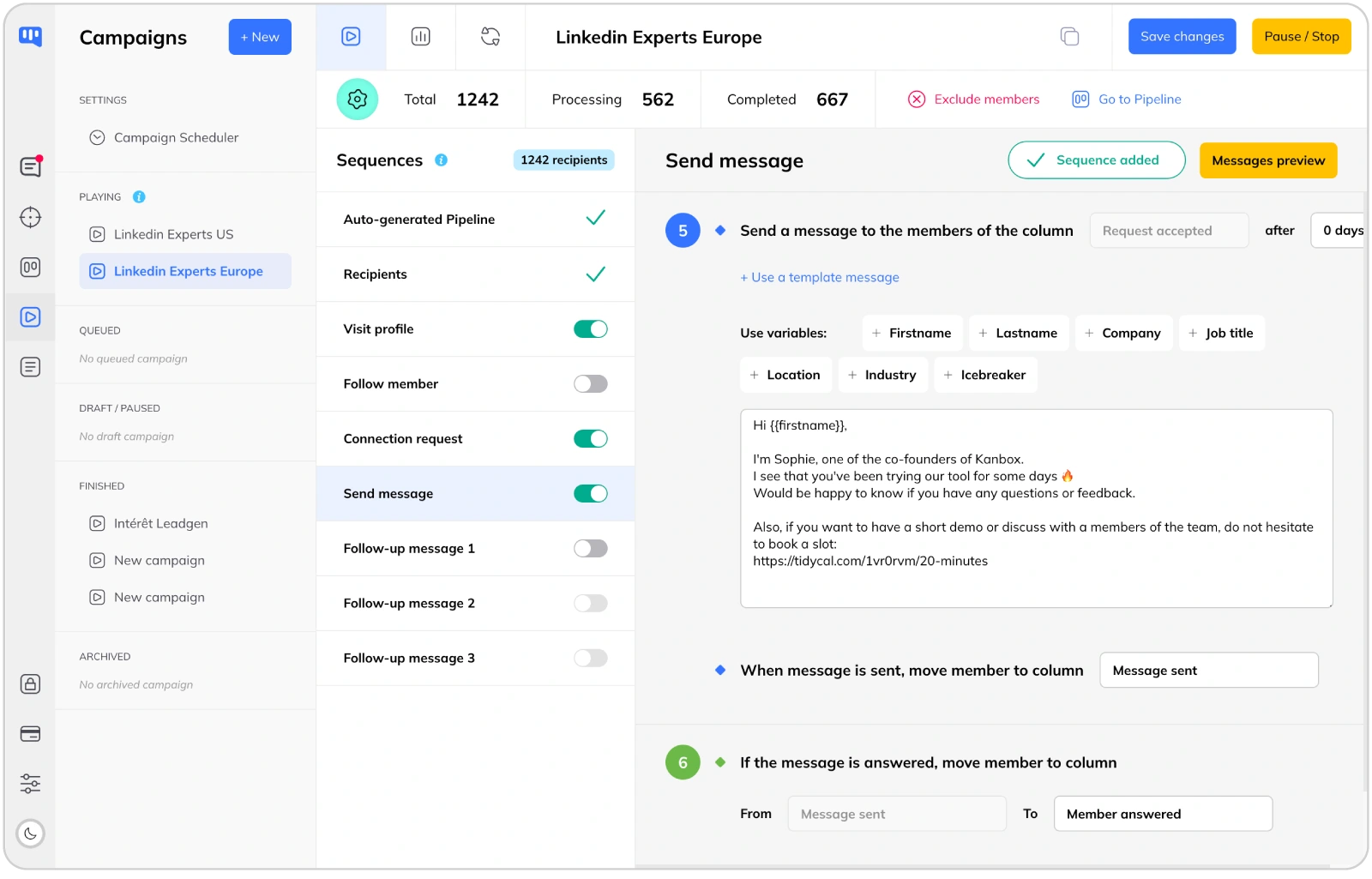
LinkedIn Automation: AI-Powered vs Template-Based
- AI message génération.
- Kanbox generates personalized messages using AI, adapting content to each lead's profile and activity. Meet Alfred offers static templates with personalization snippets, but does not generate unique messages per lead.
- Cloud-native 24/7 automation.
- Kanbox runs entirely in the cloud with no browser extension needed. Your séquences execute around the clock, even when your computer is off. Meet Alfred requires a browser extension and your computer needs to be on for automation to run.
- ICP scoring to target the right leads.
- Kanbox automatically scores leads based on your Ideal Customer Profile, so you focus outreach on high-value prospects. Meet Alfred lacks ICP scoring, meaning you need to manually qualify leads before adding them to campaigns.
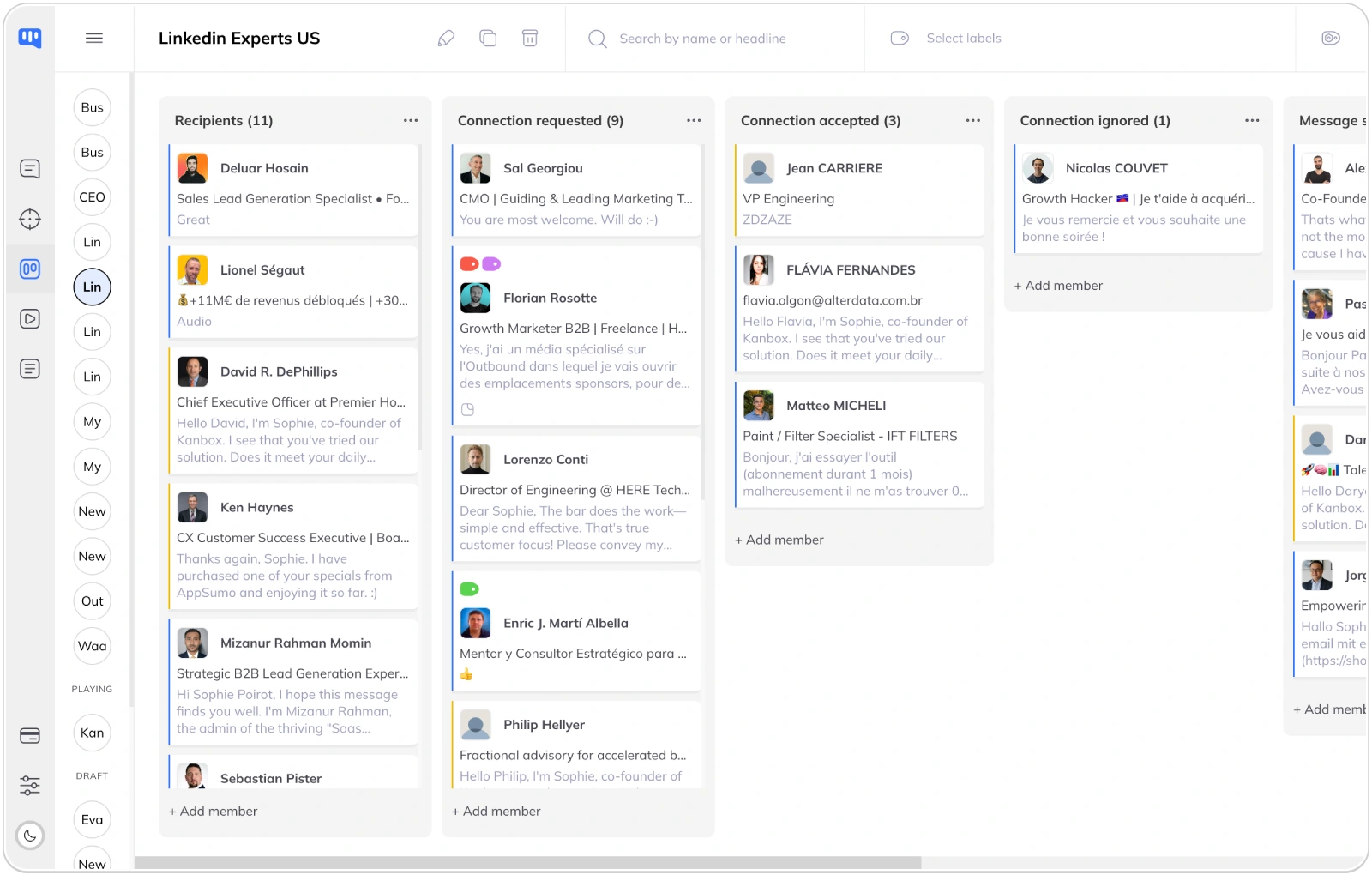
Lead Management: Visual Kanban Pipelines
- Visual pipeline management.
- Kanbox offers unlimited Kanban pipelines to track leads through your sales funnel. Meet Alfred has a basic CRM with contact management, but lacks the visual drag-and-drop pipeline approach that makes lead tracking intuitive.
- Tags and segmentation.
- Organize leads with custom tags, notes, and filters. Segment your prospects by industry, company size, engagement level, or any custom criteria.
- Team collaboration.
- Share pipelines across your team. Assign leads to team members, track progress, and ensure no prospect falls through the cracks.
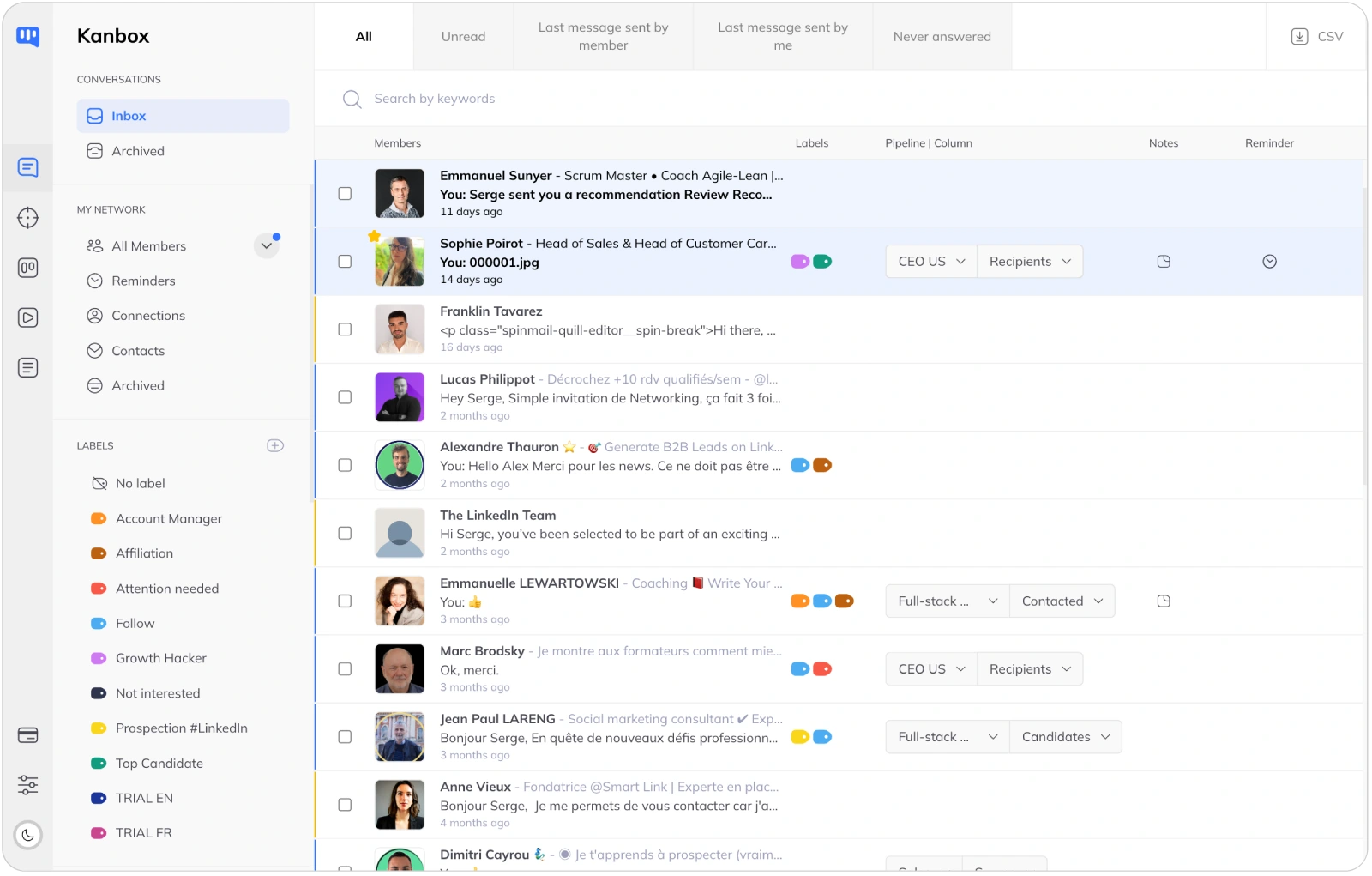
Smart Inbox: Never Miss a Conversation
- Unified inbox.
- All your LinkedIn conversations in one place. Fullscreen chat mode, quick replies, and message templates. Meet Alfred offers a basic inbox, but without fullscreen mode, advanced filters, or the same level of conversation management.
- Advanced filters.
- Filter by tags, campaign, connection status, or message content. Find any conversation instantly, even across thousands of contacts.
- Reminders and follow-ups.
- Set reminders on any conversation. Never forget to follow up with a hot prospect. Kanbox keeps you organized and on top of your outreach.
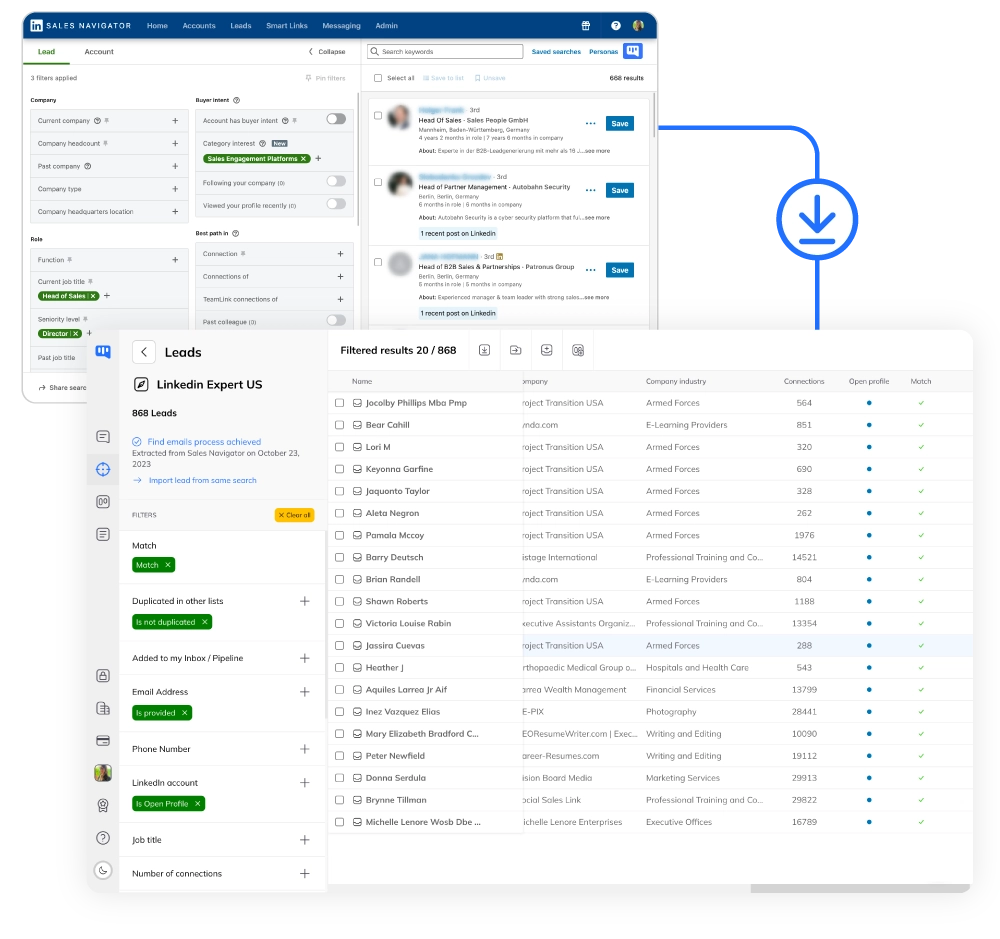
LinkedIn Scraping: Unlimited Data Extraction
- Unlimited scraping included.
- Extract up to 75,000 LinkedIn profiles per month from any source: Sales Navigator, events, posts, or URL imports. Meet Alfred offers a Lead Finder with limitéd results (1,000 to 10,000 depending on plan), not a full scraping solution.
- Auto-deduplication.
- Zero duplicates across all your lists. Kanbox detects and merges profiles automatically, saving hours of manual cléanup.
- Email finder included.
- Find professional emails for your scraped profiles. 98% deliverability rate with SMTP verification. No extra cost, included in all plans. Meet Alfred does not include an email finder.
Why Choose Kanbox Over Meet Alfred?
If LinkedIn is your main prospecting channel, Kanbox offers AI-powered messaging, a visual CRM pipeline, and cloud automation at a fraction of the cost.

"We switched from Meet Alfred to Kanbox and the difference was immediate. Cloud automation that runs 24/7, AI messages that actually get replies, and a price that makes sense. We should have switched sooner."
Frequently Asked Questions
Is Kanbox better than Meet Alfred?
It depends on your priorities. Kanbox is the better choice if LinkedIn is your main prospecting channel, because it offers:
- AI-powered message génération that creates unique messages per lead (Meet Alfred uses static templates)
- ICP scoring to automatically prioritize high-value prospects (not available in Meet Alfred)
- Cloud automation 24/7 with no browser extension needed (Meet Alfred requires your browser to be running)
- Unlimited scraping from LinkedIn and Sales Navigator (Meet Alfred's Lead Finder is limitéd)
- Visual Kanban pipelines for intuitive lead management (Meet Alfred has a basic CRM)
- 80% lower starting price: $10/month (yearly) vs $29/month (yearly)
Meet Alfred is stronger if you need multichannel outreach (LinkedIn + Email + Twitter in one sequence) or social media post scheduling. But for LinkedIn-focused prospecting, Kanbox delivers more value at a lower cost.
Does Meet Alfred have AI messaging?
No, Meet Alfred does not offer AI-generated messages. It provides personalization through template variables (first name, company, etc.), but the messages themselves are static templates that you write manually.
Kanbox, on the other hand, uses AI to generate unique messages tailored to each lead's profile, industry, and activity. This means higher personalization at scale, which typically leads to better response rates.
The difference is significant: with Meet Alfred, 100 leads receive essentially the same message with swapped variables. With Kanbox, each lead gets a genuinely different message crafted by AI.
What is the difference between Kanbox and Meet Alfred?
The core difference is their approach and technology:
Kanbox is a LinkedIn-first platform built for deep LinkedIn prospecting:
- AI message génération (unique per lead)
- ICP scoring and dynamic imports (24h auto-refresh)
- Cloud-native automation (no browser needed)
- Unlimited scraping + email finder included
- Visual Kanban CRM pipelines
- Smart Inbox with fullscreen mode
Meet Alfred is a multichannel outreach tool for LinkedIn + Email + Twitter:
- Cross-channel séquences in one workflow
- Social media post scheduling
- LinkedIn Groups and Events targeting
- Basic CRM with contact management
- Browser-based automation (extension required)
Key trade-off: Meet Alfred covers more channels; Kanbox goes deeper on LinkedIn with AI and smarter automation. If LinkedIn is your 80%+ channel, Kanbox is typically the better investment.
Can Meet Alfred do multichannel outreach?
Yes, multichannel is Meet Alfred's main strength. It can combine LinkedIn, email, and Twitter (X) actions in a single campaign sequence. This is useful if you want to contact prospects across multiple platforms automatically.
Kanbox focuses on LinkedIn and does not currently offer email sending or Twitter automation within its séquences. However, Kanbox includes an email finder to enrich your LinkedIn leads with professional emails, which you can then use in your own email tool.
The question to ask yourself: do you actually use all three channels? Many B2B teams find that LinkedIn alone drives 80%+ of their prospecting results. If that is your case, Kanbox's deeper LinkedIn features (AI messages, ICP scoring, dynamic imports) will outperform Meet Alfred's broader but shallower approach.
Does Kanbox support email outreach?
Kanbox does not send emails directly from its platform. Instead, it provides:
- Email finder: Find professional emails for your LinkedIn leads (98% deliverability, SMTP-vérifiéd)
- CSV export: Export enriched lead data to use in any email platform
- Zapier integration: Connect Kanbox to your email tool (Mailchimp, Lemlist, Instantly, etc.)
- Webhooks: Push lead data to any system in real time
This approach gives you flexibility: use the best email tool for your needs while keeping Kanbox as your LinkedIn prospecting hub. Meet Alfred includes basic email sending, but dedicated email tools typically offer better deliverability and features.
Which is cheaper, Kanbox or Meet Alfred?
Kanbox is significantly cheaper at every level:
Kanbox pricing:
- Starter: $10/month (yearly) or $20/month (monthly)
- Essential: $30/month (yearly) or $45/month (monthly)
- Pro: $50/month (yearly) or $80/month (monthly)
Meet Alfred pricing:
- Basic: $29/month (yearly) or $59/month (monthly)
- Pro: $49/month (yearly) or $99/month (monthly)
- Team: $39/month (yearly) or $79/month (monthly) per user, 5+ users
Real comparison: Kanbox Starter at $10/month (yearly) includes AI messages, ICP scoring, unlimited scraping, and cloud automation. Meet Alfred Basic at $29/month (yearly) lacks all four of these features. You get more for less with Kanbox.
Does Kanbox have ICP scoring?
Yes, ICP scoring is a core Kanbox feature. It automatically evaluates each lead against your Ideal Customer Profile criteria (industry, company size, job title, location, etc.) and assigns a score.
This lets you:
- Prioritize outreach to high-scoring leads first
- Filter campaigns by ICP score to target only the best-fit prospects
- Track which lead profiles convert best and refine your ICP over time
Meet Alfred does not offer ICP scoring. You need to manually qualify leads or use external tools before adding them to campaigns. This adds time and complexity to your workflow.
Can I migrate from Meet Alfred to Kanbox?
Yes, migrating is straightforward:
- Export your Meet Alfred contacts as CSV files
- Import them into Kanbox using the CSV import or URL import feature
- Recreate your séquences in Kanbox (often improved with AI message génération)
- Set up your Kanban pipelines to organize leads visually
The Kanbox support team can help with migration. Most users report being fully operational within a day. Since Kanbox runs in the cloud, there is no browser extension to install or computer to keep running.
Which tool is better for agencies?
It depends on your agency's focus:
Choose Kanbox if your agency:
- Manages LinkedIn prospecting for multiple clients
- Needs visual Kanban pipelines per client
- Wants AI-powered messaging at scale
- Needs unlimited scraping without per-lead costs
- Values cloud automation (no browser management)
Choose Meet Alfred if your agency:
- Runs multichannel campaigns across LinkedIn, email, and Twitter
- Needs social media scheduling for clients
- Already has the team plan workflow established
For LinkedIn-focused agencies, Kanbox is typically more cost-effective. The Agency plan offers custom pricing with unlimited campaigns and dedicated proxies. Meet Alfred's Team plan requires a minimum of 5 users at $39/month (yearly) each.
How long is each trial?
Kanbox offers à 15-day trial with full access to all features. No credit card required. You can test AI messaging, ICP scoring, automation séquences, Kanban pipelines, and the Smart Inbox without any commitment.
Meet Alfred offers a 14-day trial.
Kanbox gives you one extra day, but more importantly, you get access to all features during the trial, so you can truly evaluate the platform's capabilities before deciding.
Verified reviews from Kanbox users

UI, Kanban function. Attachments for emails make the process more efficient and structured.
Capterra
Kanbox is a game-changer. Connected to LinkedIn, we can run campaigns, track responses, and manage candidate engagement seamlessly.
Capterra
Clean interface, and the pipeline feature is unlike anything I've used before.
Capterra
Excellent pipeline management and campaigns. Everything is well-structured and streamlined.
Capterra
Kanbox's Kanban-style interface makes organizing leads incredibly easy. Custom pipelines make tracking outreach seamless.
Capterra
Seamless integration with LinkedIn and Sales Navigator. The intuitive inbox makes managing conversations easy and efficient.
Capterra
The best part? The Kanban board and filters make it easy to label and prioritize my leads effectively.
Capterra
Kanban is an excellent tool for anyone who uses LinkedIn for sales. It streamlines collecting, organizing, and interacting with potential clients.
CapterraReady to boost your LinkedIn prospecting?
15-day trial - No credit card required
15 days trial - No credit card required - Full access from day one