10 Clients. 1 Dashboard. Zero Chaos.
LinkedIn prospecting agencies spend 60% of their time switching between accounts and tools. Kanbox centralizes all your client LinkedIn accounts in one place: unified inbox, automated sequences per client, separate pipelines, dynamic imports and AI personalized messages. Scale your B2B acquisition without multiplying tools.
15-day free trial - No credit card required










Why Prospecting Agencies Choose Kanbox
The all-in-one LinkedIn automation tool designed for agencies managing prospecting for multiple clients

"We used to manage 5 clients with 5 different tools. With Kanbox, we handle 15 clients stress-free. The multi-account dashboard changed everything for our agency."
Core Features
Core LinkedIn Prospecting Features for Agencies
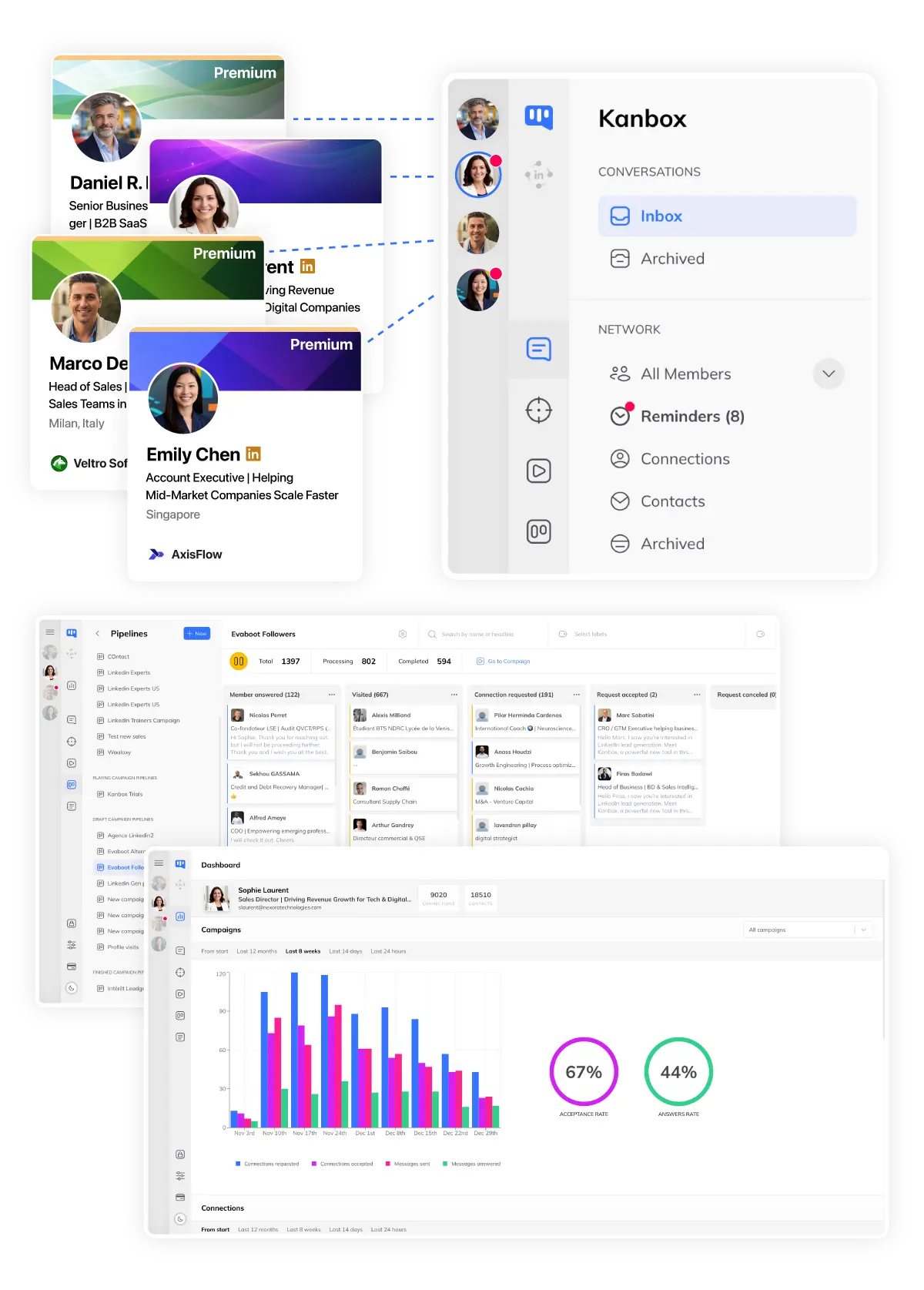
Multi-Account Dashboard
- Instant switch.
- Jump between client accounts in one click.
- Global overview.
- See all campaigns, all clients, one dashboard.
- Secure access.
- Dedicated proxy per account. Zero ban risk.
Automated Sequences
- Dynamic variables.
- Use {firstName}, {company}, {jobTitle} and more.
- Multi-step sequences.
- LinkedIn automated prospecting: connect, message, follow-up — up to 6 steps per campaign.
- Per-client voice.
- Customize templates to match each client brand.
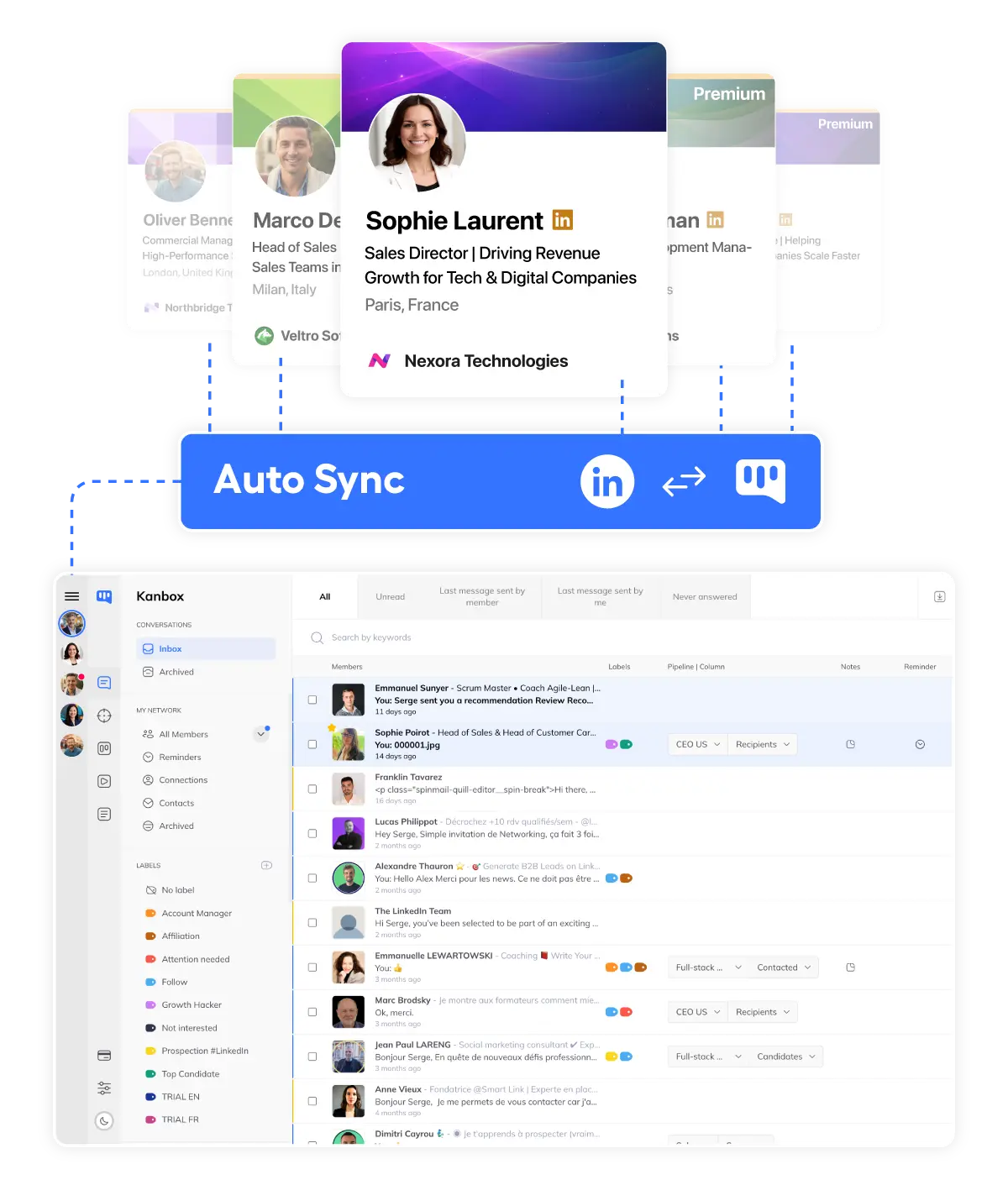
Unified Inbox
- Centralized messages.
- All client conversations in one place.
- Tags by client.
- Organize conversations by client, campaign, priority.
- Advanced filters.
- Find any conversation instantly with smart filters.
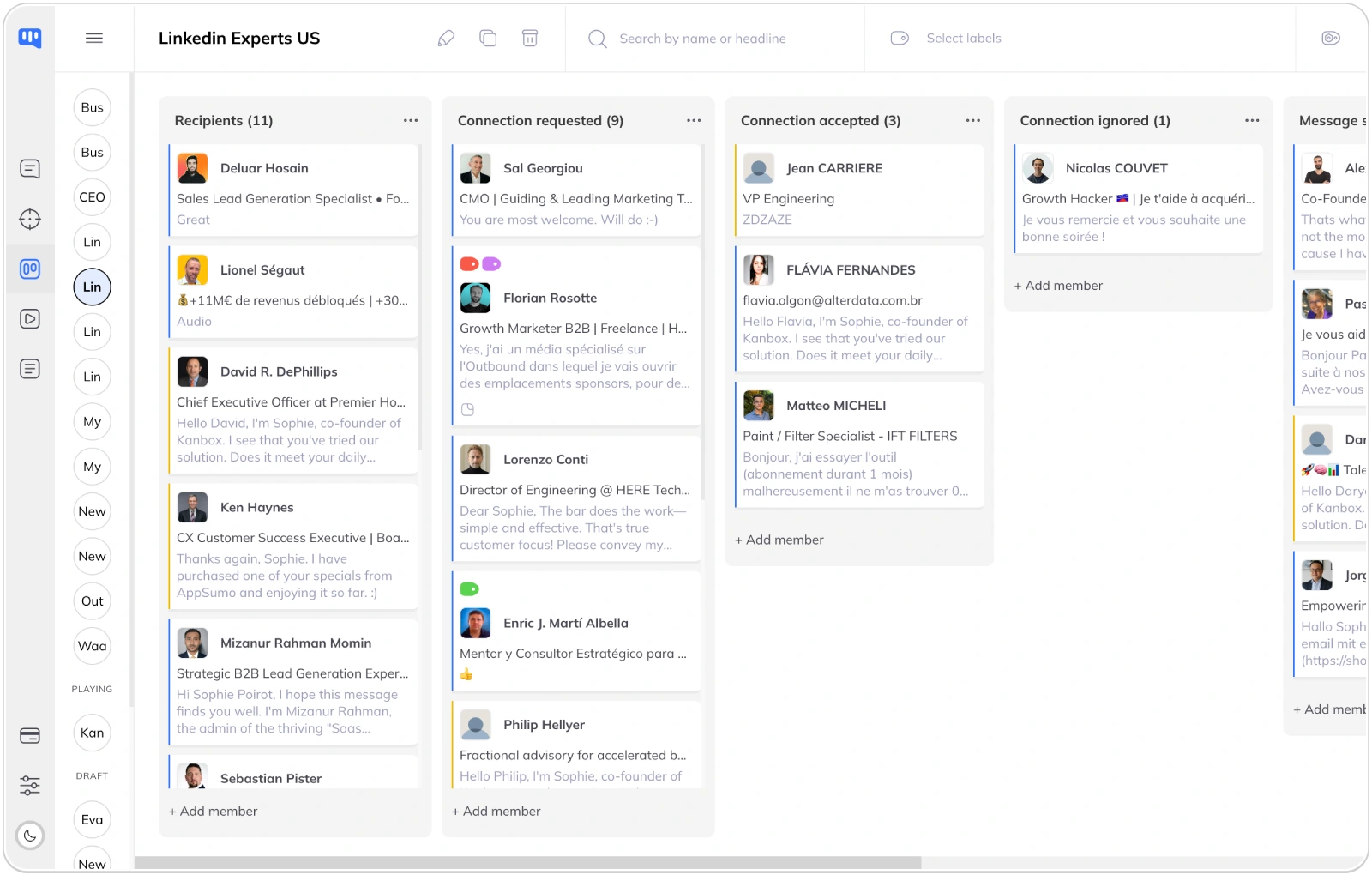
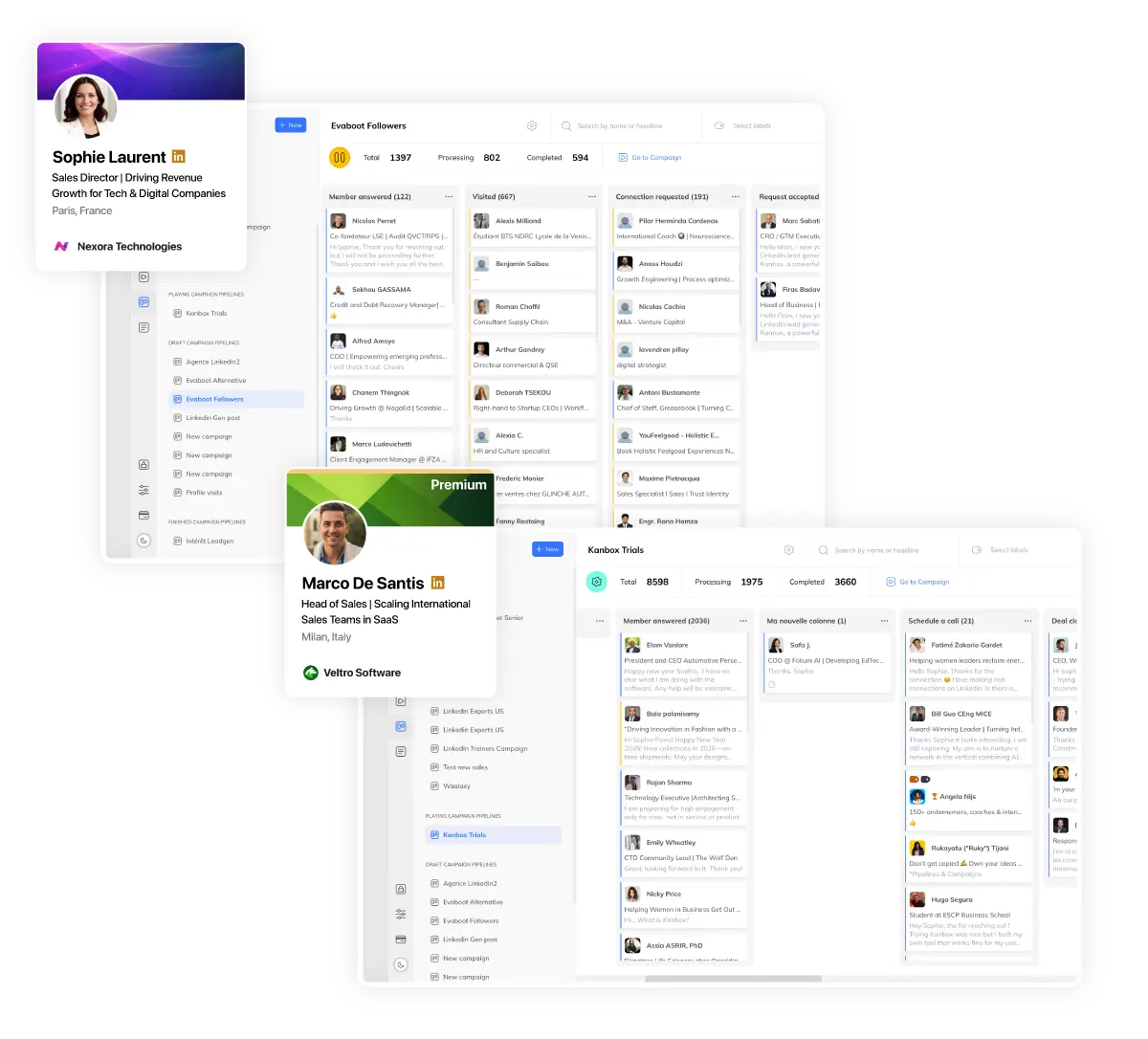
Client Pipelines
- Kanban per client.
- Separate pipeline for each client campaign.
- Client reporting.
- Share progress with clients via exports.
- Full visibility.
- Never lose track of any lead, any client.
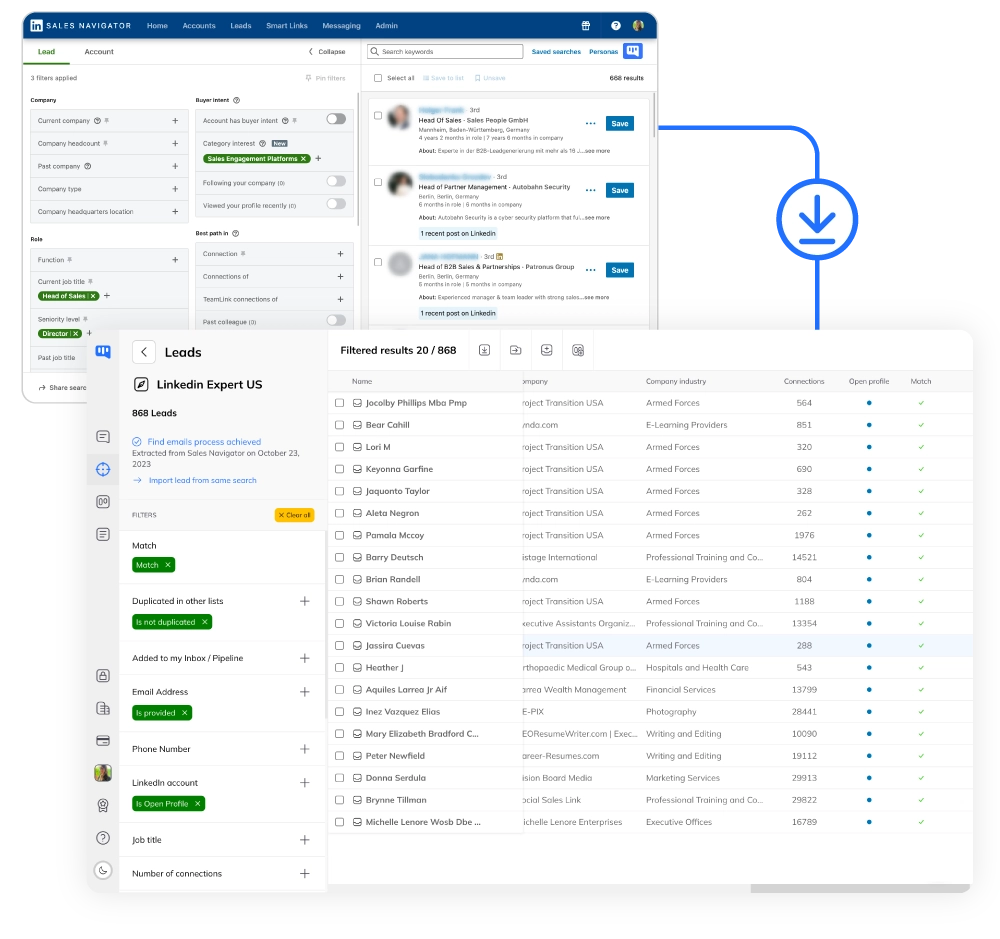
Mass Lead Scraping
- 75k profiles/month.
- Scrape from LinkedIn and Sales Navigator at scale for all clients.
- Auto-deduplicated.
- No duplicate leads across client campaigns.
- CSV export.
- Export leads to your client CRM in one click.
Dynamic Imports & ICP Filter
- Auto-updating lists.
- Import profile visitors, Sales Navigator searches, and post contributors — auto-refreshed every 24h.
- ICP filter at entry.
- Filter leads by industry, location, and function before they enter your prospecting campaign.
- Post reactions import.
- Import people who react to your client posts and add them to campaigns automatically.
AI Messages & Lead Magnet
- AI-generated messages.
- Create personalized messages per lead based on their LinkedIn profile with custom AI prompts.
- Lead Magnet automation.
- Detect keywords in post comments, auto-reply, and send a DM with your lead magnet automatically.
- AI response handling.
- AI handles lead responses and qualifies them until a meeting is booked. Coming soon.
Ready to Automate Your Agency LinkedIn Prospecting?
Join hundreds of agencies who automate their LinkedIn prospecting and save 10+ hours per week.
Start FreePricing
Simple, Transparent Pricing
Choose the plan that fits your agency needs
Starter
- Simultaneous Campaign: 1
- Lead Import: 300 /month
- Cloud-based
- Email Finder
- Smart Linkedin Inbox with Tags and Filters
Essential
- Simultaneous Campaign: 3
- Lead Import: 600 /month
- Cloud-based
- Email Finder
- Smart Linkedin Inbox with Tags and Filters
- Team / Multi-account
- Unlimited account managers
Pro
- Simultaneous Campaign: 5
- Lead Import: 75K /month
- Cloud-based
- Email Finder
- Smart Linkedin Inbox with Tags and Filters
- Unlimited AI Prompts and Prompt Templates
- Team / Multi-account
- Unlimited account managers
- Webhooks / API
Agency 10
- 5 Simultaneous Campaigns
- Lead Import: 75K /month
- Cloud-based
- Email Finder
- Smart Linkedin Inbox with Tags and Filters
- Unlimited AI Prompts and Prompt Templates
- Team / Multi-account
- Unlimited account managers
- Webhooks / API
- Bring your own Proxies
Kanbox vs Other Agency Tools
| Feature | Other Tools | Kanbox |
|---|---|---|
| Native Multi-Account | ~ 5-10 accounts | Unlimited |
| Unified Inbox | ||
| Pipeline per Client | Kanban | |
| Scraping/Account | ~10k | 75k |
| Multi-Account Pricing | 80-200€/account | Agency Plan |
| LinkedIn Security | ~ | Dedicated proxies |
| Dynamic Imports | Auto-refresh 24h | |
| AI Messages | Per-lead AI prompts | |
| ICP Filter | At campaign entry | |
| Lead Magnet Automation | ||
| Starting Price | 200€+/mois | 15€/mois |
Who Uses Kanbox for Agencies?
From agency founders to growth marketers
Agency Founder
Goals: Scale without hiring, standardize processes
- Global dashboard for all clients
- Client reporting & exports
- Team access management
+300%clients managed
-50%management time
Account Manager
Goals: Manage multiple campaigns, respond fast
- Unified inbox for all clients
- Separate pipelines per client
- Tags & notes for context
-60%response time
+40%client satisfaction
Growth Marketer
Goals: Test, iterate, optimize campaigns
- A/B test sequences
- Mass scraping for ICP
- Campaign analytics
+40%conversion rate
3xcampaigns launched
What LinkedIn Prospecting Agencies Say About Kanbox
Verified reviews from Kanbox users

UI, Kanban function. Attachments for emails make the process more efficient and structured.
Capterra
Kanbox is a game-changer. Connected to LinkedIn, we can run campaigns, track responses, and manage candidate engagement seamlessly.
Capterra
Clean interface, and the pipeline feature is unlike anything I've used before.
Capterra
Excellent pipeline management and campaigns. Everything is well-structured and streamlined.
Capterra
Kanbox's Kanban-style interface makes organizing leads incredibly easy. Custom pipelines make tracking outreach seamless.
Capterra
Seamless integration with LinkedIn and Sales Navigator. The intuitive inbox makes managing conversations easy and efficient.
Capterra
The best part? The Kanban board and filters make it easy to label and prioritize my leads effectively.
Capterra
Kanban is an excellent tool for anyone who uses LinkedIn for sales. It streamlines collecting, organizing, and interacting with potential clients.
CapterraFrequently Asked Questions
1. How many client accounts can I manage?
2. Is there any risk to my clients' LinkedIn accounts?
3. How does multi-account billing work?
4. Can I give access to my team?
5. Is client data kept separate?
6. Does Kanbox work with Sales Navigator?
7. Can I export leads to my client CRM?
8. What support do agencies get?
9. How do dynamic imports work for agencies?
10. Can AI generate personalized messages for each client?
11. What is the Lead Magnet automation?
Ready to Scale Your LinkedIn Prospecting?
Join 500+ agencies who automate LinkedIn prospecting for all their clients from one dashboard.
15 days free · No credit card required · Full access from day one