Kanban Pipelines to Organize Your LinkedIn Leads
Stop losing leads in spreadsheets. Kanbox pipelines let you visualize every contact, track their status, and move them through your workflow with a simple drag & drop.
15-day free trial - No credit card required










Why Use Kanbox Kanban Pipelines
The visual CRM designed for LinkedIn: sales, recruiters, agencies, and creators

"Before Kanbox, we tracked leads in Excel. Now everything is visual and clear. We reduced our follow-up time by 60% and our conversion rate went up 25%."
How it works
Manage Your Pipeline in 3 Steps
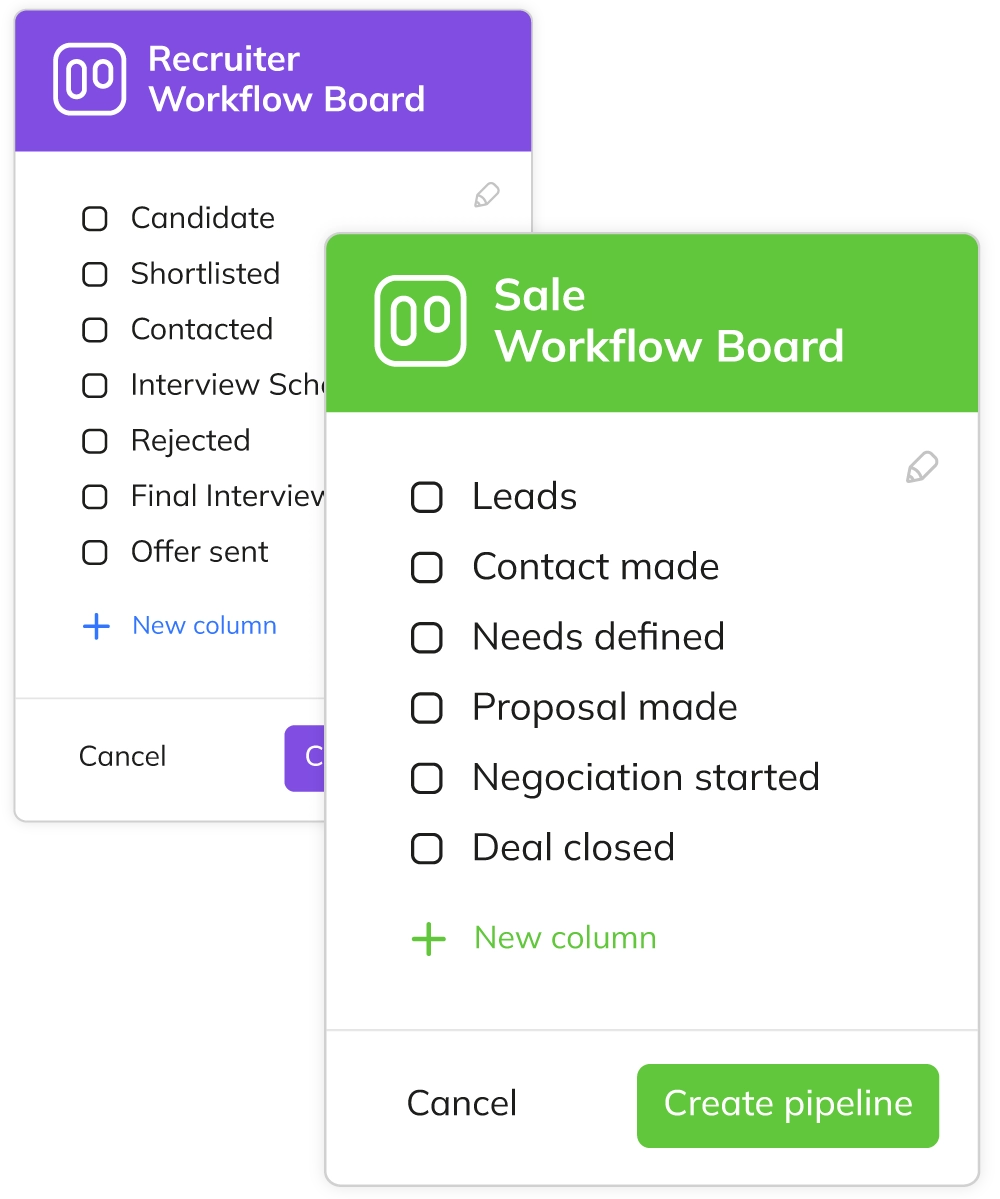
Step 1: Create Your Pipeline
- Choose a template.
- Start with a sales or recruitment template, or create from scratch.
- Define your stages.
- Add, rename, or reorder columns to match your exact process.
- Set up tags.
- Create color-coded tags for quick visual identification.
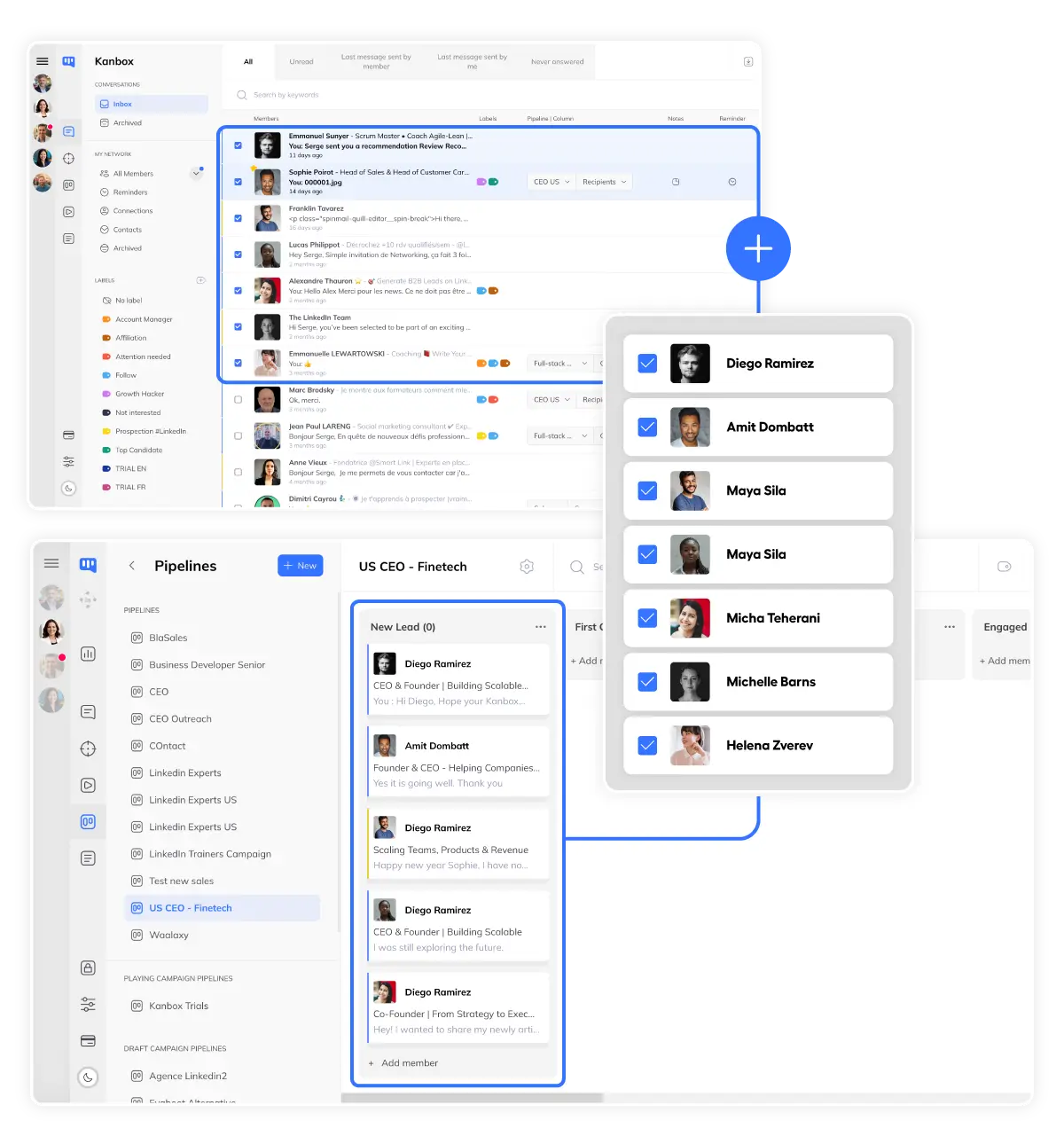
Step 2: Add Your Leads
- Import from LinkedIn.
- Scrape profiles and add them directly to your pipeline.
- Drag & drop.
- Move leads between stages as they progress through your funnel.
- Auto-sync.
- Pipeline updates automatically when leads reply or engage.
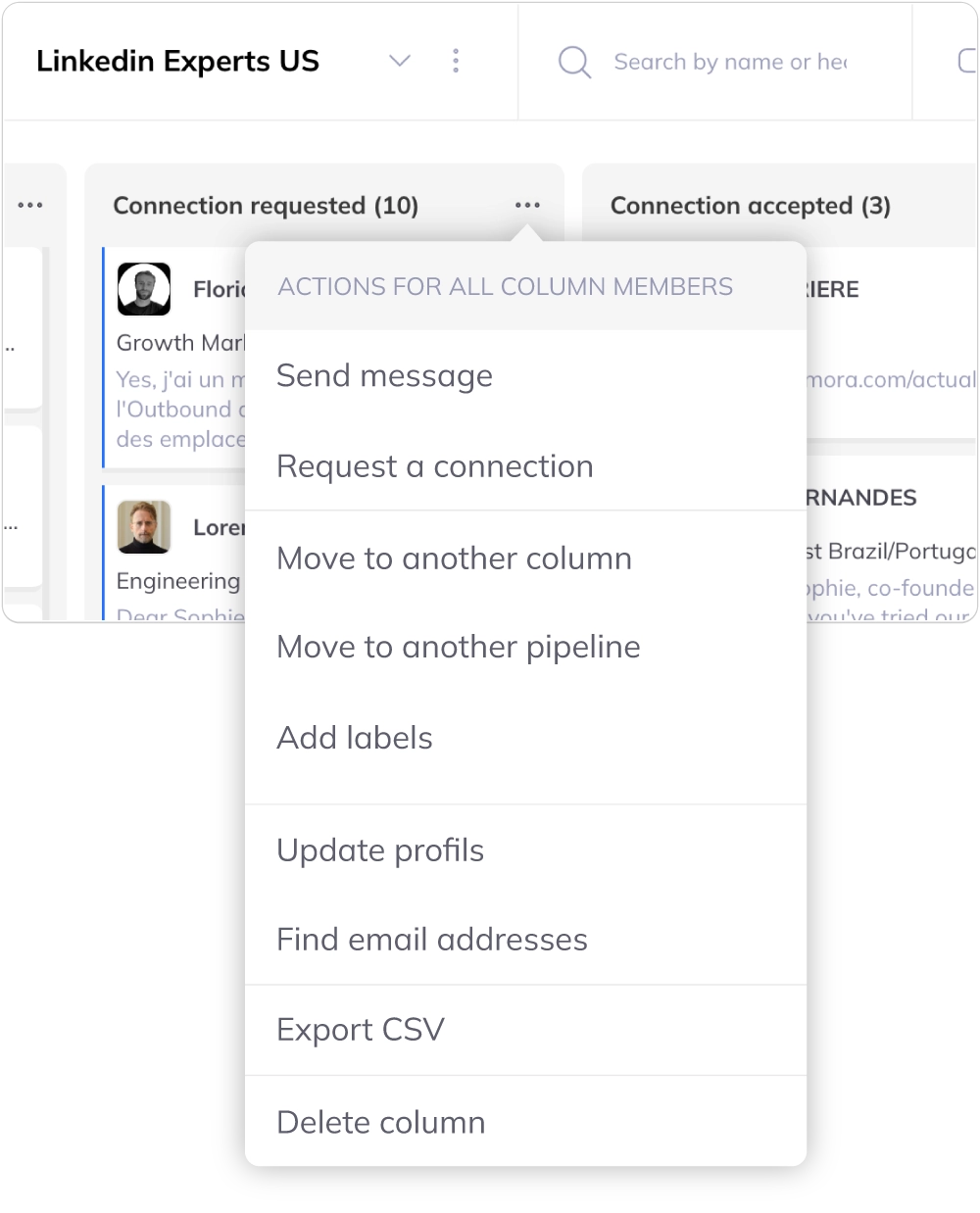
Step 3: Take Action
- Bulk actions.
- Select multiple leads and apply actions instantly.
- Schedule follow-ups.
- Set reminders on any card to never miss a follow-up.
- Track progress.
- See conversion rates and identify bottlenecks in your pipeline.
Core Features
Pipelines Adapted to Your Workflow
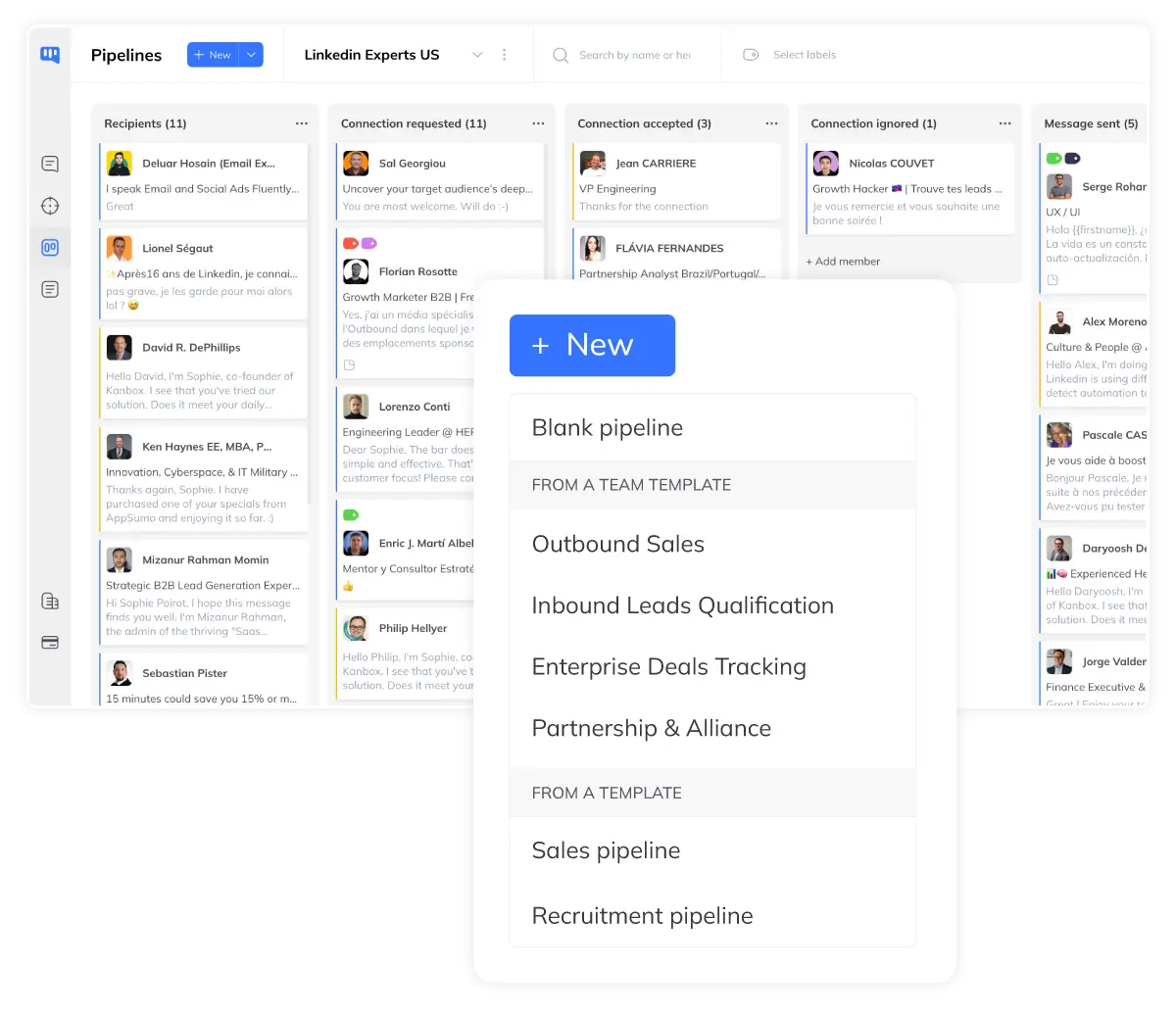
Custom Pipelines
- Create your own stages.
- Add, rename, or reorder columns to match your exact workflow.
- Use templates.
- Start instantly with pre-built templates for sales, recruitment, or agencies.
- Share pipelines as templates.
- Team members can make their pipelines available as templates, so everyone can align on one or multiple standard models.
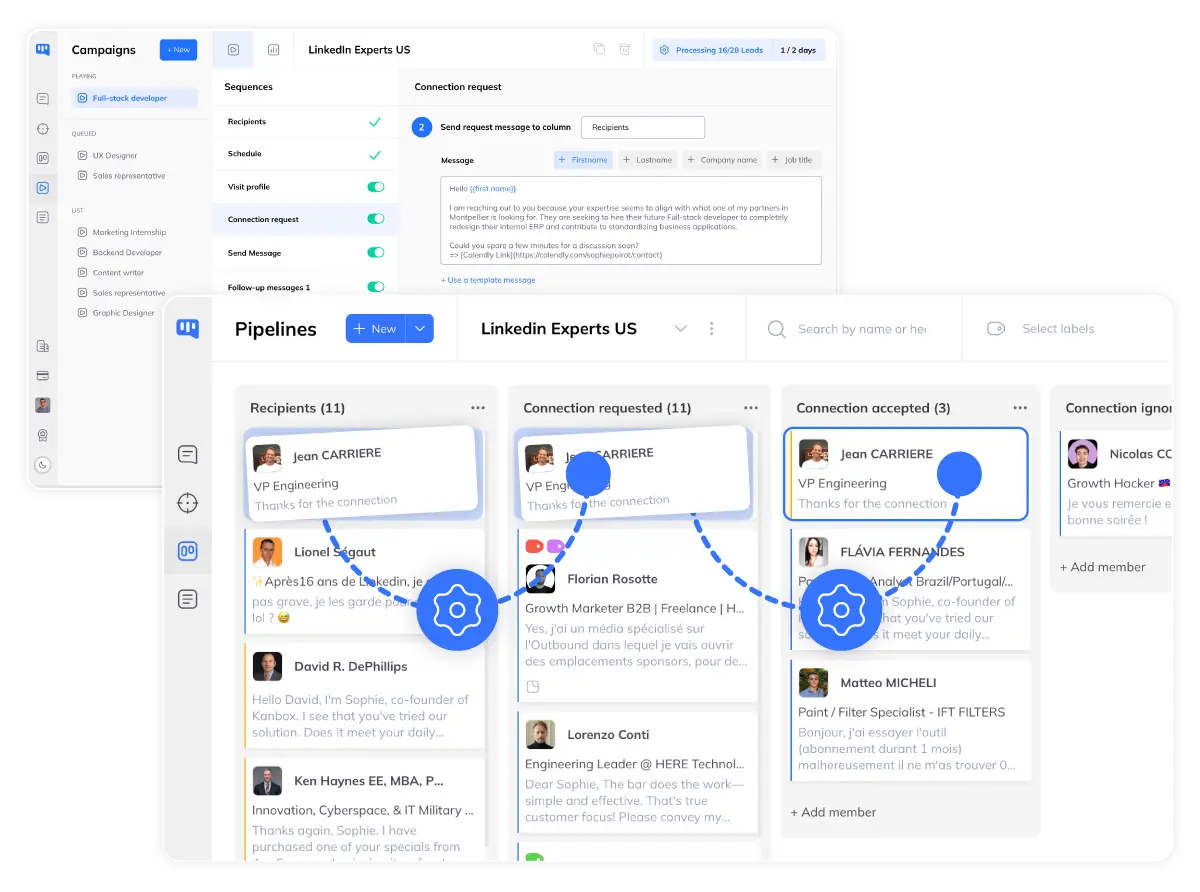
Automated Pipelines
- Auto-generated pipelines.
- When you create a campaign, a pipeline is automatically generated with your sequence steps.
- Automatic lead movement.
- Leads move from column to column automatically based on their progress in the sequence.
- Real-time tracking.
- Track your campaign progress visually without any manual intervention.
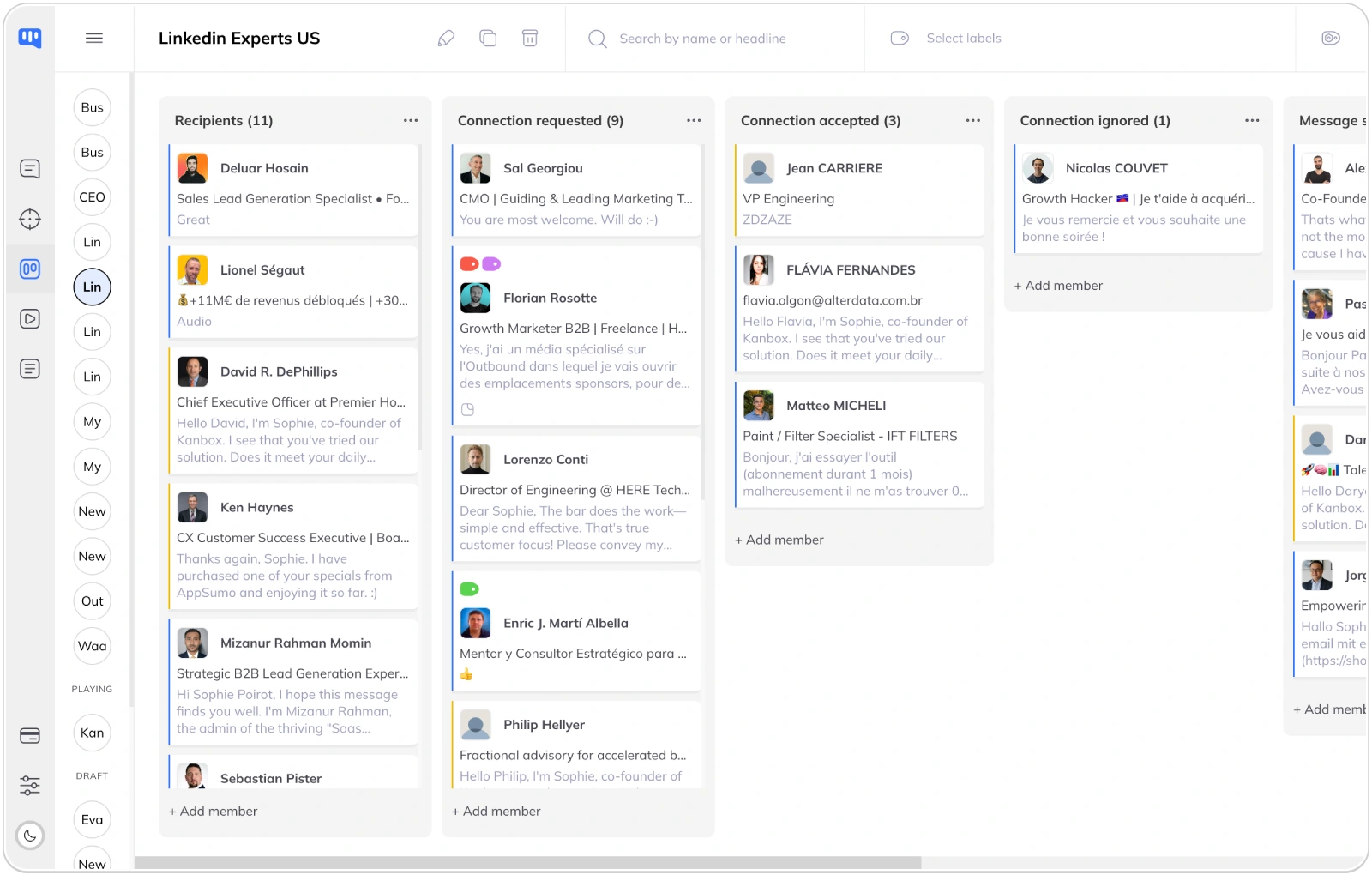
For Every Use Case
- For sales.
- Track deals from first contact to closed won—visualize your entire sales funnel.
- For recruiters.
- Manage candidates from sourcing to hired—organized by role or client.
- For agencies & creators.
- One pipeline per client or project. Manage partnerships and DMs efficiently.
Ready to visualize your pipeline?
Start your 15-day free trial and see every lead clearly.
Start FreeKanbox vs Spreadsheets
| Feature | Spreadsheets | Kanbox |
|---|---|---|
| Visual pipeline view | No | Yes |
| Drag & drop | No | Yes |
| LinkedIn sync | Manual copy | Automatic |
| Bulk actions | Limited | Full |
| Follow-up reminders | No | Yes |
| Team collaboration | Complex | Built-in |
What Users Say About Kanbox Pipelines
Verified reviews from Kanbox users

UI, Kanban function. Attachments for emails make the process more efficient and structured.
Capterra
Kanbox is a game-changer. Connected to LinkedIn, we can run campaigns, track responses, and manage candidate engagement seamlessly.
Capterra
Clean interface, and the pipeline feature is unlike anything I've used before.
Capterra
Excellent pipeline management and campaigns. Everything is well-structured and streamlined.
Capterra
Kanbox's Kanban-style interface makes organizing leads incredibly easy. Custom pipelines make tracking outreach seamless.
Capterra
Seamless integration with LinkedIn and Sales Navigator. The intuitive inbox makes managing conversations easy and efficient.
Capterra
The best part? The Kanban board and filters make it easy to label and prioritize my leads effectively.
Capterra
Kanban is an excellent tool for anyone who uses LinkedIn for sales. It streamlines collecting, organizing, and interacting with potential clients.
CapterraPricing
Simple, Transparent Pricing
Visual pipelines included in all plans
Starter
- Simultaneous Campaign: 1
- Lead Import: 300 /month
- Cloud-based
- Email Finder
- Smart Linkedin Inbox with Tags and Filters
Essential
- Simultaneous Campaign: 3
- Lead Import: 600 /month
- Cloud-based
- Email Finder
- Smart Linkedin Inbox with Tags and Filters
- Team / Multi-account
- Unlimited account managers
Pro
- Simultaneous Campaign: 5
- Lead Import: 75K /month
- Cloud-based
- Email Finder
- Smart Linkedin Inbox with Tags and Filters
- Unlimited AI Prompts and Prompt Templates
- Team / Multi-account
- Unlimited account managers
- Webhooks / API
Agency 10
- 5 Simultaneous Campaigns
- Lead Import: 75K /month
- Cloud-based
- Email Finder
- Smart Linkedin Inbox with Tags and Filters
- Unlimited AI Prompts and Prompt Templates
- Team / Multi-account
- Unlimited account managers
- Webhooks / API
- Bring your own Proxies
Frequently Asked Questions
1. What is a Kanban pipeline and how does it help with LinkedIn prospecting?
A Kanban pipeline is a visual workflow management tool that displays your leads as cards moving through different stages (columns). For LinkedIn prospecting, it helps you:
- Visualize your entire funnel: See all prospects at each stage at a glance
- Track progress: Know exactly where each lead stands in your process
- Never lose leads: Every prospect is visible, nothing falls through the cracks
- Prioritize actions: Focus on leads that need attention now
Kanbox pipelines are specifically designed for LinkedIn, with automatic sync when leads reply or engage with your messages.
2. Can I customize the pipeline stages for my specific sales process?
Yes, Kanbox pipelines are fully customizable. You can:
- Create custom stages: Add as many columns as you need
- Rename stages: Use your own terminology (e.g., "Discovery Call" instead of "Meeting")
- Reorder stages: Drag columns to match your actual workflow
- Use templates: Start with pre-built sales or recruitment templates and customize them
Common sales stages include: New Lead → Contacted → Qualified → Meeting Booked → Proposal → Negotiation → Won/Lost. But you can create whatever fits your process.
3. How do pipeline templates work?
Pipeline templates are pre-configured workflows that help you get started instantly:
Available templates:
- Sales Prospecting: Lead → First Contact → Qualified → Meeting → Proposal → Closed
- Recruitment: Sourced → Contacted → Screened → Interview → Offer → Hired
- Account Management: New Account → Onboarding → Active → Upsell → Renewed
How to use them:
- Select a template when creating a new pipeline
- Customize stages, colors, and names to your needs
- Start adding leads immediately
You can also save your own custom pipelines as templates for future use or team sharing.
4. What bulk actions can I perform on pipeline leads?
Kanbox allows you to select multiple leads and perform actions in one click:
Available bulk actions:
- Move to stage: Move selected leads to any pipeline column
- Add/remove tags: Apply or remove tags from multiple leads
- Start sequence: Enroll selected leads in an automation sequence
- Export: Download selected leads as CSV
- Add to another pipeline: Copy leads to a different pipeline
- Delete: Remove leads from the pipeline
To use bulk actions: select leads by clicking their checkboxes, then use the action bar that appears at the top.
5. Does the pipeline sync automatically with LinkedIn?
Yes, Kanbox pipelines stay synchronized with LinkedIn activity:
Auto-sync features:
- Reply detection: When a lead replies to your message, their card can automatically move to a "Replied" stage
- Connection status: See if a lead has accepted your connection request
- Profile updates: Lead information (job title, company) stays current
- Message history: View the full conversation from the pipeline card
Manual sync: You can also manually update lead status or trigger a sync at any time.
6. How do automated pipelines work for campaigns?
When you create an automation campaign in Kanbox, a Kanban pipeline is automatically generated:
How it works:
- Auto-generated columns: Each step of your sequence becomes a pipeline column
- Automatic lead movement: Leads move from column to column based on their progress in the sequence
- Real-time tracking: See exactly where each lead is in your campaign without manual updates
- Full control: You can still manually move leads, add notes, or trigger actions at any time
This feature saves hours of manual tracking and gives you a clear visual overview of your entire campaign progress.
Stop losing leads. Start visualizing.
Join 10,000+ sales and recruiters who manage their LinkedIn pipeline with Kanbox.
15 days free · No credit card required · Full access from day one