LinkedIn Automation: Save 10 Hours per Week on Prospecting
The all-in-one LinkedIn automation tool for outreach and lead generation. Automate connection requests, AI-powered messages, and multi-step follow-ups. Kanbox runs your campaigns 24/7 while you focus on closing deals.
15-day free trial - No credit card required









Why Sales Teams Choose Kanbox as Their LinkedIn Automation Tool
The only outreach tool that combines safe automation, lead generation, visual pipelines, and CRM integration

"Kanbox automation saves us 10 hours per week. We went from manual prospecting to 150+ qualified conversations monthly. It's a game-changer."
How it works
Automate Your Prospecting in 3 Steps
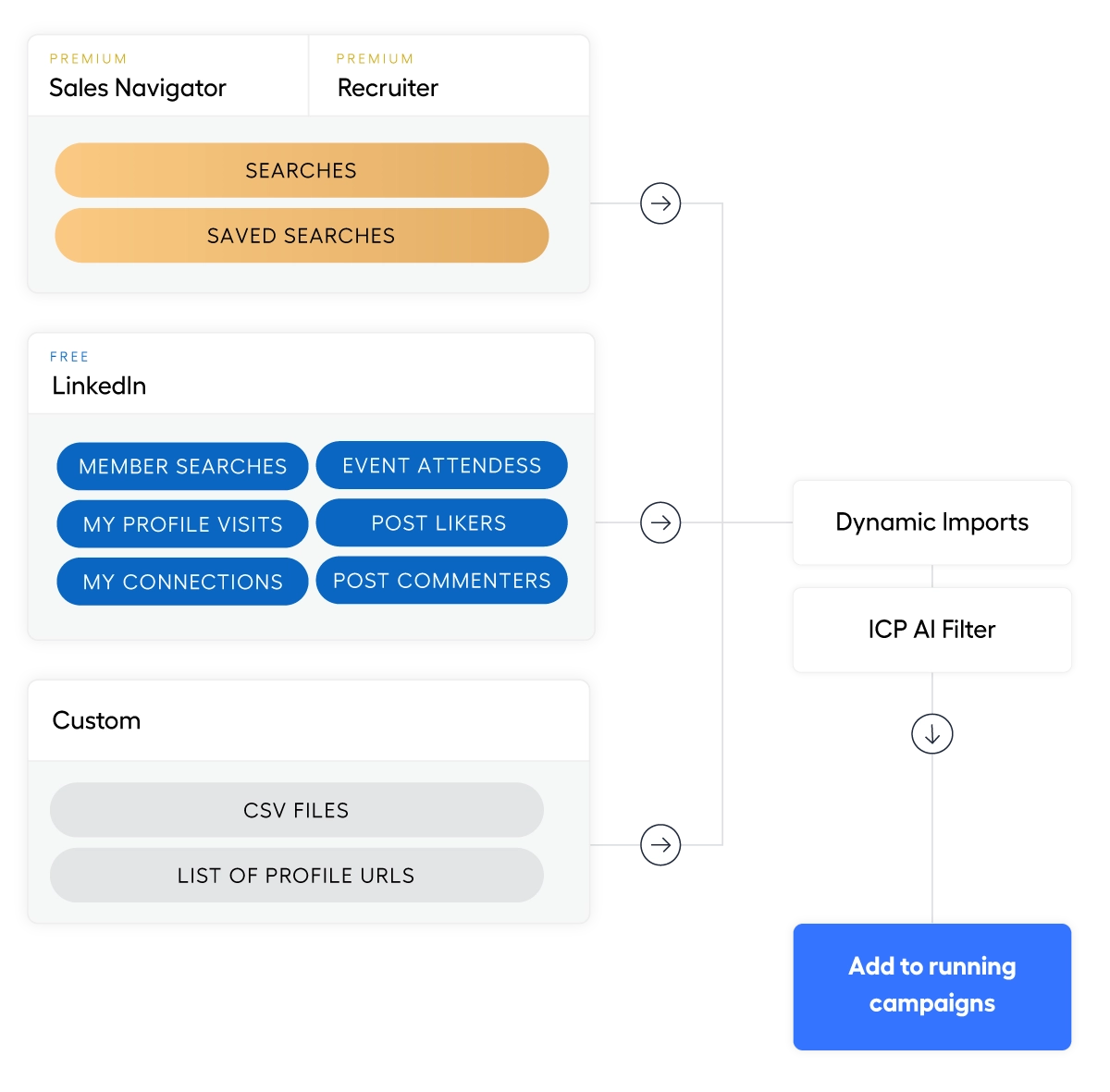
Step 1: Import Your Leads with Dynamic Imports
- Multiple sources.
- Sales Navigator saved searches, post engagement, profile visitors, events, or CSV imports.
- Smart targeting.
- 21+ filters to segment leads by industry, title, company size. Your outreach tool starts here.
- Auto-refresh & deduplication.
- Dynamic imports refresh every 24h. Zero duplicates across all your lead lists.
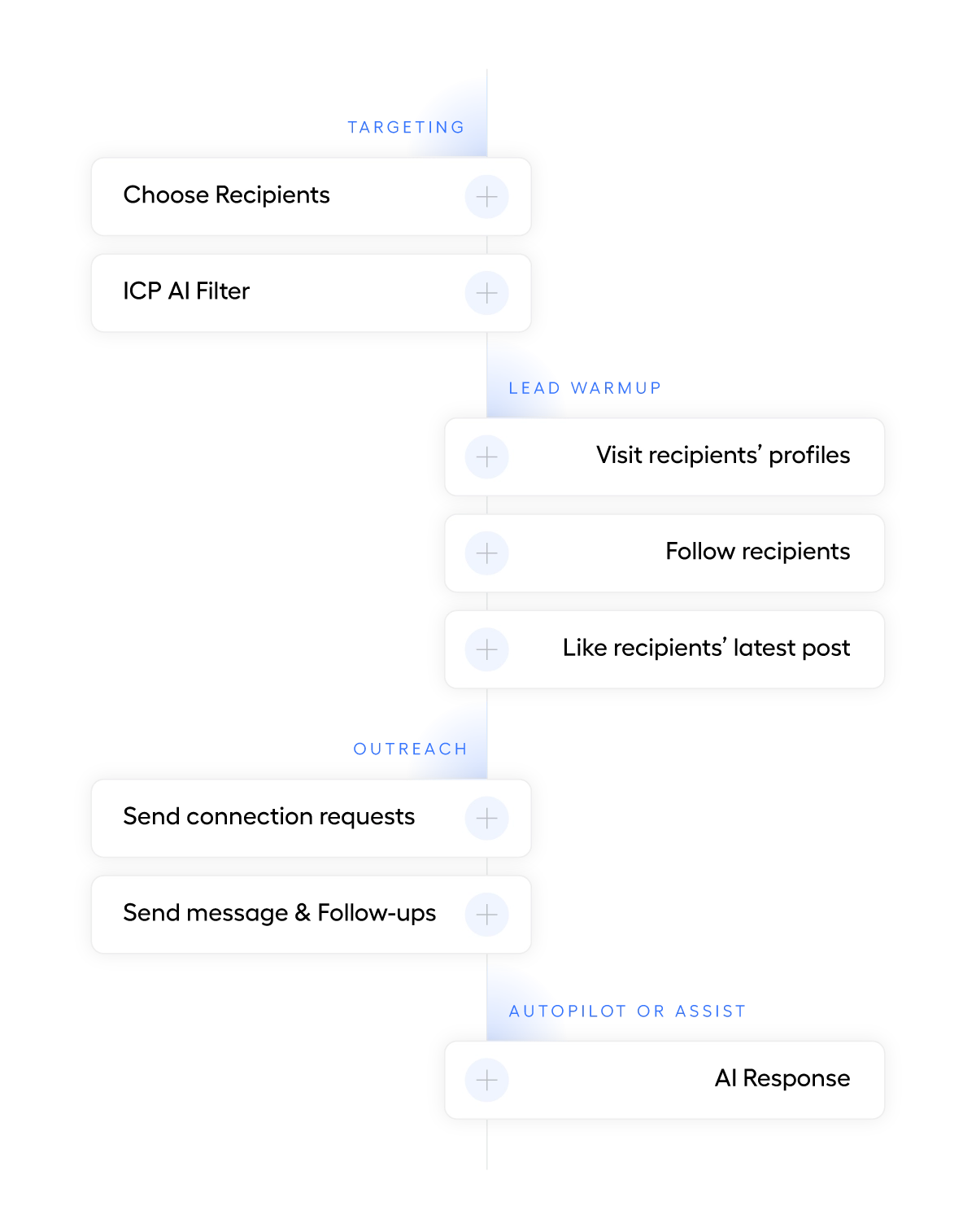
Step 2: Create Your Automation Sequence
- 6+ step sequences.
- Profile visits, invitations, messages, follow-ups.
- Smart delays.
- Random intervals between actions for account safety.
- Personalized messages.
- Dynamic variables and AI templates for each contact.
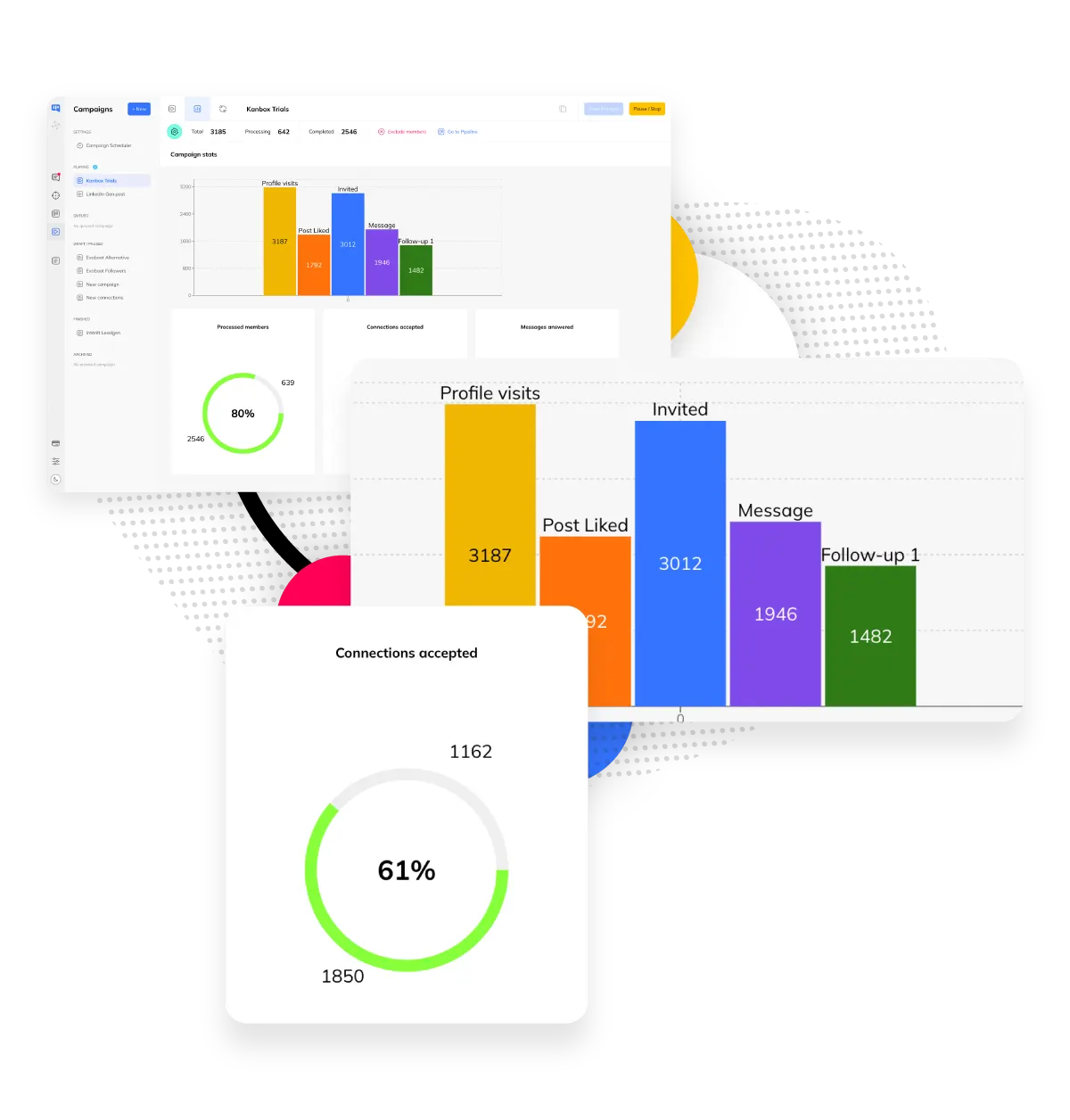
Step 3: Track, Convert & Sync to Your CRM
- Visual Kanban.
- See where each lead stands in your pipeline at a glance.
- Real-time analytics.
- Track response rates, conversions, and pipeline value for every outreach campaign.
- CRM integration via Zapier & API.
- Sync leads with HubSpot, Pipedrive, Salesforce. Export to CSV or use webhooks.
Core Features
Automation Features That Drive Results
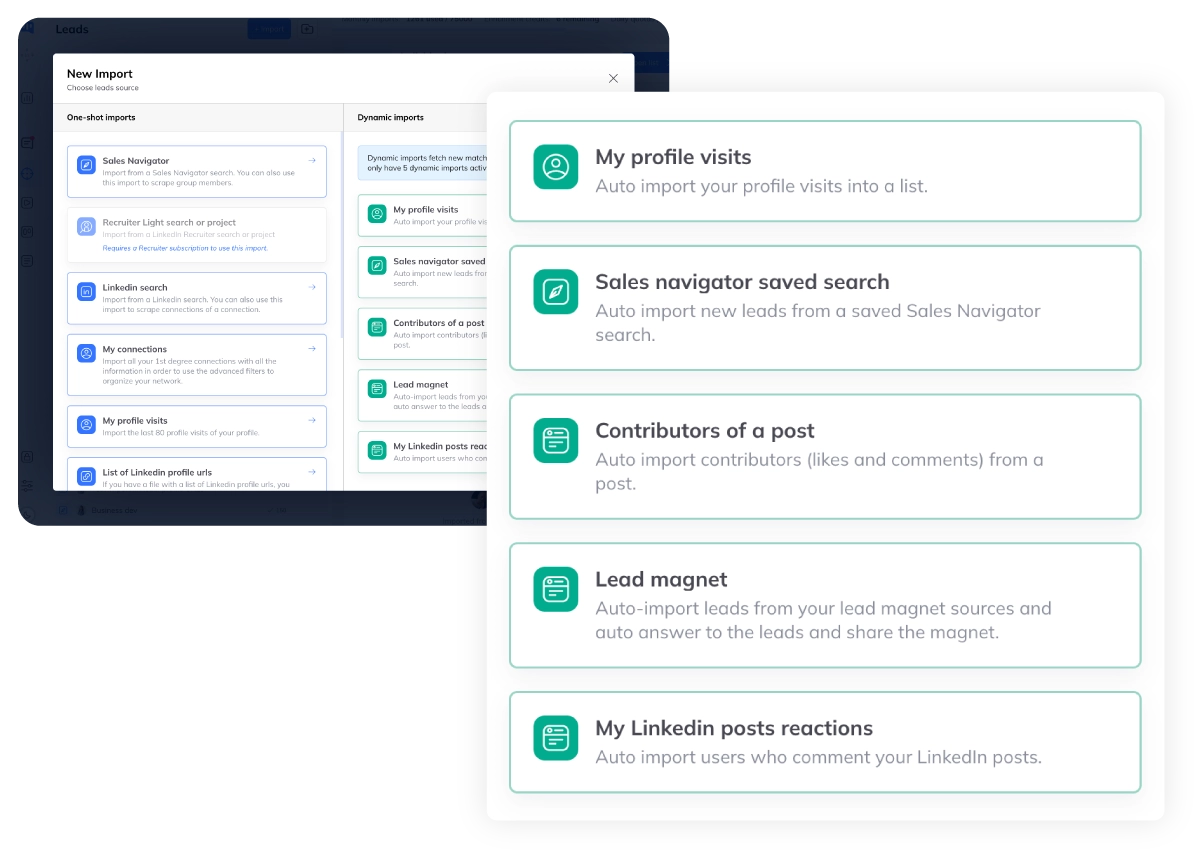
Dynamic Imports & Auto-Refresh Lists
- Auto-refresh every 24h.
- Profile visitors, Sales Navigator searches, post contributors update automatically. Never work with stale lead lists.
- 5 import sources.
- Sales Navigator saved searches, profile visitors, post reactions, LinkedIn events, and CSV. Centralize all your leads.
- Smart deduplication.
- Zero duplicates across all lists. Kanbox detects and merges contacts from multiple import sources automatically.
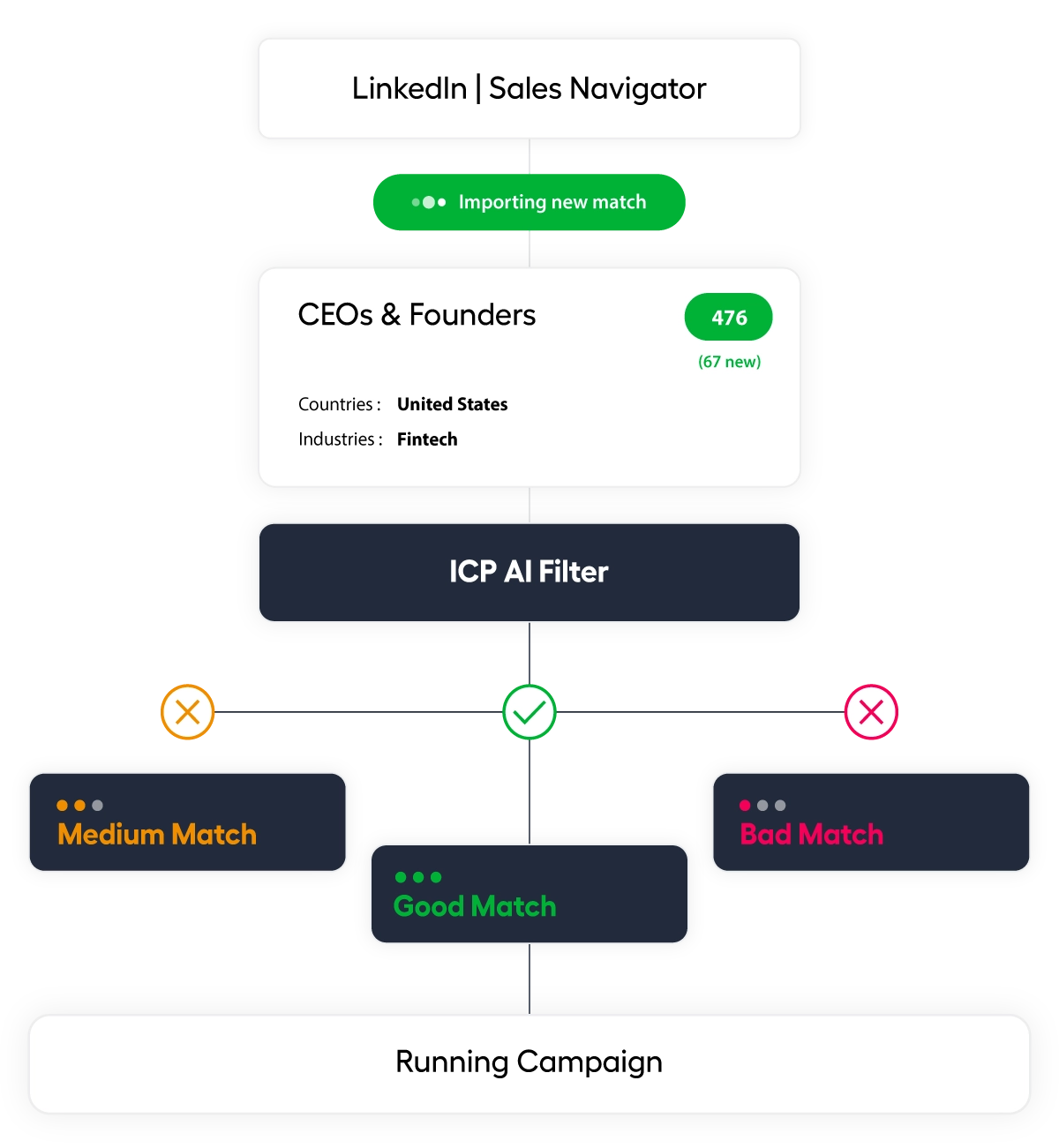
ICP Filter & Lead Scoring
- AI-powered lead scoring.
- Filter prospects at campaign entry by industry, location, job function, and company size. Only engage leads that match your ideal customer profile.
- Match levels.
- Perfect match, good match, or no match — Kanbox scores each lead 1-10 with an AI commentary explaining why. Preview results before launching.
- Exclude keywords.
- Block unwanted industries, companies, or job titles from entering your outreach sequences. Zero wasted messages.
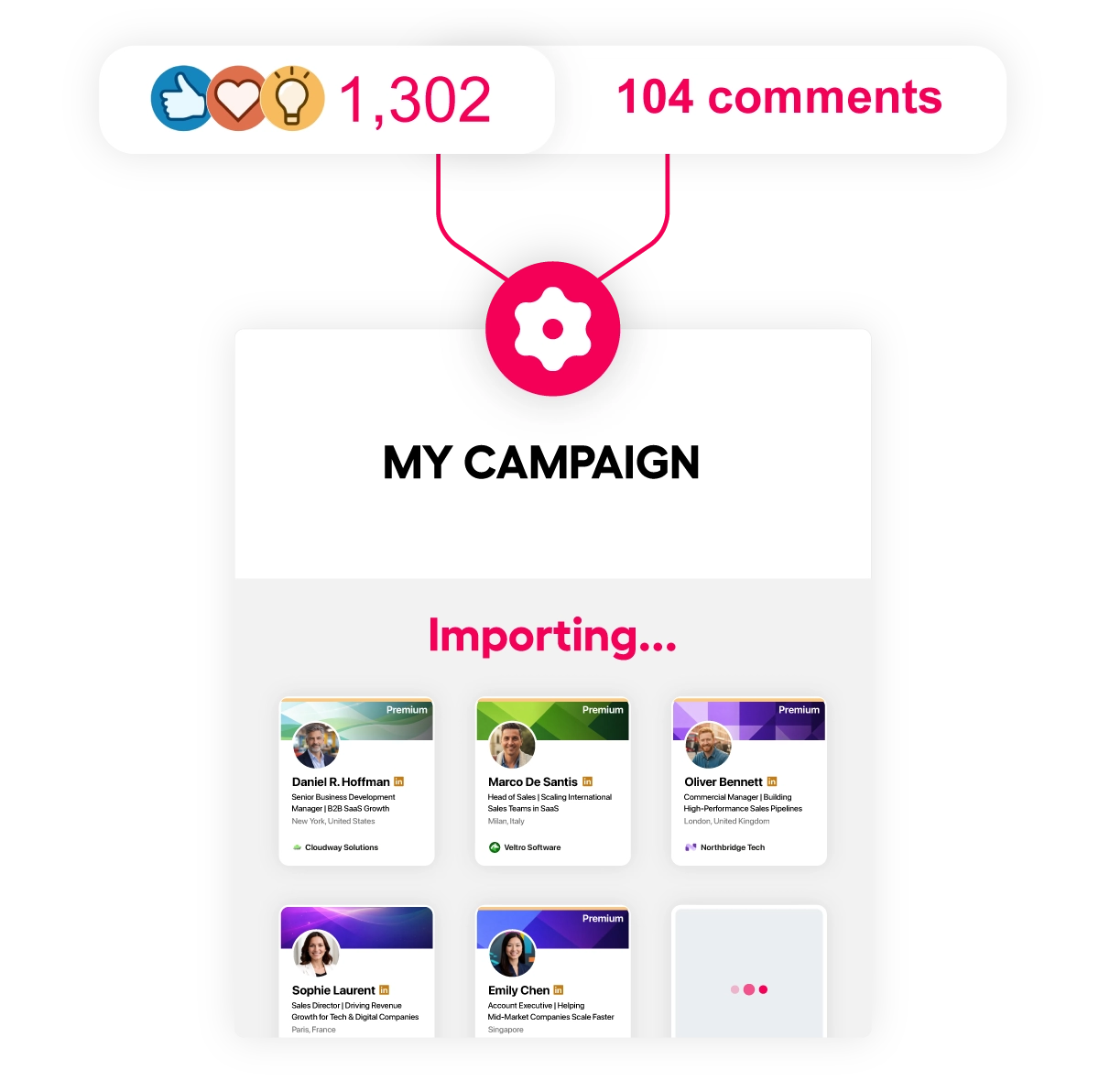
Lead Magnet Automation
- Keyword detection.
- Monitor any LinkedIn post for comments containing specific keywords. Automatically trigger your outreach sequence.
- Auto public reply.
- Reply publicly to matching comments with a personalized response. Build social proof while engaging leads.
- Automated DM follow-up.
- Send a personalized direct message after the public reply. Turn post engagement into pipeline automatically.
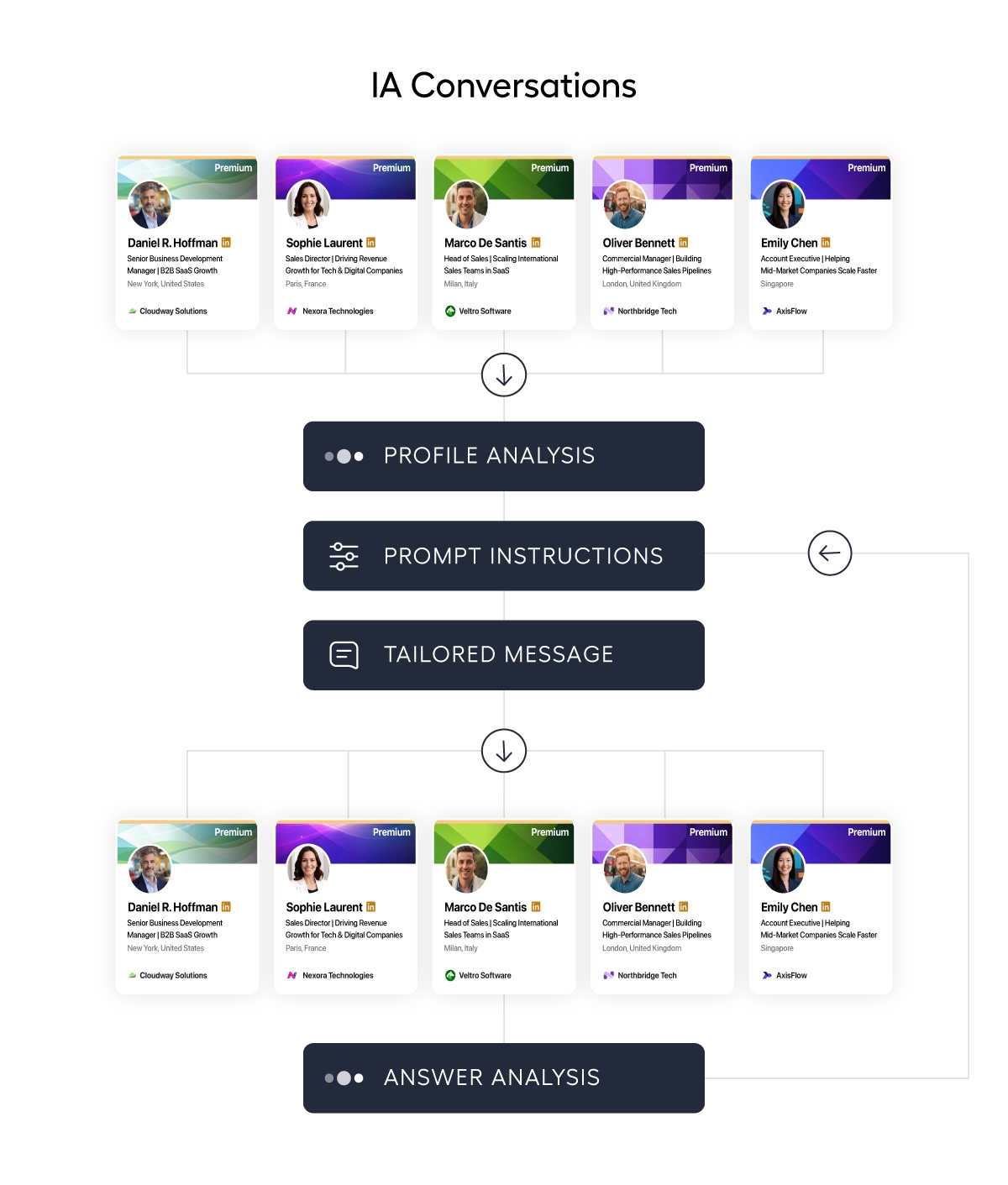
AI-Powered Message Generation
- Per-lead AI prompts.
- Write a custom prompt and let AI generate a unique, personalized message for each lead using their profile data — name, headline, company, job history.
- Context-aware.
- AI reads each lead's full LinkedIn profile, company description, and even prior conversation history to craft relevant messages. Upload PDF or text files as extra context.
- Fallback values.
- If a lead's profile is incomplete, set fallback values for any variable. AI adapts automatically — no broken messages, no generic templates.
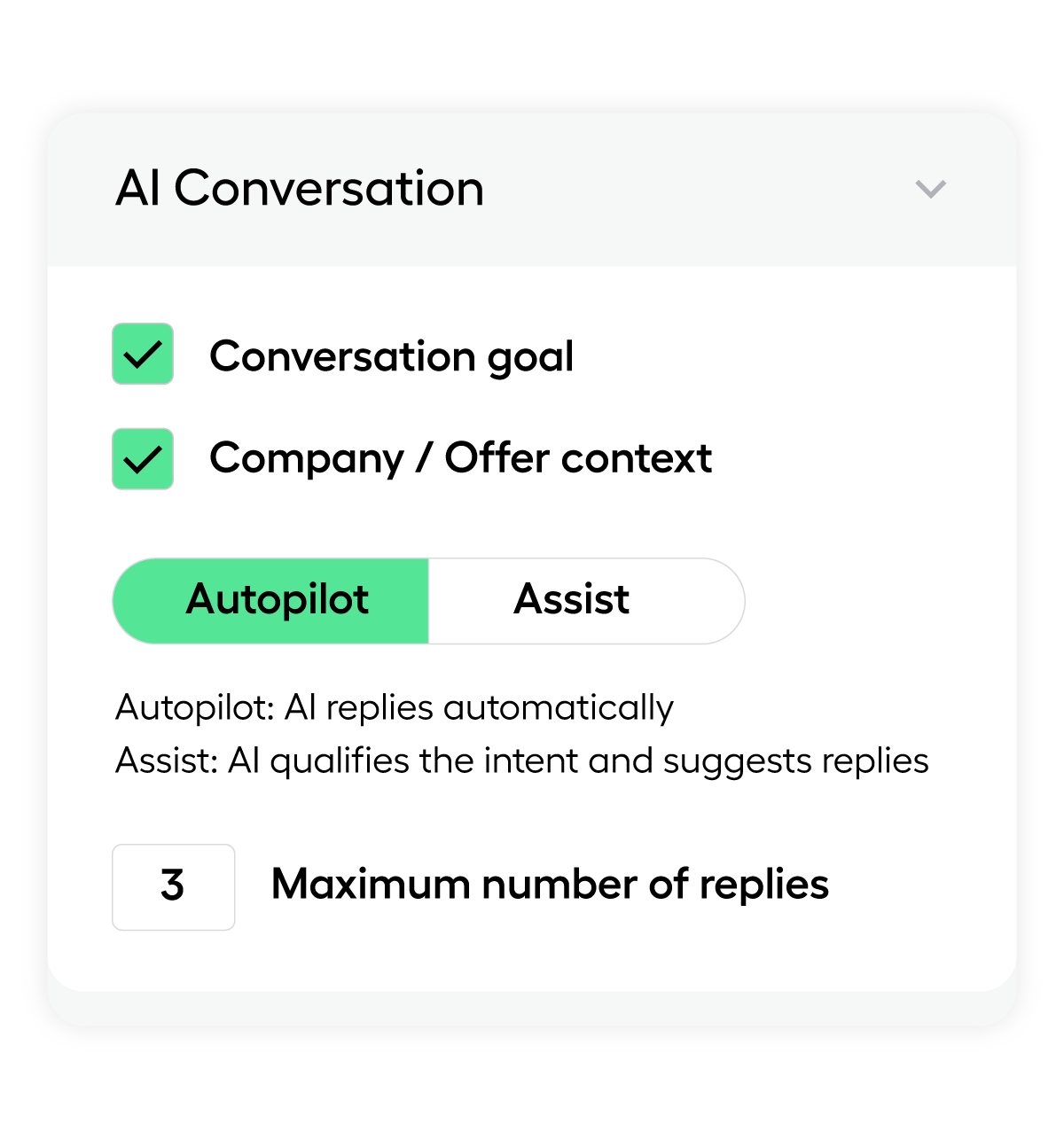
AI Response Agent
- Autonomous conversations.
- When a lead replies, the AI agent takes over and continues the conversation naturally based on your instructions.
- Pipeline actions.
- The AI agent moves leads through your pipeline stages, applies tags, and updates statuses automatically based on conversation outcomes.
- Meeting scheduling.
- AI can propose meeting times and book calls directly. Full autopilot from first message to booked appointment.
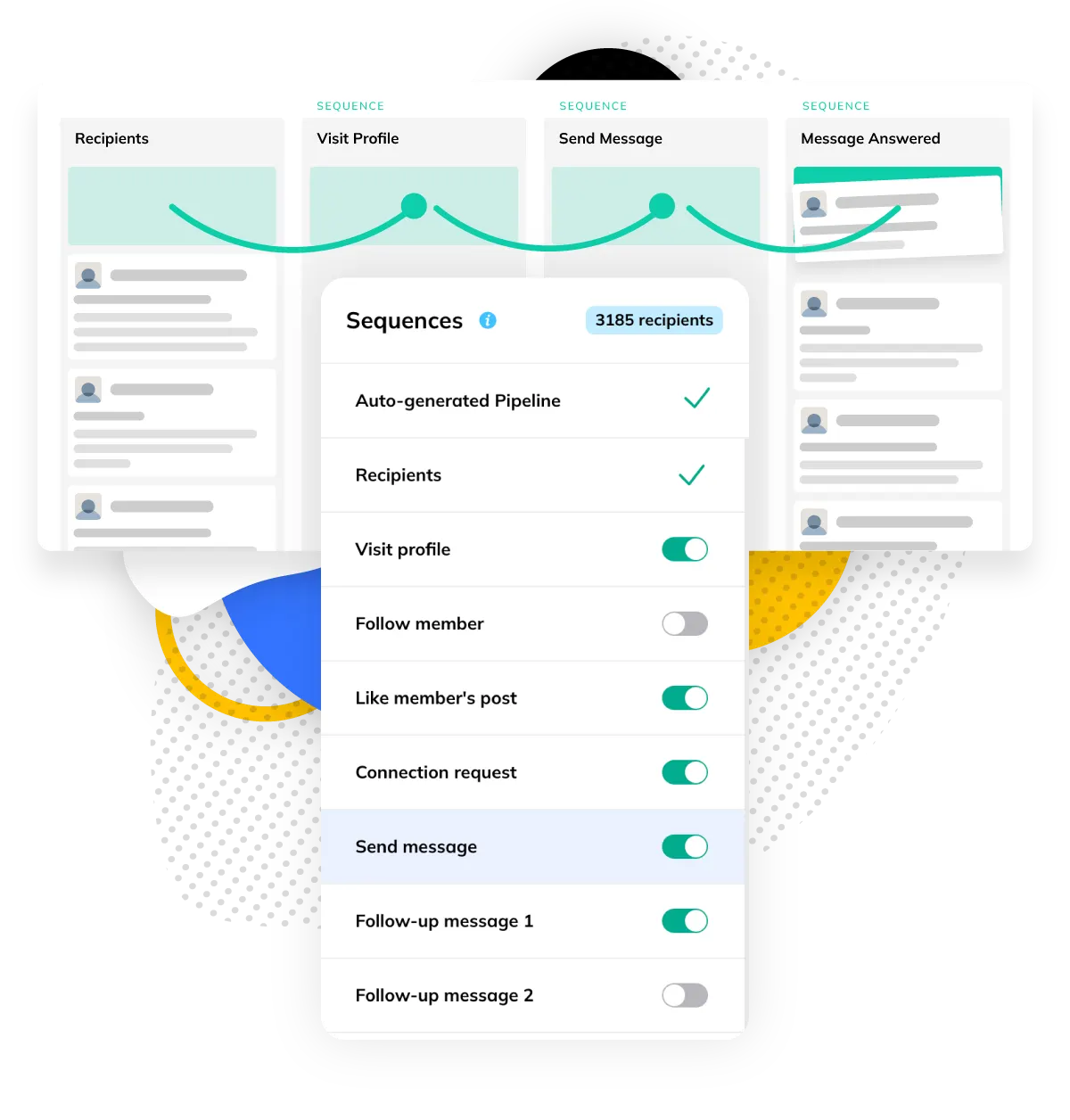
Multi-Step Sequences
- 6+ actions.
- Visits, invitations, messages, follow-ups, tags.
- Flexible scheduling.
- Set delays between each step (1-14 days).
- Conditional logic.
- Different paths based on prospect response.
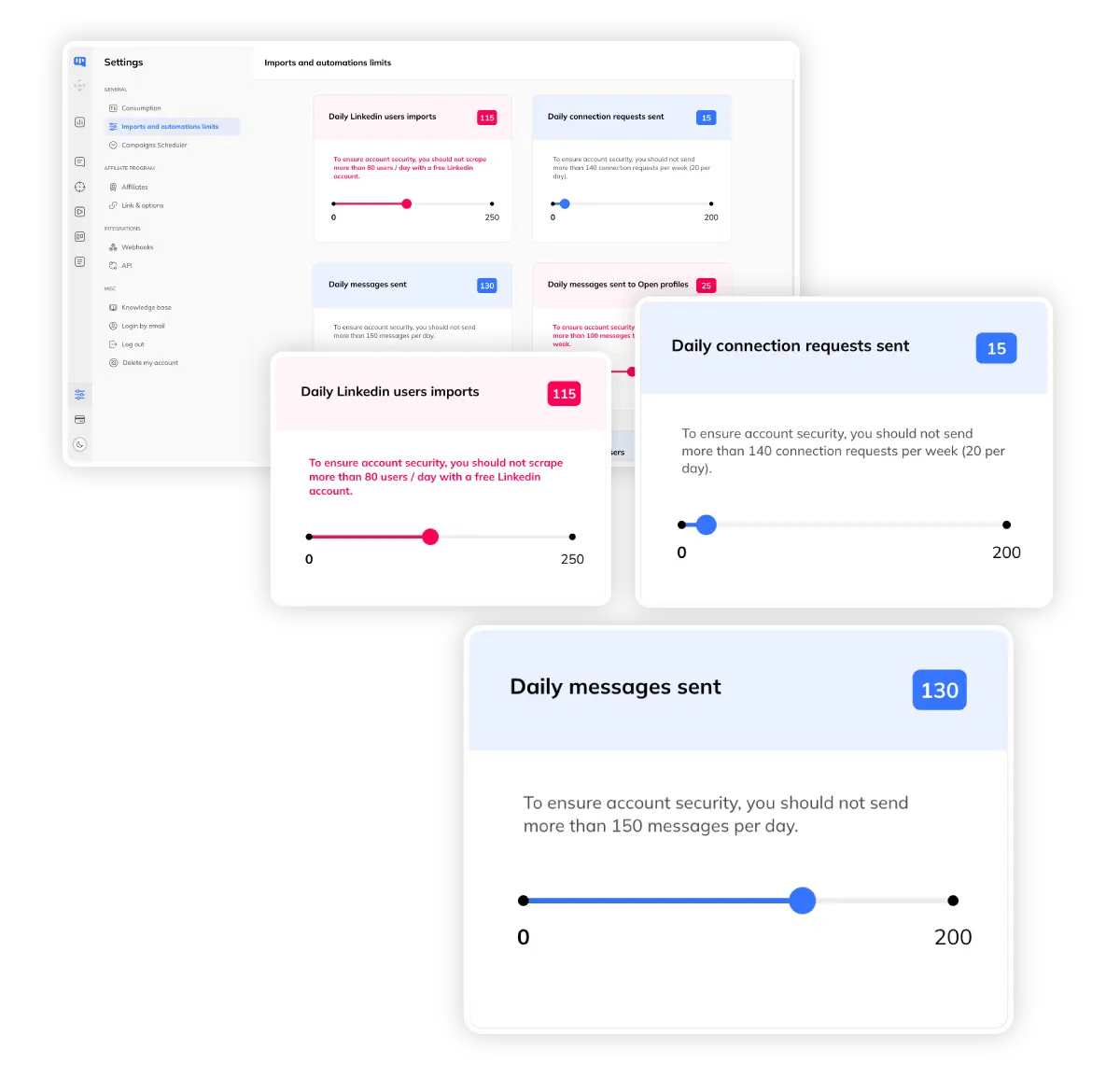
Safe Account Limits
- Daily caps.
- 50-100 invitations/day, 500-800 visits/day maximum.
- Human-like delays.
- Random intervals between actions prevent detection.
- Cloud-based.
- No browser extension required. Works 24/7.
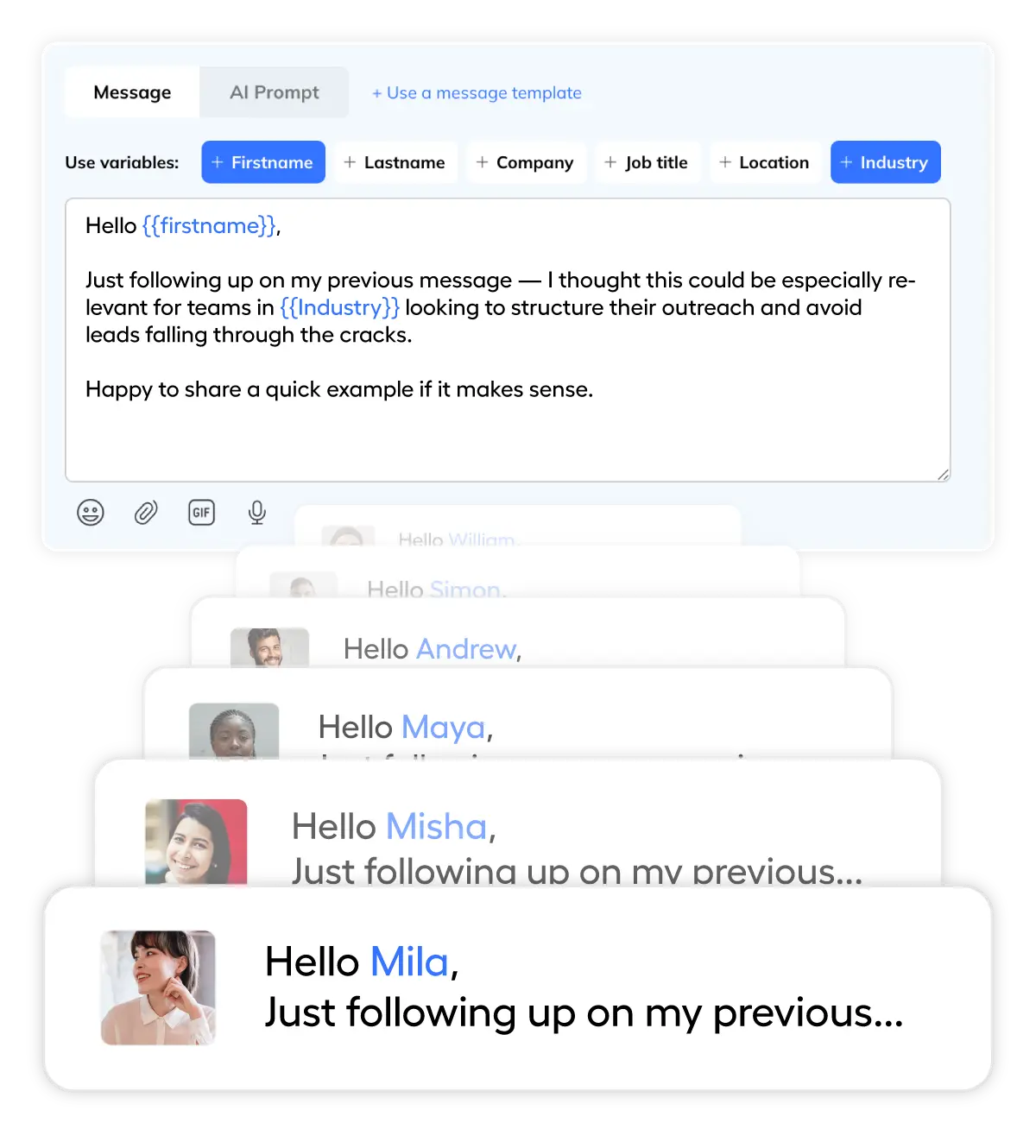
Personalization at Scale
- Dynamic variables.
- Insert {{firstName}}, {{company}}, {{jobTitle}}, ... automatically.
- AI templates.
- Generate personalized messages with AI assistance.
- A/B testing.
- Test variations automatically. Optimize conversion.
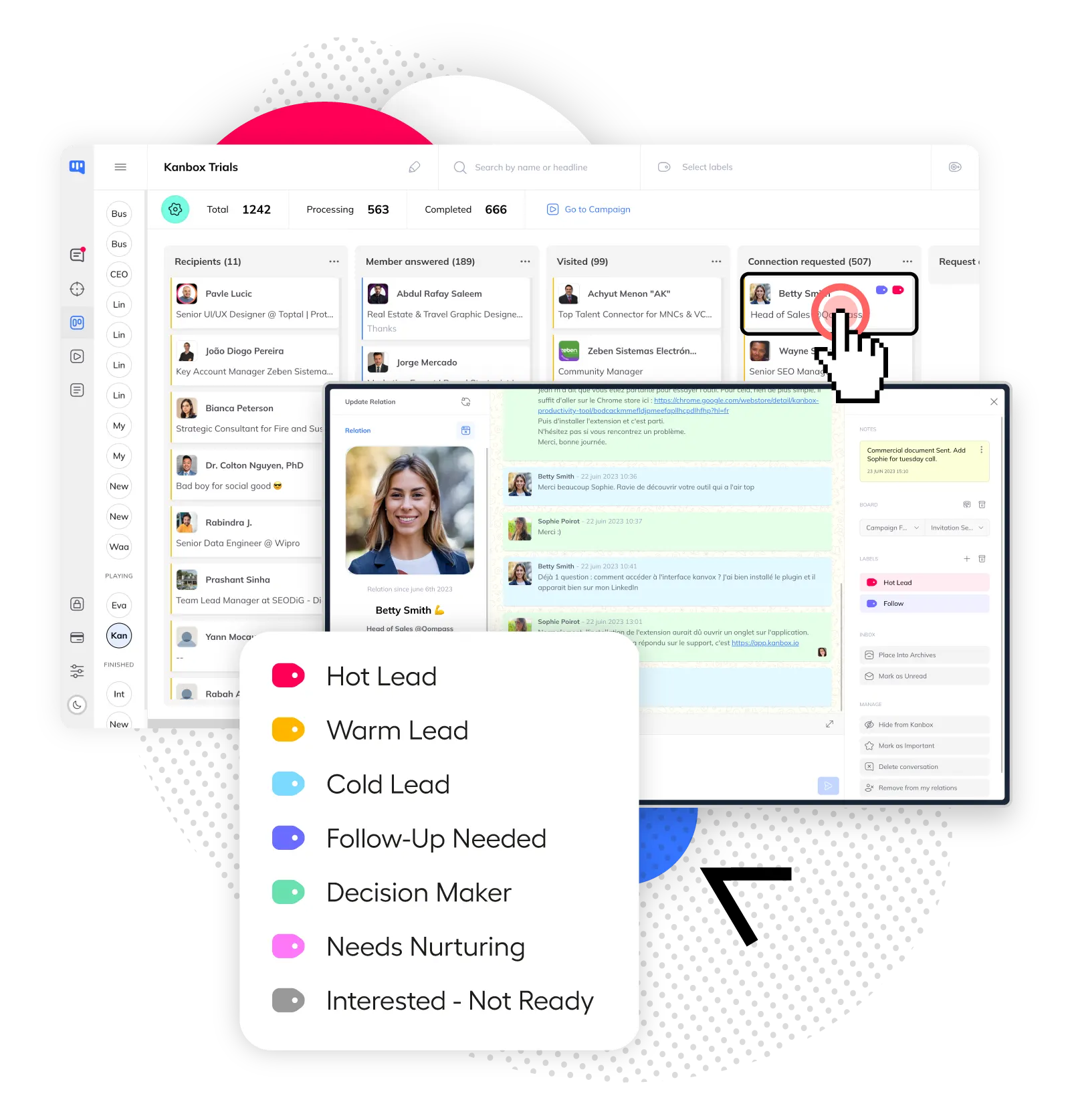
Visual Pipeline Tracking
- Kanban board.
- Visualize prospects at every stage.
- Campaign analytics.
- Response rates, conversions, ROI per campaign.
- Team collaboration (Coming soon).
- Share pipelines, assign leads, track performance (Coming soon).
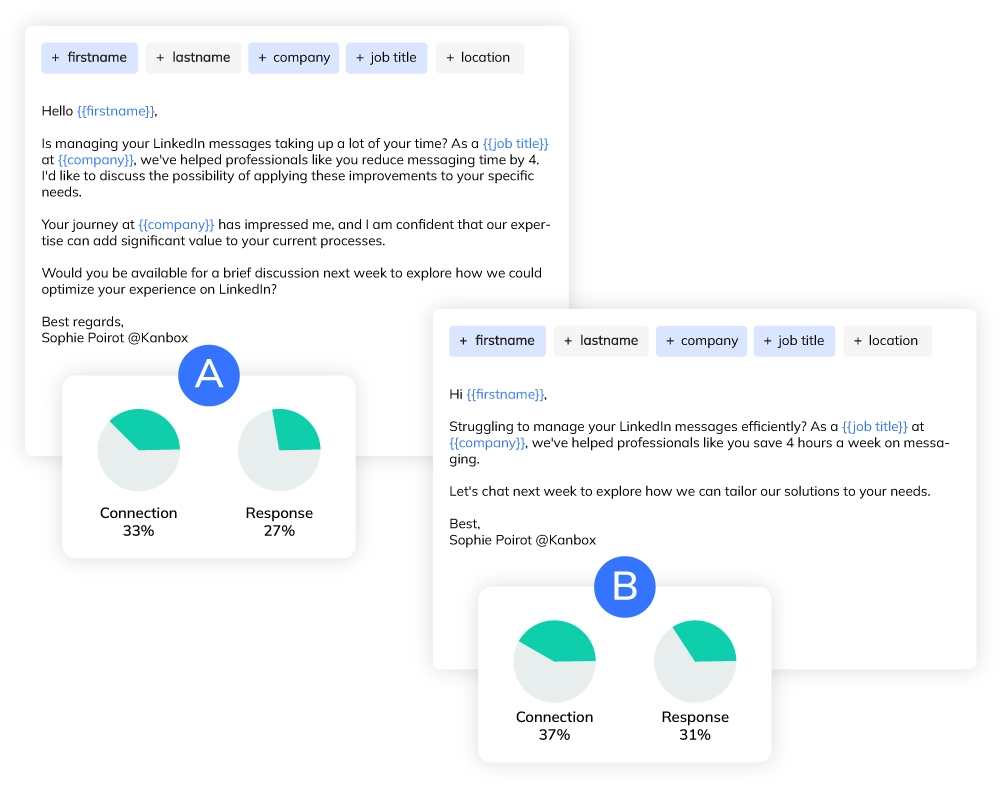
A/B Testing for Message Optimization
- Split test messages.
- Create 2 or more message variations per campaign step.
- Automatic winner selection.
- Kanbox identifies the best performing message based on response rates.
- Data-driven optimization.
- Improve conversion rates continuously with real performance data.
Ready to Automate Your LinkedIn Outreach?
Start automating your LinkedIn prospecting in minutes. No credit card required.
Start FreeKanbox vs Other LinkedIn Automation Tools
| Feature | Other Tools | Kanbox |
|---|---|---|
| Cloud-based (no extension) | ||
| Multi-step sequences | ~ 3 steps | 6+ steps |
| Visual pipeline (Kanban) | ||
| Smart daily limits | Manual | Automatic |
| A/B testing | ||
| Centralized inbox | ||
| CRM integrations | Limited | Zapier + API |
| Starting price | 50-100€/mo | 15€/mo |
| Dynamic imports (auto-refresh) | Every 24h | |
| ICP filter & lead scoring | AI-scored 1-10 | |
| AI message generation | Basic templates | Per-lead AI prompts |
| Lead magnet automation | Coming soon |
What Sales Teams Say About Kanbox Automation
Verified reviews from Kanbox users

UI, Kanban function. Attachments for emails make the process more efficient and structured.
Capterra
Kanbox is a game-changer. Connected to LinkedIn, we can run campaigns, track responses, and manage candidate engagement seamlessly.
Capterra
Clean interface, and the pipeline feature is unlike anything I've used before.
Capterra
Excellent pipeline management and campaigns. Everything is well-structured and streamlined.
Capterra
Kanbox's Kanban-style interface makes organizing leads incredibly easy. Custom pipelines make tracking outreach seamless.
Capterra
Seamless integration with LinkedIn and Sales Navigator. The intuitive inbox makes managing conversations easy and efficient.
Capterra
The best part? The Kanban board and filters make it easy to label and prioritize my leads effectively.
Capterra
Kanban is an excellent tool for anyone who uses LinkedIn for sales. It streamlines collecting, organizing, and interacting with potential clients.
CapterraPricing
Simple, Transparent Pricing
All plans include LinkedIn automation features. Upgrade for more volume and team features.
Starter
- Simultaneous Campaign: 1
- Lead Import: 300 /month
- Cloud-based
- Email Finder
- Smart Linkedin Inbox with Tags and Filters
Essential
- Simultaneous Campaign: 3
- Lead Import: 600 /month
- Cloud-based
- Email Finder
- Smart Linkedin Inbox with Tags and Filters
- Team / Multi-account
- Unlimited account managers
Pro
- Simultaneous Campaign: 5
- Lead Import: 75K /month
- Cloud-based
- Email Finder
- Smart Linkedin Inbox with Tags and Filters
- Unlimited AI Prompts and Prompt Templates
- Team / Multi-account
- Unlimited account managers
- Webhooks / API
Agency 10
- 5 Simultaneous Campaigns
- Lead Import: 75K /month
- Cloud-based
- Email Finder
- Smart Linkedin Inbox with Tags and Filters
- Unlimited AI Prompts and Prompt Templates
- Team / Multi-account
- Unlimited account managers
- Webhooks / API
- Bring your own Proxies
Frequently Asked Questions
1. What is LinkedIn automation?
LinkedIn automation uses software to automate connection requests, LinkedIn messages, and social selling tasks. Instead of manual effort, an automation tool handles repetitive actions while you focus on strategy. Kanbox combines automation, kanban pipelines, and a centralized inbox to manage LinkedIn accounts efficiently.
Key automated actions:
- Automate connection requests with personal notes to connect with target audience
- Track outreach performance with outreach metrics (response rate, engagement)
- Schedule follow up messages based on user behavior and timing
- Scrape profiles from sales navigator for lead generation
2. Is LinkedIn automation allowed and safe?
LinkedIn automation is safe when you use a trusted outreach tool that follows best practices and respects LinkedIn terms. Kanbox prioritizes account security with daily limits, human-like delays, and cloud based infrastructure (no risky chrome extensions).
Safety measures:
- Daily limits: Kanbox caps actions at safe thresholds (50-100 connection requests/day, 500-800 visits/day)
- Smart delays: Random intervals between actions prevent bot detection and maintain human behavior
- Cloud based: No local software or browser extensions that trigger LinkedIn security
- Authentic engagement: Personal messages and gradual ramp-up maintain natural activity
3. How much does LinkedIn automation cost?
Cost of LinkedIn automation varies widely, but Kanbox offers affordable pricing 40% below market. Plans start at €15/month for individuals, with pro and team plans for agencies and businesses. All pricing tiers include unlimited campaigns, analytics, and customer support.
Pricing comparison:
- Kanbox: €15-€99/month (depends on features and accounts)
- Market average: €50-€150/month for similar automation tools
- Premium and Enterprise: Custom pricing for large teams and advanced integrations
4. How does A/B testing work for LinkedIn messages?
A/B testing (also called split testing) lets you compare two or more message variations to find which one performs best. Kanbox includes built-in A/B testing to help you optimize your LinkedIn outreach automatically.
How it works:
- Create variations: Write 2 or more versions of your message for any campaign step
- Automatic distribution: Kanbox randomly sends each variation to a portion of your audience
- Track performance: Monitor response rates, acceptance rates, and engagement for each version
- Identify winner: See which message gets the best results based on real data
5. How do Dynamic Imports work for lead generation?
Dynamic Imports automatically refresh your lead lists every 24 hours, so you always work with fresh prospects. Instead of manually importing leads each time, Kanbox pulls new matching profiles from your saved sources on autopilot.
Available import sources:
- Sales Navigator saved searches: New leads matching your criteria are added automatically every day
- Profile visitors: People who viewed your LinkedIn profile (requires LinkedIn Premium)
- Post contributors: Users who liked or commented on a specific LinkedIn post
- LinkedIn events: Attendees of LinkedIn events you follow
- CSV uploads: Import external lead lists from other tools or databases
You can run up to 5 dynamic imports simultaneously. Smart deduplication ensures zero duplicates across all your lists. Available on Pro plans and above.
6. What is the ICP Filter and how does lead scoring work?
The ICP (Ideal Customer Profile) Filter lets you automatically qualify leads before they enter your outreach campaign. Instead of sending messages to everyone, Kanbox scores each lead based on how well they match your target profile.
How ICP scoring works:
- Define your criteria: Set target industries, locations, job functions, company sizes, and exclusion keywords
- AI-powered scoring: Kanbox scores each lead from 1 to 10 with an AI-generated commentary explaining the match level
- Match levels: Perfect match (green), good match (yellow), or no match (red) — only qualified leads enter your sequence
- Preview before launch: Test the ICP filter on your lead list before starting the campaign to verify results
7. Can I integrate LinkedIn automation with my CRM?
Yes. Kanbox integrates with popular CRM tools through multiple methods to keep your sales pipeline synchronized across platforms.
Integration options:
- Zapier: Connect Kanbox to HubSpot, Pipedrive, Salesforce, and 5,000+ other tools with no-code workflows
- Webhooks & API: Build custom integrations with real-time event triggers and REST API access (available on Pro plans)
- CSV export: Export lead data, campaign results, and conversation history at any time
Common CRM workflows include automatically creating new contacts when a lead responds, updating deal stages based on campaign progress, and syncing conversation history for full context.
8. How does AI message personalization differ from templates?
Traditional templates use static variables like {{firstName}} and {{company}} to personalize messages. AI message generation goes further — it creates a completely unique message for each lead by analyzing their full profile data.
Key differences:
- Templates: Same structure for everyone, only names and company fields change. Quick to set up but easily detectable as mass outreach
- AI prompts: You write a prompt (e.g. "Write a casual message referencing their recent job change"), and the AI crafts a unique message per lead using their headline, company description, job history, and even prior conversation history
- Context files: Upload PDF or text documents that the AI can reference when generating messages — useful for product briefs or case studies
- Fallback values: If a lead's profile is incomplete, set default values so the AI always generates a complete, natural-sounding message
9. What are dynamic imports?
Dynamic imports automatically refresh your lead lists every 24 hours from three sources: profile visitors, saved Sales Navigator searches, and post commenters. Once configured, new leads matching your criteria are added to your campaigns without any manual re-import.
How it works:
- Profile visitors: People who viewed your LinkedIn profile are automatically added to your lead list (requires LinkedIn Premium)
- Sales Navigator searches: Save a search with your target criteria, and Kanbox pulls new matching profiles every day
- Post commenters: Track engagement on any LinkedIn post and import users who commented or reacted
You can run up to 5 dynamic imports simultaneously. Smart deduplication ensures zero duplicates across all your lists.
10. Can Kanbox respond to leads automatically with AI?
Yes. The AI Response Agent is a fully autonomous conversation engine. When a lead replies to your outreach message, the AI agent takes over and continues the conversation based on your instructions and goals.
What the AI agent can do:
- Continue conversations: The AI reads the lead's reply, understands intent, and crafts a natural follow-up message
- Move leads in pipeline: Based on conversation outcomes, the agent automatically updates the lead's stage in your Kanban pipeline
- Schedule meetings: The AI can propose available time slots and book meetings directly, closing the loop from first message to booked call
The result is a full autopilot chain: outreach, follow-up, qualification, and meeting booking — all without manual intervention.
Ready to Automate LinkedIn Outreach & Lead Generation?
Join thousands of sales teams who generate more leads and close more deals with the Kanbox automation tool.
15 days free · No credit card required · Full access from day one