LinkedIn Prospecting: From 0 to 150 Qualified Conversations per Month
Automate your invitations, messages, and follow-ups. Kanbox handles the repetitive work while you close the deals.
15-day free trial - No credit card required




Why Sales Teams Choose Kanbox for LinkedIn Prospecting
The only platform that combines lead identification, automation, and pipeline tracking

"Kanbox transformed our prospecting. We went from 50 to 150 qualified conversations/month. The pipeline tracking saves us 10 hours per week."
How it works
Start Prospecting in 3 Steps
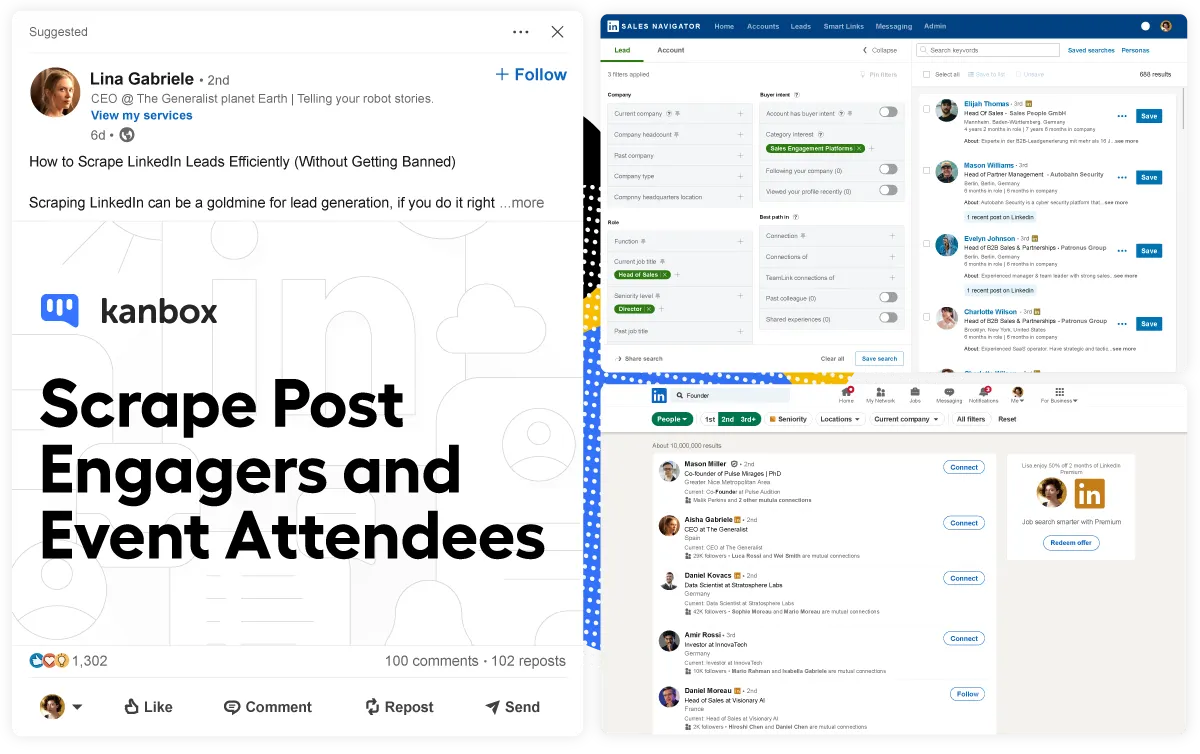
Step 1: Import High-Intent Leads
- Multiple sources.
- Post engagement, events, Sales Navigator, LinkedIn Recruiter, or CSV imports.
- Intent signals.
- Target people who already showed interest in your topic.
- Auto-deduplication.
- Zero duplicates across all your lists.
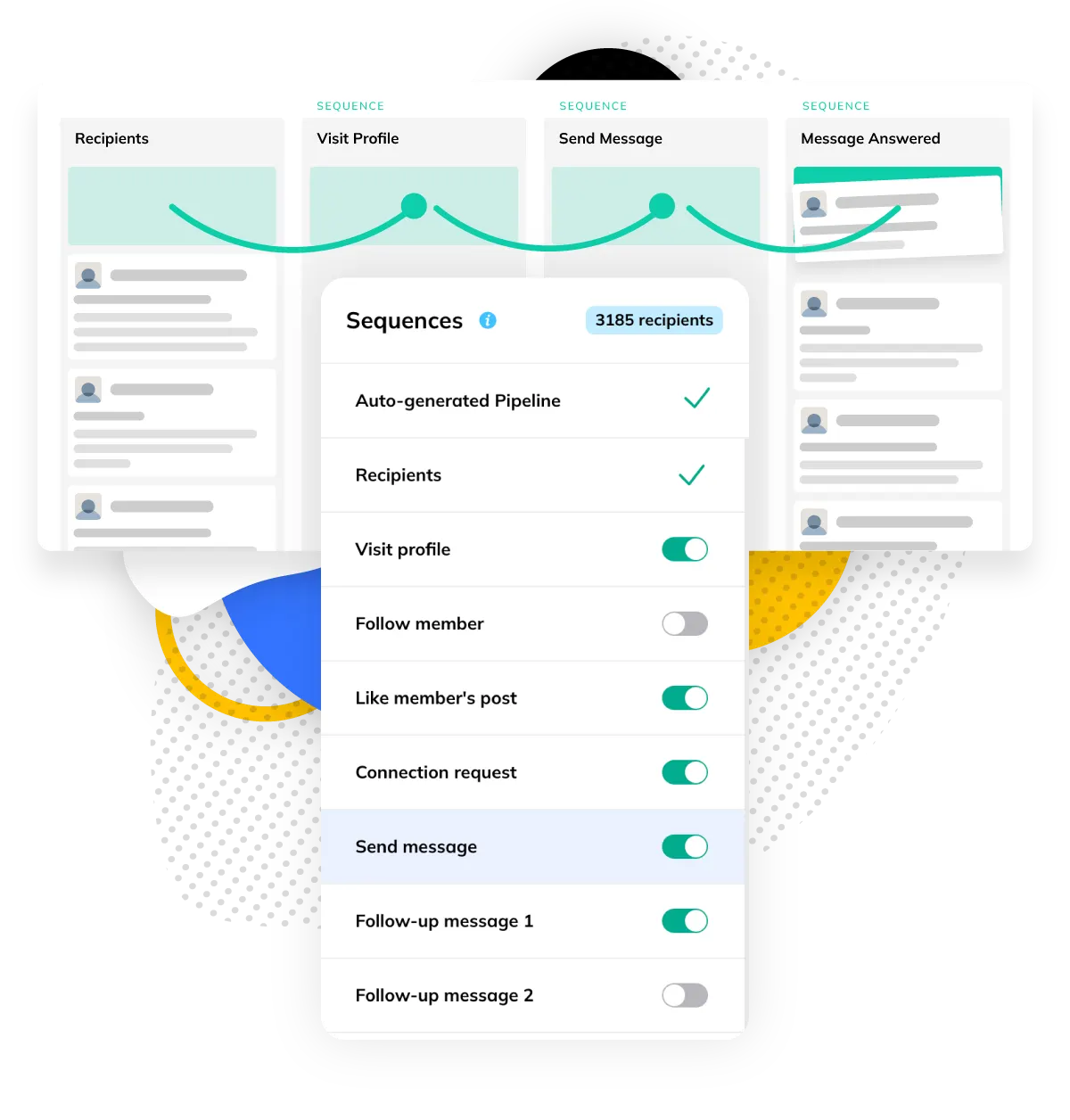
Step 2: Launch Automated Sequences
- 6+ step sequences.
- Profile visits, invitations, messages, follow-ups.
- Personalized at scale.
- Use variables and AI templates for each message.
- Safe limits.
- 100-200 invitations/week, random delays between actions.
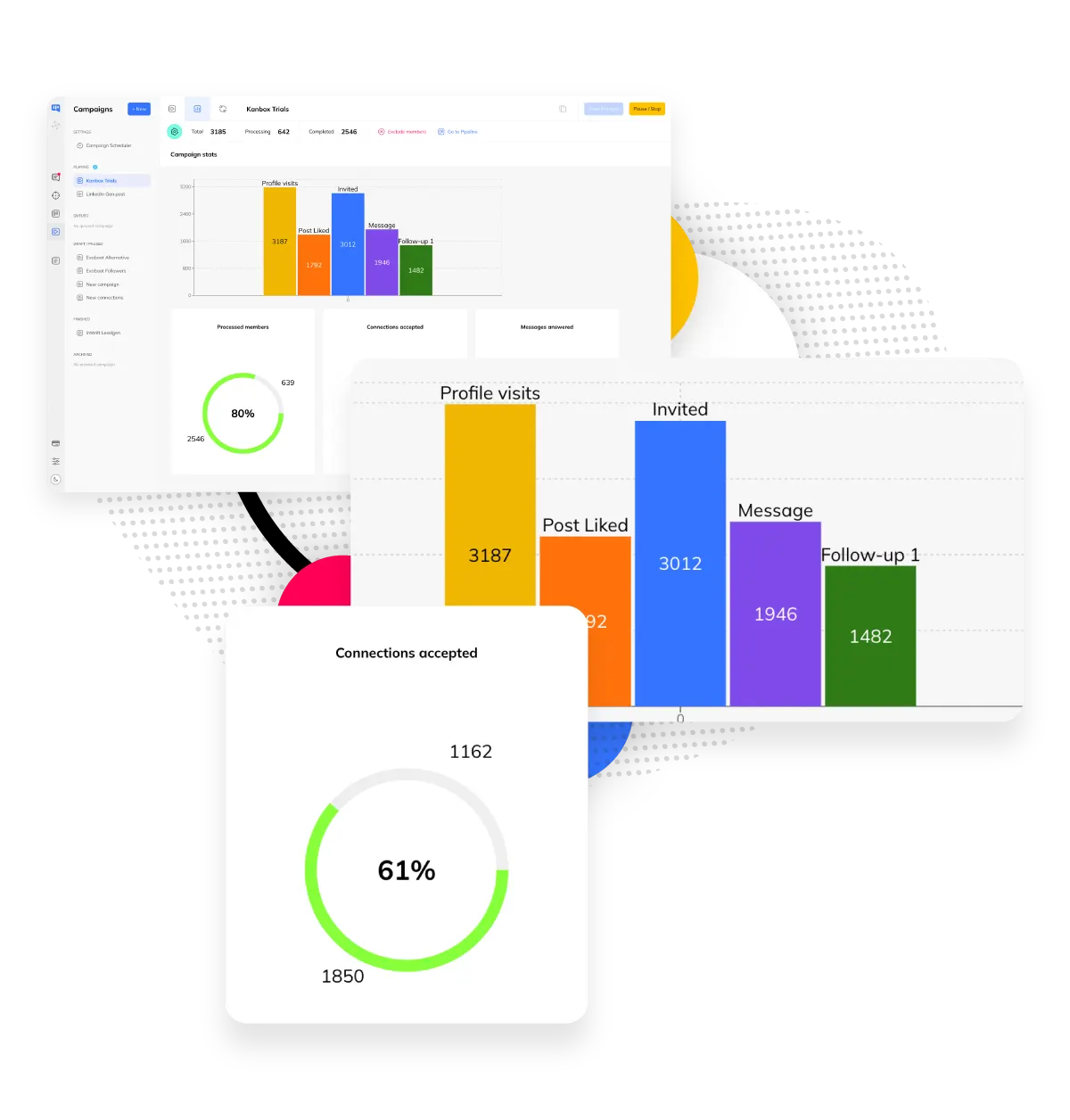
Step 3: Track & Convert
- Visual Kanban.
- See where each prospect stands at a glance.
- Inbox linked to campaigns.
- Reply instantly without switching tabs.
- Export or continue.
- Download CSV or keep nurturing in Kanbox.
Core Features
Prospecting Features That Drive Results
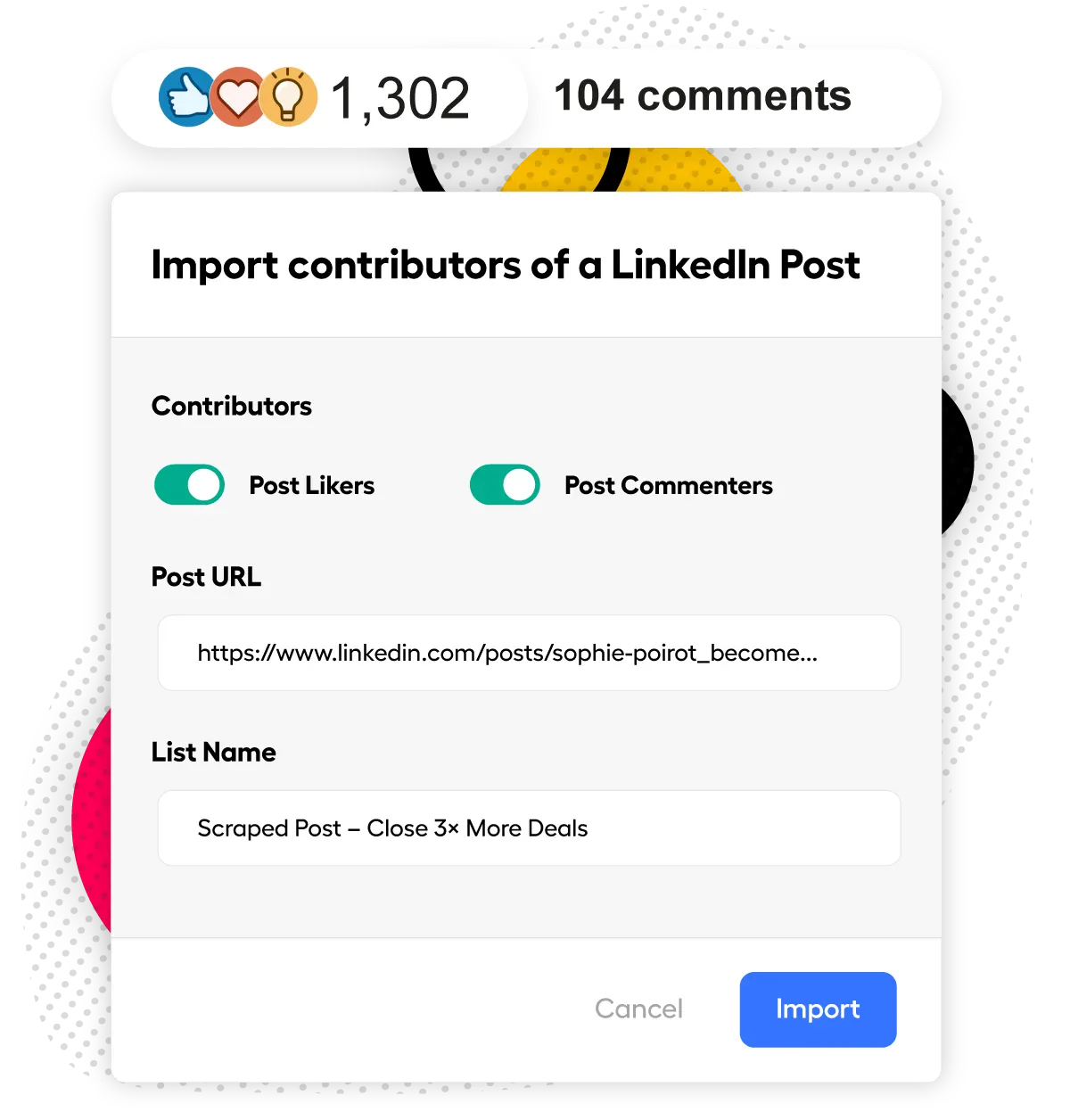
High-Intent Lead Import
- Post engagement.
- Import people who liked, commented, or shared.
- Event attendees.
- Reach people from webinars and conferences. 3-5x higher response rates.
- Profile searches.
- Extract from Sales Navigator or LinkedIn Search.
Multi-Step Automation
- 6+ actions.
- Visits, invitations, messages, follow-ups, tags.
- Smart delays.
- Random delays between actions for account safety.
- A/B testing.
- Test variations automatically. Optimize conversion rates.
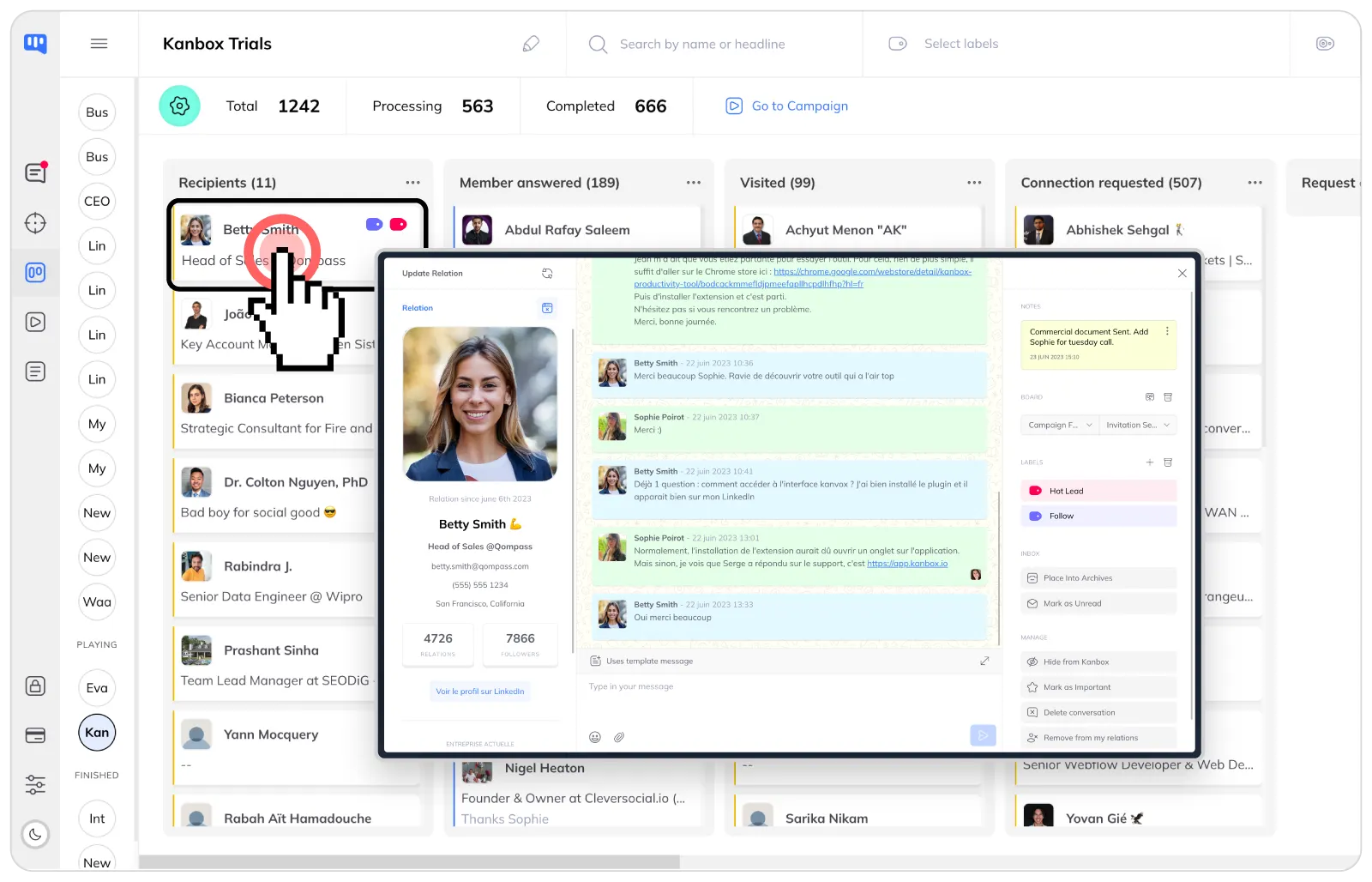
Pipeline Tracking
- Kanban board.
- Visualize prospects at every stage.
- Inbox integration.
- See campaign context when replying.
- Tags & labels.
- Organize leads with custom categories.
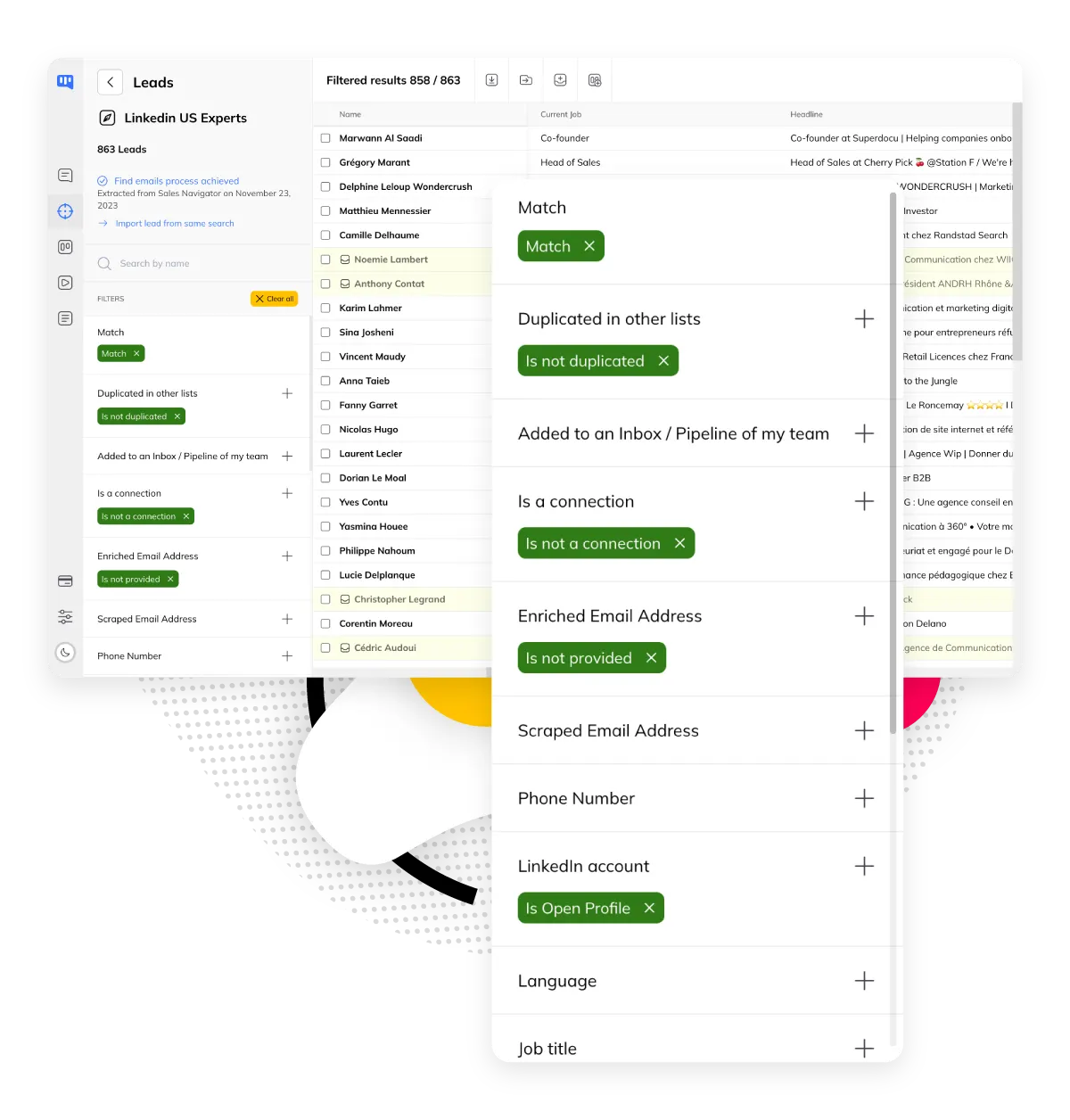
Smart Segmentation
- 21+ filters.
- Segment by industry, title, company size.
- Bulk actions.
- Apply tags and move leads in one click.
- Duplicate detection.
- Kanbox flags existing leads automatically.
Ready to 3x Your LinkedIn Conversion Rate?
Start prospecting smarter in minutes. No credit card required.
Start FreeKanbox vs Other LinkedIn Prospecting Tools
| Feature | Other Tools | Kanbox |
|---|---|---|
| High-intent lead import | ||
| Multi-step sequences | ~ 3 steps | 6+ steps |
| Visual pipeline (Kanban) | ||
| Inbox linked to campaigns | ||
| A/B testing | ||
| Post engagement scraping | ||
| Event attendees import | ||
| Starting price | 50-100€/mo | 15€/mo |
What Sales Teams Say About Kanbox
Verified reviews from Kanbox users

UI, Kanban function. Attachments for emails make the process more efficient and structured.
Capterra
Kanbox is a game-changer. Connected to LinkedIn, we can run campaigns, track responses, and manage candidate engagement seamlessly.
Capterra
Clean interface, and the pipeline feature is unlike anything I've used before.
Capterra
Excellent pipeline management and campaigns. Everything is well-structured and streamlined.
Capterra
Kanbox's Kanban-style interface makes organizing leads incredibly easy. Custom pipelines make tracking outreach seamless.
Capterra
Seamless integration with LinkedIn and Sales Navigator. The intuitive inbox makes managing conversations easy and efficient.
Capterra
The best part? The Kanban board and filters make it easy to label and prioritize my leads effectively.
Capterra
Kanban is an excellent tool for anyone who uses LinkedIn for sales. It streamlines collecting, organizing, and interacting with potential clients.
CapterraPricing
Simple, Transparent Pricing
All plans include LinkedIn prospecting features. Upgrade for more volume.
Starter
- Simultaneous Campaign: 1
- Lead Import: 300 /month
- Cloud-based
- Email Finder
- Smart Linkedin Inbox with Tags and Filters
Essential
- Simultaneous Campaign: 3
- Lead Import: 600 /month
- Cloud-based
- Email Finder
- Smart Linkedin Inbox with Tags and Filters
- Team / Multi-account
- Unlimited account managers
Pro
- Simultaneous Campaign: 5
- Lead Import: 75K /month
- Cloud-based
- Email Finder
- Smart Linkedin Inbox with Tags and Filters
- Unlimited AI Prompts and Prompt Templates
- Team / Multi-account
- Unlimited account managers
- Webhooks / API
Agency 10
- 5 Simultaneous Campaigns
- Lead Import: 75K /month
- Cloud-based
- Email Finder
- Smart Linkedin Inbox with Tags and Filters
- Unlimited AI Prompts and Prompt Templates
- Team / Multi-account
- Unlimited account managers
- Webhooks / API
- Bring your own Proxies
Frequently Asked Questions
1. What is LinkedIn prospecting and why use it?
LinkedIn prospecting consists of identifying, contacting, and converting professional prospects via the B2B social network. With 1 billion members including 65 million decision-makers, LinkedIn generates 80% of B2B leads from social networks (Source: LinkedIn Sales Blog).
Why LinkedIn is essential:
- Conversion rate 3x higher than other platforms
- 50% of B2B buyers use LinkedIn for purchasing decisions
- Direct access to decision-makers (CEO, directors, managers)
- Qualified professional data (position, company, industry)
2. What are the steps for effective LinkedIn prospecting?
An effective LinkedIn prospecting strategy follows 5 key steps:
- Optimize your profile: A complete profile increases your acceptance chances by 87%
- Define your ICP: Industry, position, company size, location
- Identify your prospects: Sales Navigator, events, engaged posts
- Launch sequences: Profile visit → Invitation → Message → Follow-ups
- Track and optimize: Visual pipeline, A/B testing, results analysis
Key stat: 54% of meetings require more than 5 touchpoints (Source: Belkins). Persistence pays off.
3. What are the best LinkedIn prospecting tools in 2026?
The best LinkedIn prospecting tools in 2026 combine automation, CRM, and lead management:
What to look for:
- Multi-source scraping: Import leads from Sales Navigator, post engagement, events
- Multi-step sequences: Automate visits, invitations, messages, and follow-ups
- Visual pipeline: Track every prospect in a Kanban board
- Cloud-based: No risky browser extensions
- Deduplication: Avoid contacting the same lead twice
Key criteria: Account security, integrated CRM pipeline, A/B testing, value for money. Kanbox offers all these features from 15€/month.
4. How to write an effective LinkedIn prospecting message?
A good LinkedIn prospecting message follows these rules:
Winning structure:
- Personalized hook: Reference to profile, post, or mutual connection (+70% meetings)
- Value proposition: Concrete benefit in 1-2 sentences
- Clear CTA: One single action requested
What to avoid:
- Generic copy-paste messages
- Sales pitch in the first message
- Messages that are too long (150-300 characters max)
Pro tip: Voice messages get up to 40% response rate.
5. How many invitations can you send on LinkedIn per day?
LinkedIn imposes strict limits to protect the platform:
2026 limits:
- Invitations/week: 100-200 depending on your SSI (Social Selling Index)
- Safe invitations/day: 20-25 maximum
- Pending requests: Maximum 700 (ideally < 500)
- Total connections: Capped at 30,000
How to increase your limits:
- Improve your SSI (score > 70 = more leeway)
- Maintain a good acceptance rate (> 30%)
- Use a cloud tool that automatically respects quotas
6. How to target and qualify prospects on LinkedIn?
Targeting is the key to successful prospecting:
With Sales Navigator or LinkedIn Recruiter:
- Advanced filters: position, seniority, company size, industry
- Saved searches with alerts
- Up to 2,500 exports/day
Qualified lead sources:
- Event attendees: Warm leads interested in your topic (3-5x higher response rates)
- Post engagement: Likes, comments = intent signals
- 2nd-degree connections: Introduced by mutual connection = +70% meetings
Pro tip: Target prospects who recently viewed your profile.
7. What mistakes to avoid in LinkedIn prospecting?
The most common mistakes that hurt your results:
Technical mistakes:
- Exceeding LinkedIn limits (risk of restriction)
- Using unsafe browser extensions
- Not deduplicating lists (spammed contacts)
Strategic mistakes:
- Incomplete profile (-87% acceptance)
- Generic messages without personalization
- Giving up after 1-2 follow-ups (54% of meetings = 5+ contacts)
- Not varying channels (message, voice, InMail)
Pro tip: Each follow-up should add value (content, testimonial, use case).
8. How to automate LinkedIn prospecting safely?
Automation allows you to scale prospecting without risking your account:
Best practices:
- Use a cloud-based tool (no risky browser extension)
- Respect daily limits (20-25 invitations/day)
- Enable random delays between actions
- Prospect during business hours (not at night)
What a good tool should offer:
- Multi-step sequences (visit, invitation, message, follow-ups)
- Personalization with dynamic variables
- Automatic A/B testing of messages
- Visual pipeline to track each prospect
9. When is the best time to prospect on LinkedIn?
Timing significantly influences your response rates (Source: Sopro 2024):
Best days:
- Tuesday: Best response rate (6.9%)
- Monday: Best connection acceptance rate
- Thursday: Good message response rate
- Saturday: Avoid (lowest rate)
Best time slots:
- 8am-10am: Morning check
- 12pm-2pm: Lunch break
- 5pm-7pm: End of day
10. How to measure LinkedIn prospecting ROI?
Essential KPIs to evaluate your performance:
Activity metrics:
- Number of invitations sent/week
- Acceptance rate (target: > 30%)
- Number of messages sent
Result metrics:
- Response rate (benchmark: 6-10%)
- Qualified conversations generated
- Meetings booked
- Deals closed / revenue generated
ROI calculation: (Revenue generated - Tool cost) / Tool cost × 100
With a tool at 15€/month, a single signed deal = massive ROI.
11. InMail vs connection request: which works best for prospecting?
Both approaches have different strengths (Source: LinkedIn Sales Solutions):
Connection requests:
- 45% acceptance rate on average
- 39% positive reply rate after connection
- Limited to ~100/week in 2026
- Free and builds your network permanently
InMails:
- 18-25% response rate (vs 3% cold email)
- Can reach anyone without connecting first
- 50 InMails/month with Sales Navigator ($79.99/mo)
- Messages under 400 characters get 22% higher response
Best strategy: Start with connection requests, use InMails for non-responders or hard-to-reach decision-makers.
12. How to build an ideal customer profile (ICP) for LinkedIn prospecting?
A well-defined ICP dramatically improves results (Source: HubSpot, Gartner):
Impact:
- Companies with strong ICP achieve 68% higher win rates
- 50% of prospects are unlikely to be a good fit—ICP helps you focus
- 86% of B2B buyers buy when their goals are understood
ICP components for LinkedIn:
- Firmographics: Industry, company size (employees/revenue), location
- Job titles: Decision-maker level, department, seniority
- Technographics: Tools they use (CRM, marketing stack)
- Pain points: Challenges your solution solves
Pro tip: Use Sales Navigator filters to match your ICP criteria exactly.
13. What is social selling and how does it differ from cold outreach?
Social selling is the warm approach to B2B prospecting (Source: LinkedIn Sales Blog):
Social selling stats:
- 78% of salespeople using social selling outsell peers who don't
- 89% of top performers say LinkedIn is crucial to closing deals
- High SSI users are 45% more likely to create opportunities
- Sales Navigator users connect with 3.6x more decision-makers
Cold outreach vs social selling:
- Cold: Direct pitch to strangers, lower response rates (~5%)
- Social selling: Engage with content first, build familiarity, then connect (~10%+ response)
2026 best practice: The "warm-first" approach—like and comment on prospects' posts before sending connection requests. This creates natural conversations.
14. How does AI improve LinkedIn prospecting?
AI transforms LinkedIn prospecting in three key ways, making it smarter rather than just automated:
- ICP scoring filters unqualified leads before messaging. AI analyzes each prospect against your ideal customer profile (industry, location, function, company size) and scores them as Good, Medium, or Bad. You only spend time on leads that match.
- AI generates personalized messages using profile data. Instead of static templates, AI crafts unique messages for each lead using their name, headline, company, and job title. Every message feels hand-written, boosting response rates.
- Dynamic imports keep your lists fresh 24/7. Your prospect lists refresh automatically every 24 hours from sources like profile visitors, saved Sales Navigator searches, and post commenters. No more outdated pipelines or manual re-imports.
The result: higher response rates, less wasted outreach, and a pipeline that stays current without manual effort.
Ready to Transform Your LinkedIn Prospecting?
Join thousands of sales teams who close more deals with Kanbox.
15 days free · No credit card required · Full access from day one