

Kanbox vs Waalaxy: Which LinkedIn Automation Tool Should You Choose?
Discover which prospecting tool is right for you. Compare features, pricing, and user experience to make the best choice for your LinkedIn strategy.
15-day free trial - No credit card required









Kanbox vs Waalaxy: Head-to-Head
LinkedIn-focused prospecting platform with scraping from multiple sources (up to 75K leads/mo), visual Kanban pipelines, and Smart Inbox included in all plans. Perfect for teams who want full control over their leads.
- LinkedIn & Sales Navigator scraping (up to 75K leads/mo)
- 6+ step automation sequences
- Visual Kanban pipelines
- Smart Inbox included (fullscreen, tags, reminders)
- Email finder with 98% deliverability
- 22 advanced filters for lead segmentation
Popular LinkedIn automation tool with a freemium model and AI-assisted messaging. Offers up to 800 invitations/month but limits scraping sources and charges extra for the Inbox feature.
- 80-800 LinkedIn invitations/month
- 99+ pre-built campaign templates
- AI-assisted message writing (Waami)
- 2000+ integrations via Zapier/Make
Feature-by-Feature Comparison
| Feature | Waalaxy | Kanbox |
|---|---|---|
| LinkedIn automation | ||
| Monthly lead import limit | 300 (Pro €19/mo) | 75,000 |
| Kanban pipelines | ||
| Smart Inbox | Paid add-on | Included |
| Post contributors scraping | ||
| Event attendees scraping | ||
| Advanced lead filters | 22 filters | |
| Data cleaning on import | ||
| Email finder | ||
| Cold email sequences | Business plan | Via integrations |
| French interface | ||
| Starting price | €0 (Freemium) | $10/mo |
Deep Dive
Detailed Feature Comparison
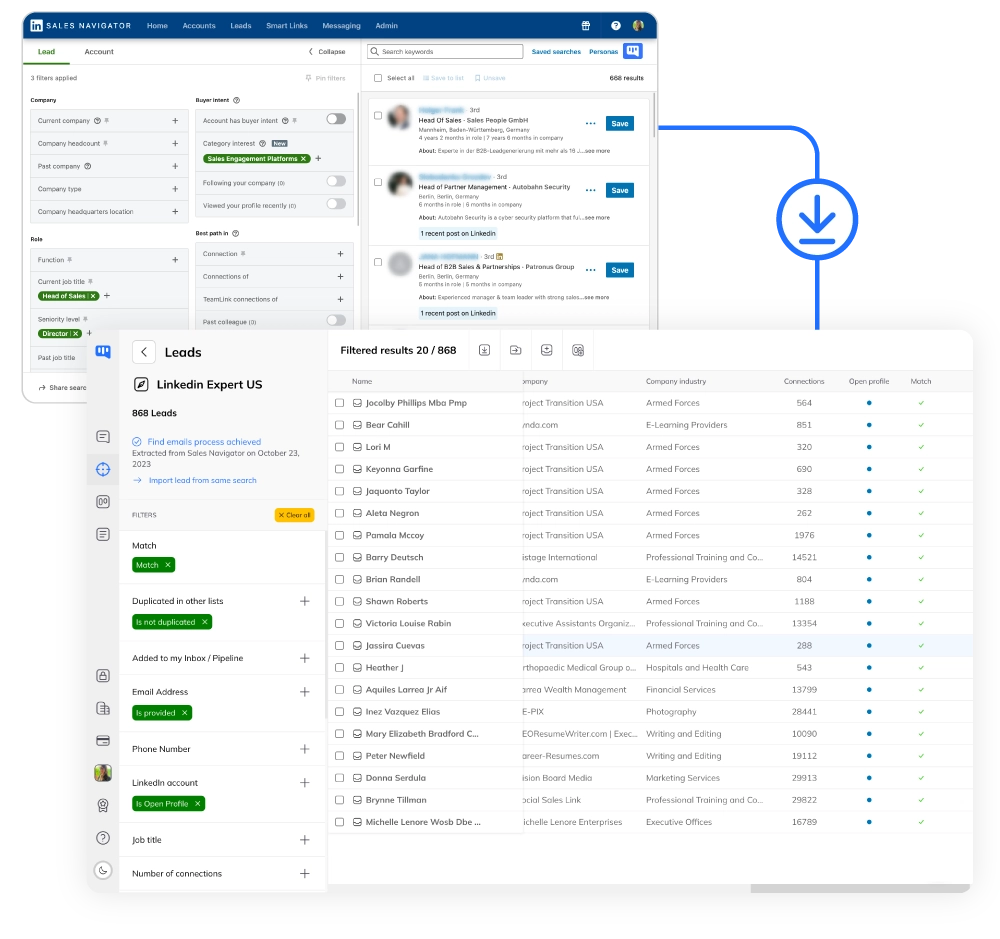
Lead Import: 75K/month vs 800/month
- Massive import capacity.
- Kanbox Pro lets you import up to 75,000 leads per month from LinkedIn, Sales Navigator, events, posts, and URL lists. Waalaxy caps all plans at 800 invitations/month maximum—even their most expensive plan.
- More data sources.
- Scrape post contributors (likers and commenters) to find highly engaged prospects. Waalaxy imports from LinkedIn search and Sales Navigator, but cannot scrape post contributors.
- 22 advanced filters.
- Clean and segment your lists with filters: job title, company size, skills, years in position, Open Profile status, phone number available, and more. Waalaxy has basic duplicate detection but no advanced filtering after import.
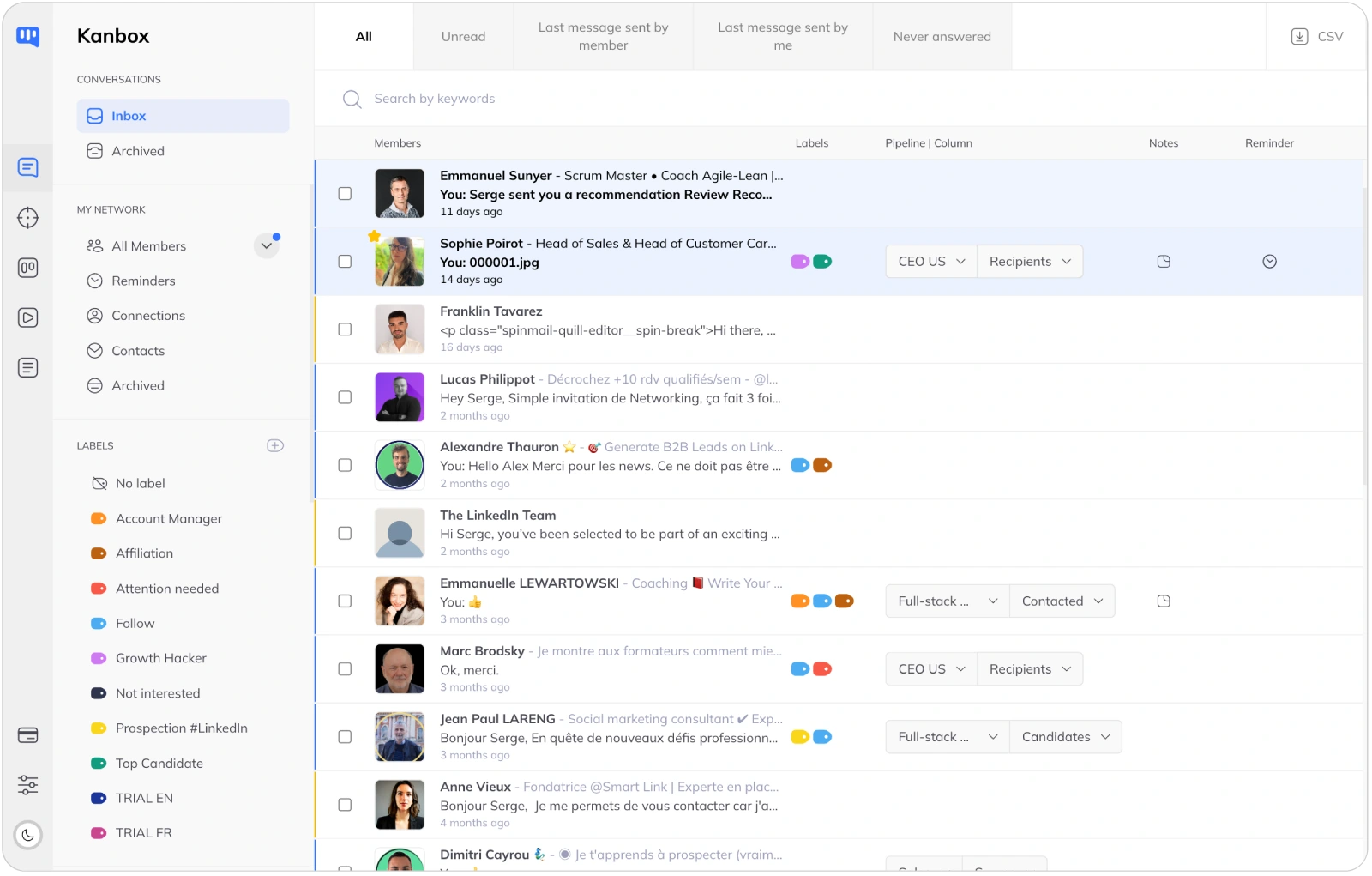
Smart Inbox: Included vs Paid Add-on
- Inbox included in all plans.
- Kanbox includes the Smart Inbox in every plan—from Starter to Agency. Fullscreen chat, tags, filters, reminders, and bulk actions. With Waalaxy, the LinkedIn Inbox is a separate paid add-on, not included in base plans.
- Reminders and follow-ups.
- Set reminders on any conversation to follow up at the right time. Never lose track of a hot prospect. Waalaxy's Inbox add-on has scheduled follow-ups but lacks the visual reminder system.
- Labels and organization.
- Organize conversations with custom labels, filter by tags, and use bulk actions to manage multiple prospects. Both tools support labels, but Kanbox's are included—Waalaxy charges extra.
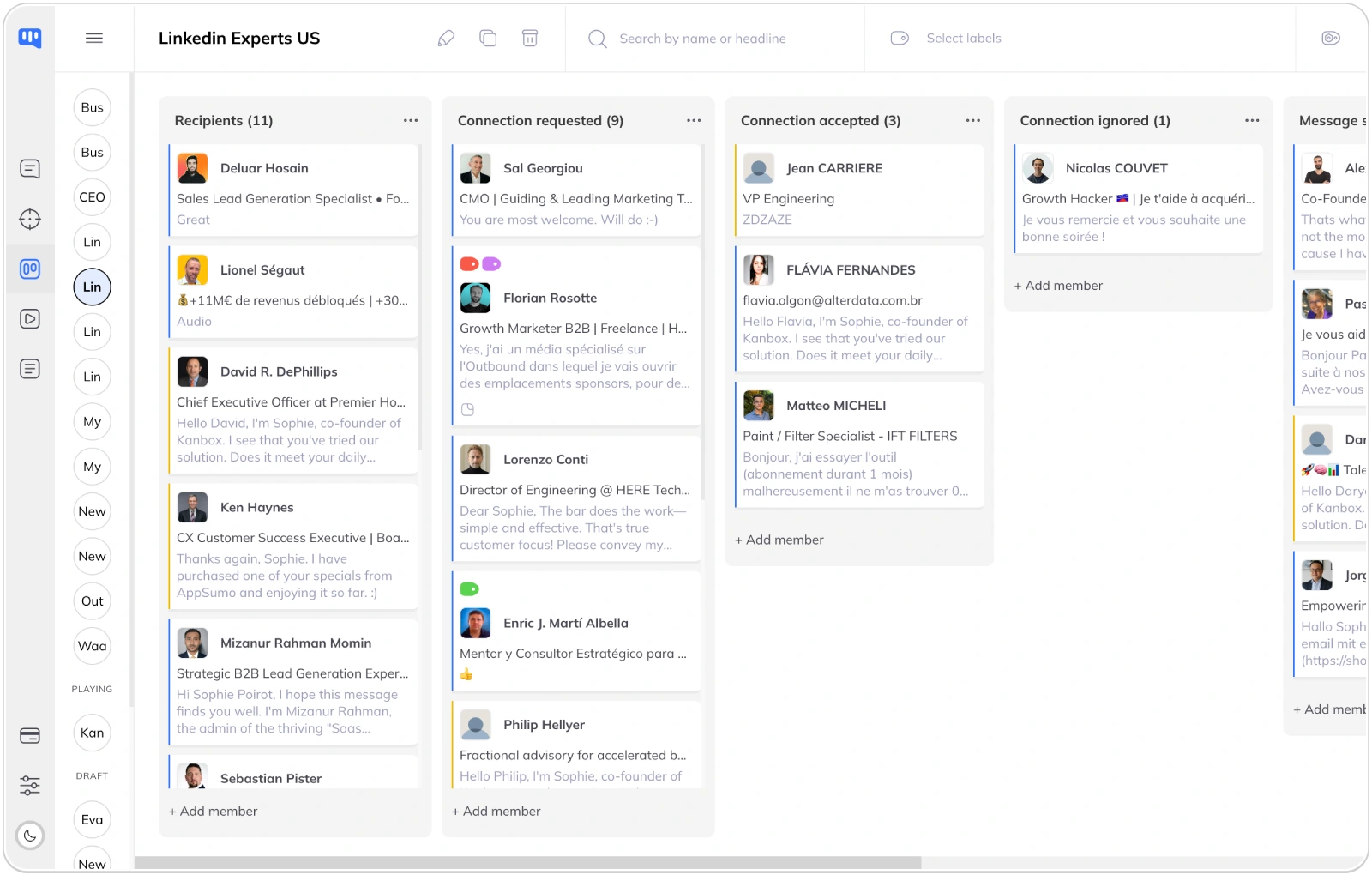
Lead Management: Visual Kanban vs List View
- Visual pipeline management.
- Kanbox offers unlimited Kanban pipelines where each column represents a campaign step. See exactly where each prospect stands—invited, connected, messaged, replied. Waalaxy has no visual pipeline; prospects are managed in lists only.
- Team collaboration.
- Share pipelines across your team. Pool lead lists, assign prospects, and track progress together. Waalaxy has team workspaces (Enterprise) but no shared visual pipeline—just analytics dashboards.
- Automatic pipeline updates.
- Prospects automatically move through your Kanban pipeline as they progress in the campaign. See who replied, who's waiting, who needs attention—at a glance.
Pricing: Transparent vs Complex
- All features included.
- Kanbox includes Smart Inbox, Kanban pipelines, and all filters in every plan. No hidden costs. Waalaxy has a freemium model but the Inbox is extra, email credits are limited (25), and you need Business (€69/mo) for cold email.
- Email finder comparison.
- Kanbox offers 30 trial credits, then pay-as-you-go packs (from $15€ for 1K). 98% deliverability guaranteed. Waalaxy includes 25 credits/month (all plans), 500/month on Business. Additional credits require separate purchase.
- Clear pricing structure.
- Kanbox: Starter $10€/mo, Essential $30/mo, Pro $50/mo (yearly). Waalaxy: Freemium €0, Pro €19/mo, Advanced €49/mo, Business €69/mo—but remember: Inbox is extra, and you're capped at 800 invitations regardless of plan.
Why Choose Kanbox Over Waalaxy?
Kanbox offers more data sources, visual pipeline management, and a complete Inbox—all included in every plan.

"We tried Waalaxy but quickly hit the 800 invitation limit. With Kanbox, we can import thousands of leads and actually see our pipeline progress. The included Inbox is a game changer."
Frequently Asked Questions
What are the main differences between Kanbox and Waalaxy?
The main differences between Kanbox and Waalaxy center on outreach capacity (connection requests), Inbox access, and pipeline tracking.
Outreach capacity (connection requests):
- Kanbox: Outreach volume depends on your configured limits and LinkedIn safety constraints
- Waalaxy: Up to ~800 invitations/month (depending on plan)
Smart Inbox:
- Kanbox: Included in all plans—fullscreen chat, labels, reminders, bulk actions
- Waalaxy: Offers an Inbox feature depending on plan / as an add-on on some plans
Lead management:
- Kanbox: Kanban-style pipelines, advanced filters, auto-deduplication
- Waalaxy: List/campaign views, basic duplicate handling, limited filtering
Data sources:
- Kanbox: LinkedIn search, Sales Navigator, LinkedIn Recruiter, events, post engagers (likers/commenters), groups, URL lists
- Waalaxy: Mainly LinkedIn search, Sales Navigator, events, groups (depending on plan)
How much does Waalaxy cost compared to Kanbox?
Typical Waalaxy pricing (check current plans):
- Freemium and paid tiers
- Invitation cap increases by plan (up to ~800 invitations/month)
- Inbox features may be offered depending on plan / as an add-on on some plans
Kanbox plans (overview):
- Starter: 300 prospects/month import limit
- Essential: 600 prospects/month import limit
- Pro: 75,000 prospects/month import limit
- Agency: 75,000 prospects/month import limit (agency usage)
Key differences: Kanbox includes Smart Inbox and Kanban-style pipeline tracking in all plans. Waalaxy’s outreach is capped by invitations, and Inbox availability varies by plan.
Does Waalaxy have Kanban pipelines like Kanbox?
Waalaxy doesn’t offer Kanban-style pipelines like Kanbox.
This is a fundamental difference between the two tools:
Waalaxy approach:
- Prospects are managed in lists and campaign views
- You see aggregate statistics (connection rate, reply rate)
- No visual representation of individual prospect progress
- Campaign results shown as numbers, not visual workflows
Kanbox approach:
- In Kanbox, campaigns are tracked in a Kanban-style pipeline
- Each column can represent a step: invited, connected, messaged, replied
- Each card is a prospect—drag and drop to manage
- See at a glance who needs attention
- Add custom columns to extend your sales workflow
For sales teams and recruiters who think in stages and deals, Kanbox’s visual approach is dramatically more intuitive.
Is Waalaxy's Smart Inbox included or paid extra?
Waalaxy offers a LinkedIn Inbox feature depending on plan / as an add-on on some plans.
What Waalaxy’s Inbox feature typically covers:
- Message templates for quick responses
- Scheduled follow-ups
- Labels to organize conversations
What Kanbox’s Smart Inbox includes (in all plans):
- Fullscreen chat view
- Message templates with personalization variables
- Reminders on conversations
- Labels
- Advanced filters (by label, campaign, status)
- Bulk actions (message, label, move to pipeline)
- Direct pipeline integration
Bottom line: Kanbox includes a full Smart Inbox in all plans. With Waalaxy, Inbox availability varies by plan.
Can I scrape post contributors with Waalaxy?
Waalaxy is mainly oriented around imports from search/Sales Navigator/events/groups (depending on plan).
Common Waalaxy data sources:
- LinkedIn search results
- Sales Navigator search results
- LinkedIn event attendees
- LinkedIn group members
With Kanbox, you can also import/scrape:
- Post engagers (people who liked or commented on a post)
- Custom URL lists (CSV or text)
Why post engagers matter: Someone who liked or commented on a post about a specific topic is actively engaged—often making them a highly qualified prospect.
How does Waalaxy's AI compare to Kanbox?
Waalaxy has an AI feature called "Waami" for message writing:
- Waami generates message drafts based on prospect profiles
- Suggests improvements to your message drafts
- Availability depends on plan
Kanbox’s approach to personalization:
- Message templates with personalization variables (when available)
- Multi-step sequences with different messages at each stage
- AI assistance can be added via integrations
Key difference: Waalaxy’s AI focuses on message writing. Kanbox focuses on workflow visibility (pipeline + Inbox) and structured prospecting management, with AI added via integrations if needed.
Is Kanbox or Waalaxy safer for my LinkedIn account?
Both tools position themselves around LinkedIn account safety with cloud execution and action pacing.
Waalaxy safety (typical):
- Cloud execution
- Action limits and delays between actions
- Randomized pacing
Kanbox safety (typical):
- Cloud execution
- Configured limits based on your settings
- Humanized delays between actions
- Scheduling based on your active days/hours and timezone settings
Important: No automation tool is 100% safe—LinkedIn actively detects and restricts automation. Best practices:
- Start conservatively (e.g., 20–30 connection requests/day)
- Use personalized messages, not obvious templates
- Don’t run multiple automation tools simultaneously
- Build your activity gradually over time
Which tool is better for a sales team?
For sales teams, Kanbox offers significant advantages:
Visual pipeline management:
- Kanbox: Shared Kanban-style pipelines—see all deals in one view, drag-and-drop management
- Waalaxy: Team analytics (depending on plan), but no Kanban-style shared pipeline
Team collaboration:
- Kanbox: Team features available depending on plan
- Waalaxy: Team workspace available depending on plan
Capacity focus:
- Kanbox: Higher lead import capacity on Pro (up to 75,000 prospects/month)
- Waalaxy: Outreach capped by invitations (up to ~800 invitations/month)
Why sales teams prefer Kanbox:
- Kanban-style pipelines match how sales teams think (stages, deals, progress)
- Advanced filters help qualify leads before outreach
- Inbox with reminders ensures no lead falls through the cracks
- Higher import capacity supports larger campaigns
Can I switch from Waalaxy to Kanbox easily?
Yes, switching from Waalaxy to Kanbox is straightforward:
What you can migrate:
- Export your lead lists from Waalaxy as CSV
- Import the CSV into Kanbox or paste LinkedIn profile URLs directly
- Recreate your campaign sequences in Kanbox
What you’ll gain:
- Kanban-style pipelines to track progress
- Smart Inbox included (no extra plan needed)
- Advanced filters to segment your lists
- Post engagers (likers/commenters) imports
Getting started:
- Sign up for Kanbox’s 15-day free trial
- Import your existing leads
- Set up your first campaign with Kanban-style tracking
- Manage replies directly from the Smart Inbox
Our support team can help with migration questions via live chat.
How does Waalaxy work?
Waalaxy is a LinkedIn automation tool that sends connection requests and messages on your behalf.
How Waalaxy works:
- Lead sourcing/import: Copy a LinkedIn or Sales Navigator search URL into Waalaxy
- Campaign creation: Choose from pre-built templates or create your own sequence
- Automated execution: Waalaxy sends invitations, messages, and follows automatically
- AI assistance: Waami helps write message drafts (depending on plan)
- Results tracking: View connection rates, reply rates, and campaign statistics
Waalaxy limitations (common):
- Outreach capped by invitations (up to ~800 invitations/month)
- No Kanban-style pipeline tracking
- Inbox features vary by plan / may be offered as an add-on
- Limited filtering after import
Kanbox works similarly but adds: Kanban-style pipelines, higher lead import capacity (up to 75K prospects/month on Pro), and a Smart Inbox included in all plans.
How do I automate LinkedIn prospecting?
Automating LinkedIn prospecting follows a 3-step process:
Step 1: Build your lead list
- Use LinkedIn search or Sales Navigator to find your target audience
- With Kanbox: Also import event attendees, post engagers, or groups
- Import into your tool for enrichment and deduplication
Step 2: Create your outreach sequence
- Profile visit → Follow → Connection request → Message → Follow-ups
- Personalize with variables (when available)
- Set delays between steps (1–30 days typically)
- Sequence can stop automatically when someone replies
Step 3: Manage responses and progress
- Waalaxy: Track via campaign statistics, respond via LinkedIn or an Inbox feature (depending on plan)
- Kanbox: A Kanban-style pipeline shows each prospect’s status; respond directly from the Smart Inbox
Key difference: Kanbox lets you see and manage each prospect visually. Waalaxy focuses more on aggregate numbers than pipeline-style tracking.
What is LinkedIn Sales Navigator and how do Kanbox and Waalaxy use it?
LinkedIn Sales Navigator is LinkedIn’s premium tool for finding and managing sales prospects.
What Sales Navigator offers:
- Advanced search filters (company size, seniority, years in role)
- Lead recommendations based on your preferences
- InMail credits to message non-connections
- Saved lead and account lists
How Kanbox integrates with Sales Navigator:
- Import leads from any Sales Navigator search URL
- Higher import capacity on Pro (up to 75,000 prospects/month)
- Advanced filtering to refine your lists
- Track prospects in Kanban-style pipelines
How Waalaxy integrates with Sales Navigator:
- Import leads from Sales Navigator search URLs
- Outreach capped by invitations (up to ~800 invitations/month)
- Basic duplicate handling
Note: Sales Navigator requires a separate LinkedIn subscription (starting around $100/month). Both tools support it, but Kanbox offers more import capacity and workflow visibility.
Does Waalaxy have a free plan?
Yes, Waalaxy offers a Freemium plan.
What’s typical in Waalaxy Freemium:
- A small monthly invitation allowance
- Limited automation capabilities
- Basic support
What’s typically limited on Freemium:
- Invitation volume (paid plans increase it up to ~800 invitations/month)
- Inbox features (vary by plan / may be offered as an add-on)
- Advanced sequences and advanced features
Kanbox alternative:
- 15-day free trial with full features
- Starter plan includes Smart Inbox and Kanban-style tracking
Consideration: Freemium is useful to test the workflow, but outreach volume is limited. If you want pipeline visibility + Inbox included, Kanbox’s trial is often a faster way to evaluate the full experience.
Can Kanbox and Waalaxy integrate with my CRM?
Both tools offer CRM integrations through different approaches:
Waalaxy integrations:
- App connections via automation platforms (e.g., Zapier/Make)
- Native connectors depending on plan
- CSV export
Kanbox integrations:
- Zapier — all plans
- Incoming and outgoing webhooks (Pro & Agency)
- CSV export — all plans
- API access (Agency plan)
Key differences:
- Webhooks: Kanbox webhooks enable custom integrations without relying only on third-party automations
- Flexibility: Webhooks + API give technical teams more control
For most users, automation platforms handle CRM needs with either tool. Technical teams may prefer Kanbox’s webhook flexibility.
Does Waalaxy offer a multichannel approach?
Waalaxy offers a native multichannel approach (LinkedIn + email), which is one of its distinctive advantages.
What Waalaxy typically offers:
- Sequences combining LinkedIn and cold email
- Built-in email enrichment credits depending on plan
- Conditional logic (e.g., if no LinkedIn response → send email)
Kanbox’s approach:
- Kanbox focuses on LinkedIn as the primary channel
- Built-in email finder
- Export found emails for use in your preferred email tool
- Webhook integration with your email tools
Which to choose?
- Waalaxy if you want all-in-one LinkedIn + email in a single interface
- Kanbox if you prefer specialized tools and want workflow visibility on LinkedIn outreach
Note: Dedicated email tools often offer deeper features (warm-up, advanced tracking, etc.).
Which tool is easier to use?
Both tools are designed to be accessible, but with different philosophies:
Waalaxy ease of use:
- Ready-to-use campaign templates
- AI assistant (Waami) for message drafting (depending on plan)
- Guided interface with tutorials
- "Black box" approach: configure and let it run
Kanbox ease of use:
- Visual interface with Kanban-style pipelines
- Advanced filters (powerful but require learning)
- Smart Inbox like a classic messaging app
- More transparency on what’s happening
Who is it for?
- Prospecting beginners: Waalaxy may feel simpler initially thanks to templates
- Experienced users: Kanbox offers more control and visibility
- Sales teams: Kanbox’s Kanban-style tracking is immediately understandable
Both tools offer trials: test them to see which matches your workflow.
What do users say about Kanbox and Waalaxy?
User feedback highlights different strengths for each tool:
What users like about Waalaxy:
- Simple interface and ready-to-use templates
- Multichannel LinkedIn + email approach
- Freemium plan to test
- Large French-speaking community
What users criticize about Waalaxy:
- Invitation limits (up to ~800 invitations/month depending on plan)
- Inbox features varying by plan
- No Kanban-style pipeline to track prospects
- Lack of visibility on ongoing actions
What users like about Kanbox:
- Kanban-style pipelines to visualize progress
- Smart Inbox included with reminders
- High import capacity on Pro (up to 75K prospects/month)
- Advanced filters for segmentation
- Responsive support
What users criticize about Kanbox:
- No free plan (15-day trial only)
- No native cold email (requires external tool)
- More features = learning time
Users migrating from Waalaxy to Kanbox often cite Kanban-style tracking and included Inbox as main reasons.
Which tool should I choose based on my profile: sales, recruiter, or agency?
The best choice depends on your profile and priorities:
For B2B sales reps and SDRs:
- Kanbox recommended — Kanban-style pipelines help you track each deal visually
- Smart Inbox with reminders so you never forget a follow-up
- Advanced filters to qualify leads before outreach
- Waalaxy if you also want native cold email from the same interface
For recruiters and HR:
- Kanbox recommended — Pipelines can map sourcing → contact → interview → hire
- Post engager imports (find candidates engaged on specific topics)
- Waalaxy if you want ready-made templates and multichannel in one place
For agencies:
- Kanbox Agency — Multi-account, shared pipelines
- High import capacity supports large client operations
- Waalaxy if you prioritize native multichannel per client workflow
For freelancers and consultants:
- Kanbox Starter if you want a complete LinkedIn workflow (Inbox + pipeline tracking)
- Waalaxy Freemium if you’re starting with a very limited budget
Summary: Kanbox for control and visibility, Waalaxy for simplicity and native multichannel.
Verified reviews from Kanbox users

UI, Kanban function. Attachments for emails make the process more efficient and structured.
Capterra
Kanbox is a game-changer. Connected to LinkedIn, we can run campaigns, track responses, and manage candidate engagement seamlessly.
Capterra
Clean interface, and the pipeline feature is unlike anything I've used before.
Capterra
Excellent pipeline management and campaigns. Everything is well-structured and streamlined.
Capterra
Kanbox's Kanban-style interface makes organizing leads incredibly easy. Custom pipelines make tracking outreach seamless.
Capterra
Seamless integration with LinkedIn and Sales Navigator. The intuitive inbox makes managing conversations easy and efficient.
Capterra
The best part? The Kanban board and filters make it easy to label and prioritize my leads effectively.
Capterra
Kanban is an excellent tool for anyone who uses LinkedIn for sales. It streamlines collecting, organizing, and interacting with potential clients.
CapterraReady to boost your LinkedIn prospecting?
15-day free trial • No credit card required
15 days free · No credit card required · Full access from day one