

Kanbox vs Humanlinker: Which LinkedIn tool fits your prospecting needs?
Two different approaches to LinkedIn prospecting. Compare automation depth, pipeline management, pricing and AI features to pick the right tool for your workflow.
15-day free trial - No credit card required







Meet the Contenders
LinkedIn-focused prospecting platform with 7-step automation sequences, visual Kanban pipelines, unlimitéd scraping, and smart inbox management. Built for teams who want depth on LinkedIn at a clear price.
- Unlimitéd LinkedIn & Sales Navigator scraping
- 7-step automation sequences with cloud execution
- Visual Kanban pipelines
- Smart Inbox with fullscreen chat
- ICP scoring filter
- Dynamic imports with 24h refresh
AI-powered prospecting platform with DISC personality analysis, a 700M contact database, and multichannel outreach (email + LinkedIn). Designed for personalized AI messaging at scale, but limitéd by credit-based pricing.
- DISC personality analysis for message personalization
- 700M contact database
- Multichannel outreach (Email + LinkedIn)
- CRM integrations (HubSpot, Salesforce, Dynamics)
Feature-by-Feature Comparison
| Feature | Humanlinker | Kanbox |
|---|---|---|
| Starting price | 69 EUR/mo | 15 EUR/mo |
| LinkedIn automation sequences | Limited (credit-based) | 7 steps |
| Kanban CRM pipeline | ||
| Smart Inbox (fullscreen) | ||
| Unlimitéd LinkedIn scraping | ||
| ICP scoring filter | ||
| Dynamic imports (24h refresh) | ||
| Cloud automation 24/7 | Chrome extensión | |
| AI message génération | ||
| DISC personality analysis | ||
| Multichannel (Email) | ||
| 700M contact database | ||
| CRM integrations (native) | Zapier | |
| Email enrichment | Credit-based (200/year) | Built-in |
Deep Dive
Detailed Feature Comparison
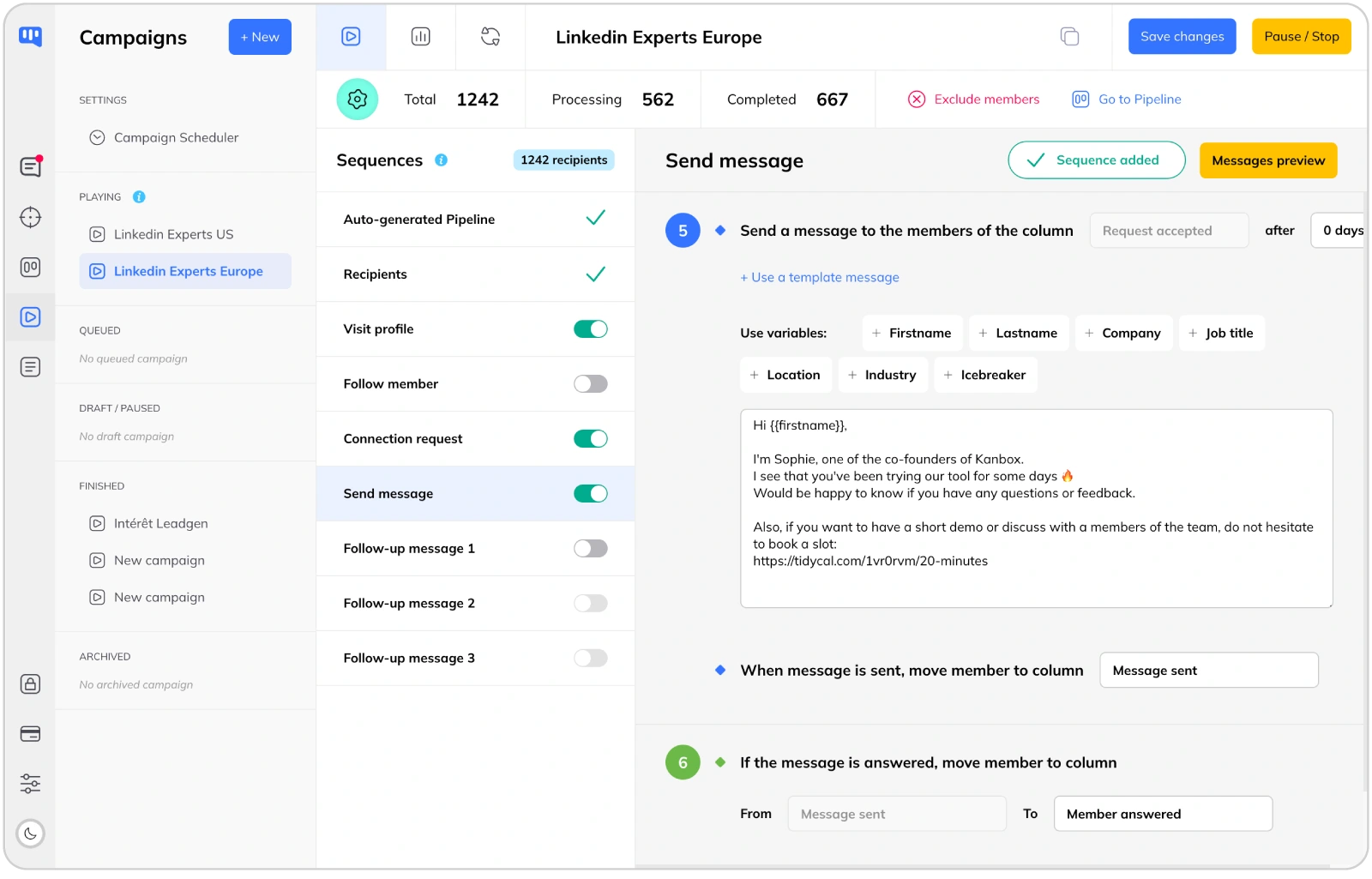
LinkedIn Automation: 7-Step Sequences vs AI Credits
- 7-step sequences.
- Kanbox offers 7-step sequences (profile visits, follows, likes, connection requests, messages, follow-ups) running 24/7 in the cloud. Humanlinker relies on AI-generated messages with a limitéd credit system: 200 AI crédits per year on the Pro plan.
- Cloud execution vs Chrome extensión.
- Kanbox runs automation from the cloud, 24/7, without keeping your browser open. Humanlinker requires a Chrome extensión, meaning your actions only run while your browser is active.
- Human-like delays.
- Random intervals between actions mimic human behavior. This humanized approach reduces the risk of LinkedIn restrictions and increases response rates.
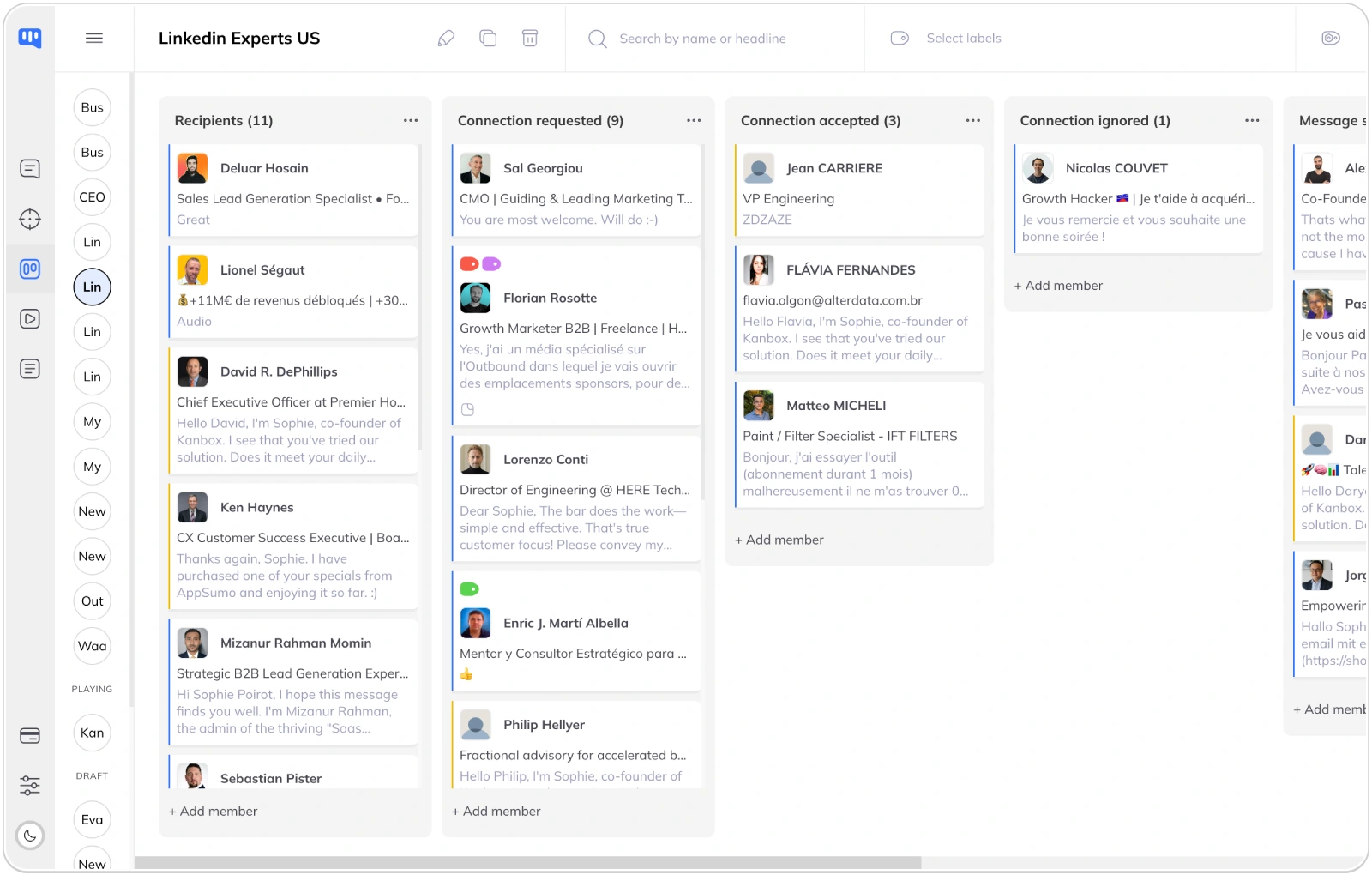
Lead Management: Kanban Pipeline vs No Visual CRM
- Visual pipeline management.
- Kanbox offers unlimitéd Kanban pipelines to track leads through your sales funnel. Humanlinker has no built-in pipeline view: you manage contacts through lists and the contact database, without a visual deal-tracking interface.
- Tags and segmentation.
- Organize leads with custom tags, notes, and filters. Segment your prospects by industry, company size, engagement level, or any custom criteria.
- Team collaboration.
- Share pipelines across your team. Assign leads to team members, track progress, and ensure no prospect falls through the cracks.
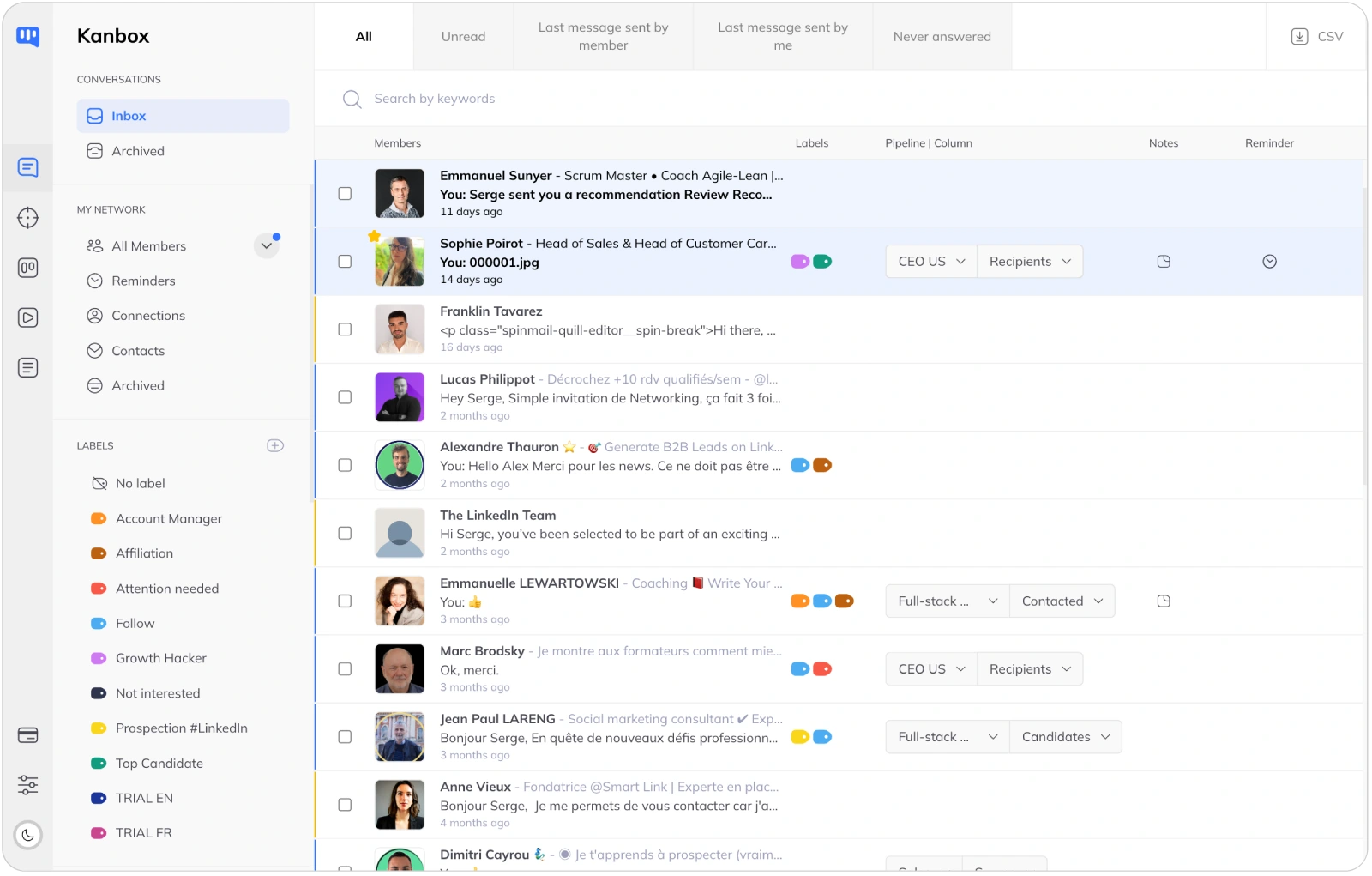
Smart Inbox: Never Miss a Conversation
- Unified inbox.
- All your LinkedIn conversations in one place. Fullscreen chat mode, quick replies, and message templates. Humanlinker focuses on outbound messaging but lacks a dedicated advanced inbox for managing conversations.
- Advanced filters.
- Filter by tags, campaign, connection status, or message content. Find any conversation instantly, even across thousands of contacts.
- Reminders and follow-ups.
- Set reminders on any conversation. Never forget to follow up with a hot prospect. Kanbox keeps you organized and on top of your outreach.
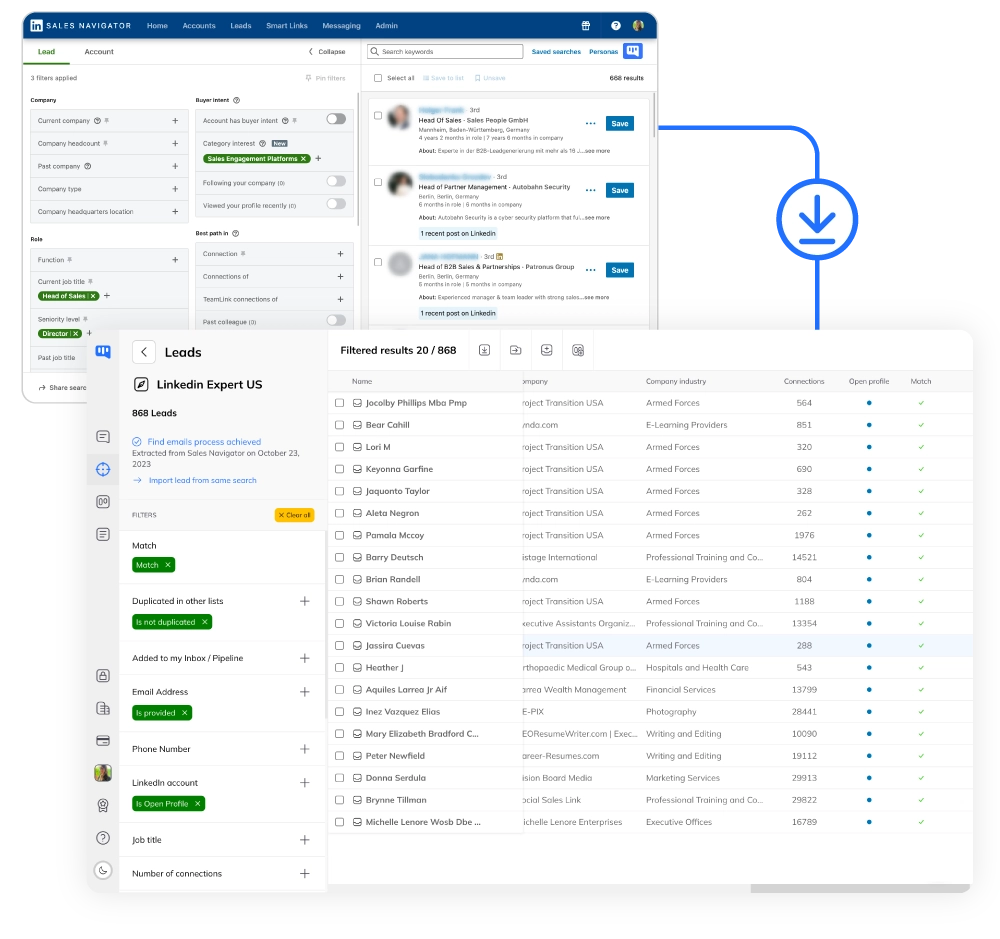
LinkedIn Scraping: Unlimitéd Data vs Credit-Based Access
- Unlimitéd scraping included.
- Extract up to 75,000 LinkedIn profiles per month from any source: Sales Navigator, events, posts, or URL imports. Humanlinker gives you 800 contact recommendations per month and 200 email enrichments per year on the Pro plan. Additional phone enrichment costs 47 EUR per 100 numbers.
- Auto-deduplication.
- Zero duplicates across all your lists. Kanbox detects and merges profiles automatically, saving hours of manual cleanup.
- ICP scoring and dynamic imports.
- Score leads based on your Ideal Customer Profile criteria. Dynamic imports auto-refresh every 24 hours to keep your prospect lists always up to date. Features Humanlinker does not offer.
Why Choose Kanbox Over Humanlinker?
If LinkedIn is your main prospecting channel, Kanbox offers deeper automation, a built-in CRM, and a clearer price. No crédits to count, no limits to hit.

"We switched from Humanlinker to Kanbox because we needed real LinkedIn automation without counting crédits. The Kanban pipeline and Smart Inbox are exactly what we were missing. And at 85% less, the decision was easy."
Frequently Asked Questions
Is Kanbox better than Humanlinker?
It depends on your prospecting priorities.
Choose Kanbox if:
- LinkedIn is your primary prospecting channel
- You need deep automation (7-step sequences running 24/7 in the cloud)
- You want a visual Kanban pipeline to manage leads
- You need unlimitéd LinkedIn scraping without per-contact crédits
- Budget matters (Kanbox starts at 15 EUR/month vs 69 EUR/month)
Choose Humanlinker if:
- You need DISC personality analysis for hyper-personalized messaging
- You want access to a 700M contact database
- You run multichannel campaigns (email + LinkedIn)
- You need native CRM integrations (HubSpot, Salesforce, Dynamics)
Bottom line: for LinkedIn-focused prospecting with automation and pipeline management, Kanbox offers more depth at a lower price. For AI-driven multichannel personalization, Humanlinker has unique strengths, but at a higher cost with credit limitations.
How much does Humanlinker cost?
Humanlinker pricing (2026):
- Pro: 69 EUR/month per user (828 EUR/year)
- Business: Custom pricing (50+ users)
- Enterprise: Custom pricing (50+ users)
What is included in the Pro plan:
- 200 AI crédits per year
- 800 contact recommendations per month
- 200 email enrichments per year
- 2 email inboxes + 1 social account
- Phone enrichment add-on: 47 EUR per 100 numbers
- 14-day trial with limitéd access
Kanbox pricing for comparison:
- Starter: 15 EUR/month (yearly) or 25 EUR/month (monthly)
- Essential: 30 EUR/month (yearly) or 45 EUR/month (monthly)
- Pro: 50 EUR/month (yearly) or 80 EUR/month (monthly)
Kanbox includes unlimitéd scraping, email finder, Kanban pipeline, and Smart Inbox in every plan. No credit-based limitations.
Does Humanlinker have LinkedIn automation?
Humanlinker offers AI-powered messaging on LinkedIn, but its automation capabilities differ significantly from Kanbox:
Humanlinker approach:
- AI-generated personalized messages using DISC personality analysis
- Chrome extensión required (actions only run while browser is open)
- 200 AI crédits per year on the Pro plan
- Focus on message quality over sequence depth
Kanbox approach:
- 7-step automation sequences (profile visits, follows, likes, connection requests, messages, follow-ups)
- Cloud-based execution 24/7 (no browser required)
- Human-like delays and smart scheduling
- Conditional logic and A/B testing
- No credit limits on automation actions
Key difference: Humanlinker excels at AI message personalization. Kanbox excels at automation workflow depth and consistency, running in the cloud without interruption.
What is DISC analysis in Humanlinker?
DISC analysis is a personality assessment framework that categorizes people into four behavioral styles:
- D (Dominance): Direct, results-oriented, decisive
- I (Influence): Enthusiastic, collaborative, optimistic
- S (Steadiness): Patient, reliable, supportive
- C (Conscientiousness): Analytical, precise, systematic
Humanlinker uses AI to analyze a prospect's LinkedIn profile and determine their DISC type, then suggests messaging approaches that match their personality style.
Is it useful? It can help personalize outreach at scale. However, the accuracy depends on the data available on the prospect's profile, and the 200 AI crédits per year on the Pro plan limit how many profiles you can analyze.
Kanbox alternative: Kanbox uses a different personalization approach based on lead context (company, role, engagement history) and AI-generated message suggestións tailored to each lead's profile data.
Can Kanbox do multichannel outreach?
Kanbox is focused on LinkedIn as the primary channel, which is where most B2B prospecting happens. Here is what Kanbox offers beyond LinkedIn:
- Email finder: Built-in email discovery with 98% deliverability, included in all plans
- CSV export: Export enriched leads to use in any email tool
- Zapier integration: Connect to 5,000+ apps for automated workflows
- Webhooks: Real-time data sync with your existing tools
Humanlinker multichannel: Humanlinker connects 2 email inboxes and 1 social account on the Pro plan, allowing email + LinkedIn sequences from one interface.
The trade-off: if you specifically need email and LinkedIn in the same sequence, Humanlinker handles that natively. If LinkedIn is your main channel and you use a separate tool for email (Lemlist, Instantly, etc.), Kanbox gives you deeper LinkedIn automation at a lower price, and you export enriched contacts for your email campaigns.
Which is cheaper, Kanbox or Humanlinker?
Kanbox is significantly cheaper at every level.
Price comparison (yearly billing):
- Entry-level: Kanbox Starter 15 EUR/month vs Humanlinker Pro 69 EUR/month (78% savings)
- Full features: Kanbox Pro 50 EUR/month vs Humanlinker Pro 69 EUR/month (28% savings)
But the real difference is in what is included:
- Kanbox: unlimitéd scraping, email finder, Kanban pipelines, Smart Inbox, 7-step sequences in the cloud
- Humanlinker: 200 AI crédits/year, 800 contacts/month, 200 email enrichments/year, Chrome extensión only
Hidden costs with Humanlinker:
- Phone enrichment add-on: 47 EUR per 100 numbers
- AI crédits run out quickly with active prospecting
- Higher tiers (Business/Enterprise) require custom pricing for 50+ users
For a team of 3 doing LinkedIn prospecting, Kanbox Pro costs 150 EUR/month total. Humanlinker Pro costs 207 EUR/month before add-ons.
Does Kanbox have AI messaging?
Yes, Kanbox includes AI-powered message génération.
Kanbox AI messaging:
- AI-generated message suggestións based on lead profile data
- Context-aware personalization (company, role, recent activity)
- Message templates with dynamic variables
- A/B testing to optimize response rates
Humanlinker AI messaging:
- DISC personality-based message génération
- AI icebreakers from prospect's LinkedIn activity
- Buying signal detection
- Limited to 200 AI crédits per year (Pro plan)
Key difference: Humanlinker's DISC approach is innovative for personalization. Kanbox's AI is integrated into the automation workflow, so you generate and send personalized messages without credit limitations.
Does Humanlinker have a Kanban pipeline?
No. Humanlinker does not offer a visual Kanban pipeline for lead management.
Humanlinker manages contacts through:
- A 700M contact database with search and filtering
- Contact lists and segments
- CRM integrations (HubSpot, Salesforce, Dynamics) for pipeline management
Kanbox Kanban features:
- Unlimitéd visual Kanban pipelines
- Drag-and-drop lead management
- Custom stages for your sales process
- Team collaboration with shared pipelines
- Notes, tags, and activity tracking per lead
If you need a visual pipeline without adding a separate CRM tool, Kanbox has it built in. With Humanlinker, you would need an external CRM for pipeline management.
Which tool is better for agencies?
It depends on the type of agency and client needs.
Kanbox for agencies:
- Manage multiple client accounts from one dashboard
- Separate Kanban pipelines per client
- Unlimitéd scraping for building prospect lists
- White-label-ready with custom proxies (Agency plan)
- Cost-effective: even the Pro plan at 50 EUR/month gives full features
Humanlinker for agencies:
- AI personalization at scale with DISC analysis
- 700M contact database for lead sourcing
- ABM monitoring on Business plan
- Higher per-user cost, custom pricing for teams of 50+
Best fit: agencies doing LinkedIn outreach for multiple clients will find Kanbox more practical and affordable. The per-client pipeline management and unlimitéd scraping scale better. Agencies focused on AI-driven email + LinkedIn multichannel for enterprise clients may prefer Humanlinker's personalization depth.
Can I migrate from Humanlinker to Kanbox?
Yes. Migrating from Humanlinker to Kanbox is straightforward:
Step 1: Export your contacts
- Export your Humanlinker contact lists as CSV files
- Include all relevant data: name, company, title, email, LinkedIn URL
Step 2: Import into Kanbox
- Use Kanbox's CSV import or LinkedIn URL import
- Kanbox auto-deduplicates and enriches profiles
- Organize imported leads into Kanban pipelines
Step 3: Set up your workflows
- Create your 7-step automation sequences
- Configure your Smart Inbox filters and tags
- Set up Zapier integrations for your CRM
Timeline: most teams are fully migrated and running campaigns within 1-2 days. Kanbox's interface is intuitive, so the learning curve is minimal compared to setting up Humanlinker.
Need help migrating? Kanbox support can guide you through the process.
Verified reviews from Kanbox users

UI, Kanban function. Attachments for emails make the process more efficient and structured.
Capterra
Kanbox is a game-changer. Connected to LinkedIn, we can run campaigns, track responses, and manage candidate engagement seamlessly.
Capterra
Clean interface, and the pipeline feature is unlike anything I've used before.
Capterra
Excellent pipeline management and campaigns. Everything is well-structured and streamlined.
Capterra
Kanbox's Kanban-style interface makes organizing leads incredibly easy. Custom pipelines make tracking outreach seamless.
Capterra
Seamless integration with LinkedIn and Sales Navigator. The intuitive inbox makes managing conversations easy and efficient.
Capterra
The best part? The Kanban board and filters make it easy to label and prioritize my leads effectively.
Capterra
Kanban is an excellent tool for anyone who uses LinkedIn for sales. It streamlines collecting, organizing, and interacting with potential clients.
CapterraReady to boost your LinkedIn prospecting?
15-day trial - No credit card required
15 days trial - No credit card required - Full access from day one