

Kanbox vs HeyReach: Which LinkedIn automation tool is best for you?
Discover which LinkedIn tool is right for you. Compare features, pricing, safety, and CRM capabilities to make the best choice for your prospecting strategy.
15-day free trial - No credit card required




Meet the Contenders
LinkedIn-focused prospecting platform with unlimitéd scraping, visual Kanban pipelines, Smart Inbox, and email finder. A complète sales toolkit built for safety and simplicity.
- Unlimitéd LinkedIn & Sales Navigator scraping
- 6+ step automation séquences
- Visual Kanban pipelines
- Smart Inbox with fullscréen chat
- Email finder included
- Chrome extension (zero LinkedIn bans)
Agency-focused LinkedIn outreach platform built around multi-account sender rotation. Designed for teams managing many LinkedIn profiles from a single dashboard.
- Unlimitéd LinkedIn sender accounts
- Multi-account sender rotation
- Unified inbox for all senders
- Integrations via Zapier (HubSpot, Salesforce)
Feature-by-Feature Comparison
| Feature | HeyReach | Kanbox |
|---|---|---|
| Starting price | $79/mo (per seat) | $10/mo (yearly) |
| LinkedIn accounts | Unlimitéd senders | 1 per user (safe) |
| Smart Inbox | ||
| CRM / Pipeline | ||
| Lead scraping volume | Limited (via campaigns) | Up to 75K/month |
| Email finder | ||
| Automation séquences | Connect, message, InMail | Visit, follow, connect, message (6+ steps) |
| LinkedIn safety | Cloud-based (higher risk) | Chrome extension (zero bans) |
| AI features | Pro plan | |
| Multi-account management | ||
| Team collaboration | Essential plan+ | |
| API & Webhooks | Agency plan ($999/mo) | Pro plan ($50/mo) |
Deep Dive
Detailed Feature Comparison
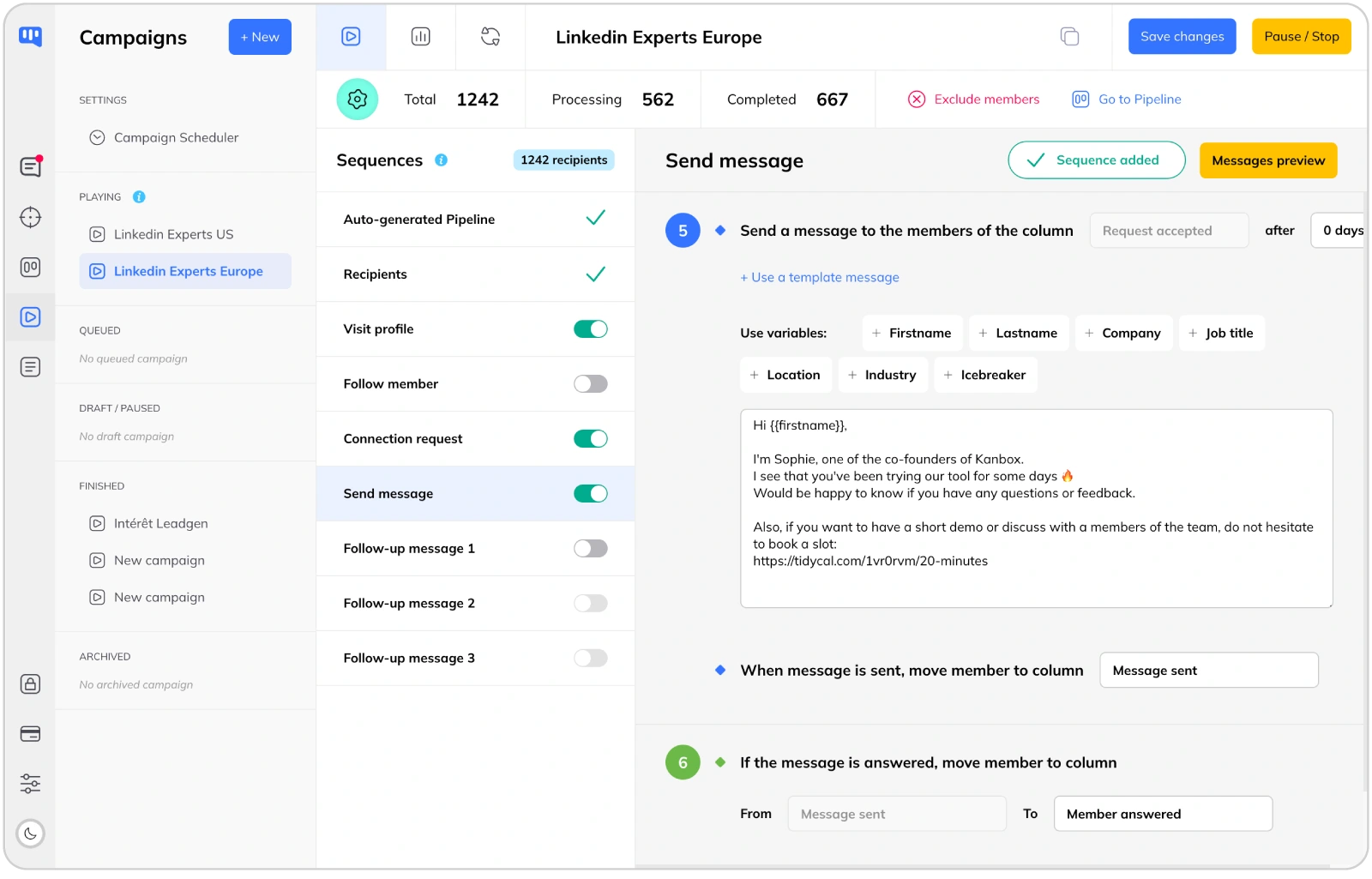
LinkedIn Automation: Safe, Personalized Sequences
- Multi-step séquences.
- Kanbox offers 6+ step séquences (profile visits, follows, likes, connection requests, messages, follow-ups). HeyReach focuses on connect and message actions only. More touchpoints mean higher conversion rates.
- Chrome extension safety.
- Kanbox runs as a Chrome extension, mimicking natural human behavior with zero LinkedIn bans in 18 months. HeyReach uses cloud-based multi-account rotation, which LinkedIn actively detects and penalizes.
- Smart scheduling.
- Schedule campaigns during business hours. Set custom time windows for each séquence step to maximize engagement. HeyReach offers basic scheduling but without timezone-aware delivery.
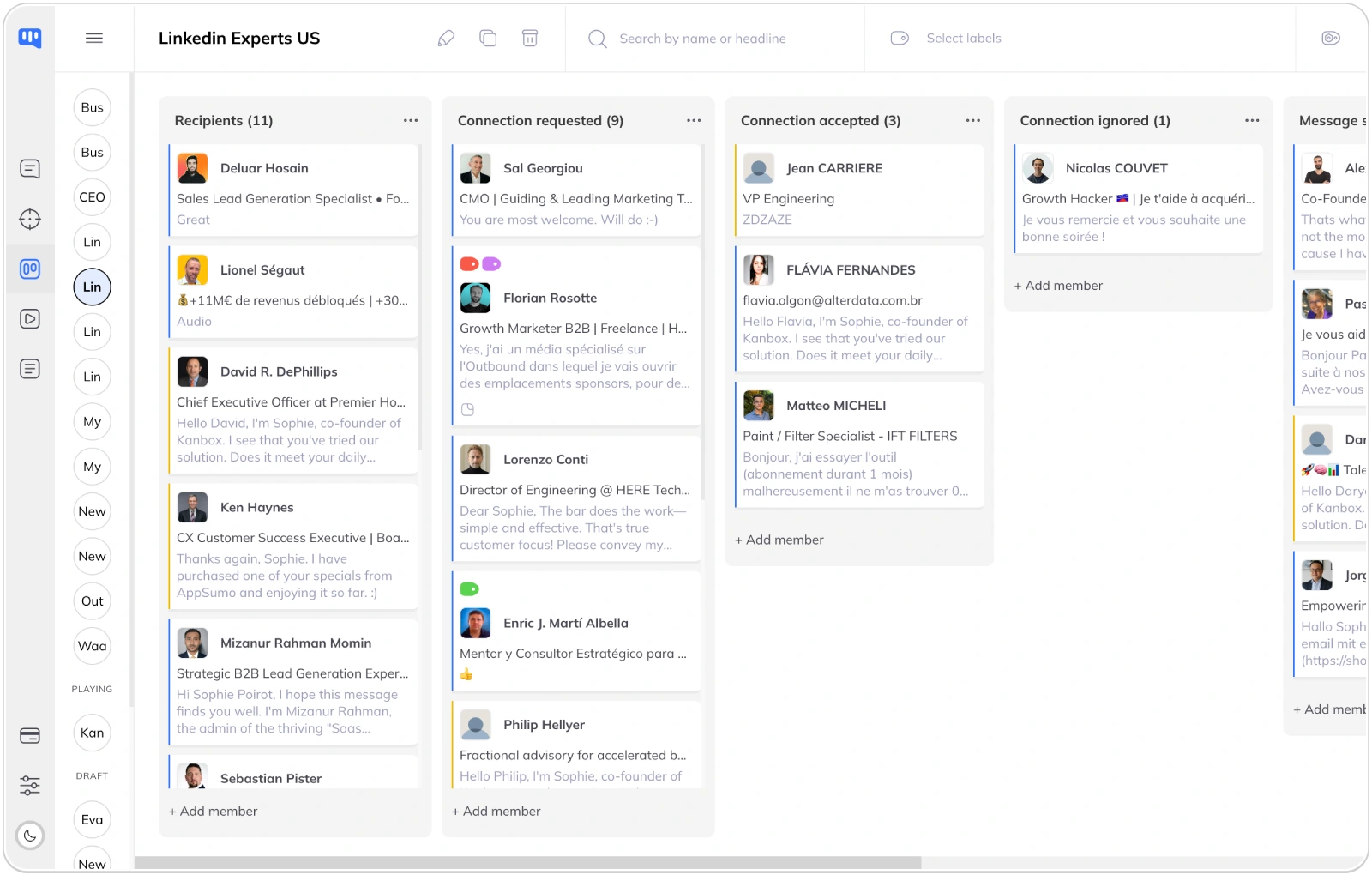
CRM & Pipeline: Built-In vs Non-Existent
- Visual pipeline management.
- Kanbox offers unlimitéd Kanban pipelines to track leads through your sales funnel. HeyReach has no built-in CRM at all -- you need HubSpot, Salesforce, or Pipedrive via Zapier at extra cost.
- Tags and segmentation.
- Organize leads with custom tags, notes, and filters. Segment your prospects by industry, company size, engagement level, or any custom criteria. HeyReach offers no lead segmentation tools.
- Team collaboration.
- Share pipelines across your team. Assign leads to team members, track progress, and ensure no prospect falls through the cracks. HeyReach supports team campaign management but lacks pipeline-level collaboration.
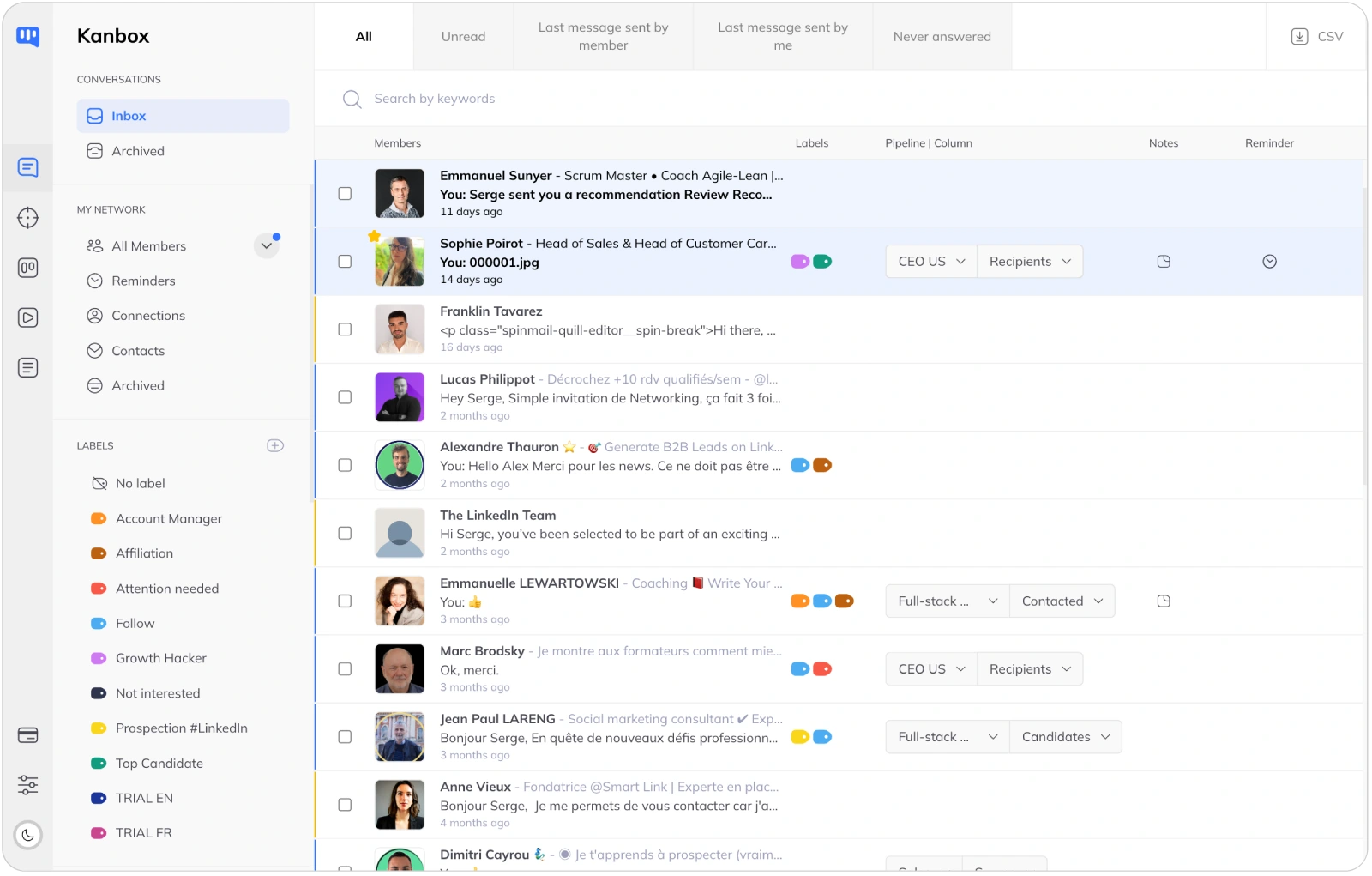
Smart Inbox: Manage Conversations at Scale
- Advanced inbox management.
- All your LinkedIn conversations in one place. Fullscréen chat mode, quick replies, and message templates. HeyReach offers a basic unified inbox but lacks tags, filters, notes, and bulk actions.
- Advanced filters.
- Filter by tags, campaign, connection status, or message content. Find any conversation instantly, even across thousands of contacts. HeyReach only lets you filter by sender account.
- Reminders and follow-ups.
- Set reminders on any conversation. Never forget to follow up with a hot prospect. HeyReach has no reminder system -- leads can easily fall through the cracks without a built-in CRM.
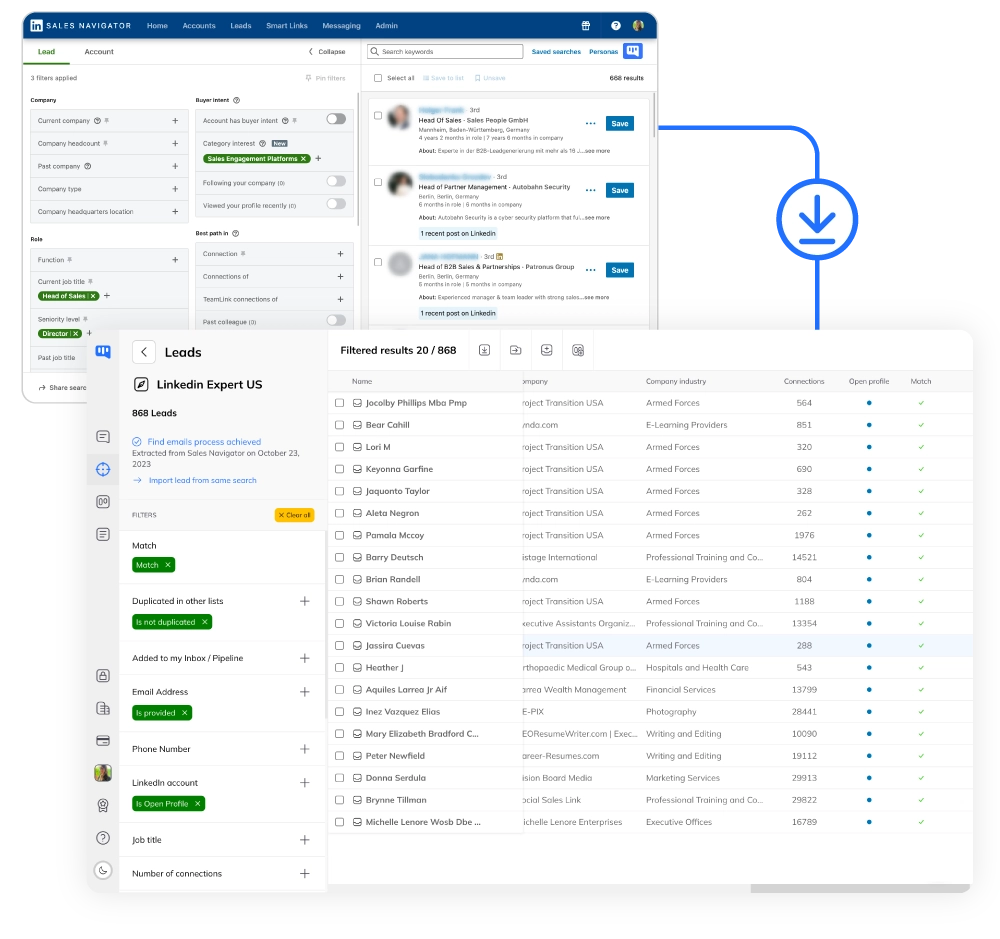
LinkedIn Scraping & Email Finder: All-In-One Data
- Up to 75,000 leads per month.
- Extract up to 75,000 LinkedIn profiles per month from any source: Sales Navigator, events, posts, or URL imports. HeyReach only imports leads within campaign setup -- no standalone scraping tool or volume.
- Auto-deduplication.
- Zero duplicates across all your lists. Kanbox detects and merges profiles automatically, saving hours of manual cleanup. HeyReach offers basic deduplication within campaigns only.
- Email finder included.
- Find professional emails for your scraped profiles. 98% deliverability rate with SMTP verification. No extra cost -- included in all plans. HeyReach has no email finder at any price.
Why Choose Kanbox Over HeyReach?
If LinkedIn is your main prospecting channel, Kanbox gives you more features, better safety, and lower costs -- all in one platform.

"We switched from HeyReach to Kanbox and cut our costs by 80% while gaining a CRM, Smart Inbox, and email finder we never had before. The Chrome extension approach means our LinkedIn accounts stay safe."
Frequently Asked Questions
Is Kanbox cheaper than HeyReach?
Yes, significantly. Kanbox starts at $10/month (yearly billing) with automation, Smart Inbox, Kanban pipelines, and scraping included. HeyReach starts at $79/month per seat with no CRM, no inbox management, and no email finder.
Cost comparison for a team of 3:
- Kanbox Starter: $10/month x 3 = $30/month -- includes CRM, Smart Inbox, scraping, email finder
- HeyReach Growth: $79/month x 3 = $237/month -- no CRM, no inbox, no email finder
Even Kanbox Pro at $50/month per user ($150/month for 3) costs less than HeyReach's entry plan while offering significantly more features, including AI capabilities, webhooks, and API accèss.
Can I use multiple LinkedIn accounts with Kanbox?
Kanbox uses a one account per user approach, which is intentional for safety. HeyReach supports unlimitéd LinkedIn sender accounts, but this multi-account rotation is a pattern LinkedIn actively detects and penalizes.
Why one account is safer:
- Kanbox operates as a Chrome extension mimicking natural human behavior
- Uses your own IP address and browser fingerprint
- 18-month track record of zero LinkedIn bans
- No cloud-based activity that LinkedIn can flag
If you need team outreach, Kanbox's Essential and Pro plans include team collaboration features where multiple users can coordinate campaigns and share pipelines -- safely, with one account per person.
Which tool is safer for my LinkedIn account?
Kanbox is significantly safer. It operates as a Chrome extension that runs directly in your browser, mimicking natural human behavior with randomized delays and respecting LinkedIn's daily limits.
Kanbox safety record:
- Chrome extension architecture -- actions come from your browser
- Your own IP and browser fingerprint -- LinkedIn sees normal activity
- 18 months of zero LinkedIn bans across all users
- Humanized delays and smart throttling
HeyReach risks:
- Cloud-based actions from external servers
- Multi-account rotation that LinkedIn actively monitors
- Cloud server IPs easier to detect than residential
- A single detection event can restrict multiple accounts simultaneously
If your LinkedIn profile is central to your career, Kanbox's Chrome extension model is the safer choice.
Does HeyReach have a CRM?
No. HeyReach does not include any CRM or pipeline management. You need to integrate with external tools like HubSpot, Salesforce, or Pipedrive via Zapier, which adds complexity and cost.
Kanbox includes a full Kanban CRM in every plan:
- Unlimitéd visual Kanban pipelines with drag-and-drop
- Custom pipeline stages matching your sales process
- Lead tracking from first contact to closed deal
- Team collaboration with shared pipelines
- Tags, notes, and filters for lead segmentation
With Kanbox, the moment a prospect replies you can tag the conversation, move them to the next pipeline stage, and add notes -- all without leaving the platform.
Can I switch from HeyReach to Kanbox?
Yes, easily. You can export your lead lists from HeyReach as CSV and import them into Kanbox. Kanbox also lets you scrape up to 75,000 LinkedIn profiles per month, so you can quickly rebuild and enrich your pipeline.
Migration steps:
- Export leads from HeyReach as CSV
- Import CSV into Kanbox lead lists
- Enrich with the built-in email finder
- Organize leads in Kanban pipelines
- Set up new automation séquences
The 15-day trial gives you time to test everything before committing. Most teams are fully migrated within a few days.
Which tool is better for agencies?
It depends on what you prioritize.
HeyReach strengths for agencies:
- Unlimitéd LinkedIn sender accounts per subscription
- Centralized campaign dashboard for managing multiple profiles
- Whitelabel options on Agency ($999/month) and Unlimitéd ($1,999/month) plans
Kanbox strengths for agencies:
- Complete workflow: CRM, Smart Inbox, lead enrichment, and automation in one tool
- Visual Kanban pipelines for client pipeline management
- Chrome extension approach: safer for client LinkedIn accounts
- Dramatically lower cost: Pro at $50/month vs HeyReach Agency at $999/month
- API and webhooks on Pro plan for custom intégrations
For agencies focused on volume through multi-account rotation, HeyReach may suit. For agencies that value pipeline visibility, lead management, and account safety alongside outreach, Kanbox is the better fit.
What are the pricing différences between Kanbox and HeyReach?
Kanbox pricing (all features included):
- Starter: $10/month (yearly) or $20/month (monthly) -- 1 campaign, 300 leads/month, Smart Inbox, pipelines, scraping
- Essential: $30/month (yearly) or $45/month (monthly) -- 3 campaigns, 600 leads/month, team features
- Pro: $50/month (yearly) or $80/month (monthly) -- 5 campaigns, 75K leads/month, AI, webhooks, API
HeyReach pricing:
- Growth: $79/month per seat ($59/seat billed annually) -- unlimitéd campaigns, unified inbox, intégrations
- Agency: $999/month ($749/month annually) -- 50 senders, whitelabel, dedicated onboarding
- Unlimitéd: $1,999/month ($1,499/month annually) -- unlimitéd senders (capped at 500), priority support
What HeyReach does not include at any price: CRM, Kanban pipelines, Smart Inbox with tags/filters, email finder, lead enrichment, AI features.
With Kanbox, you get a complète prospecting stack. With HeyReach, you pay more and still need external tools for CRM, enrichment, and inbox management.
Does Kanbox support email and multichannel outreach like HeyReach?
Kanbox is focused on LinkedIn as the primary channel, which is where most B2B prospecting happens. It does not support email or Twitter outreach natively.
However, Kanbox compensates with:
- Built-in email finder: Find vérifiéd professional emails to use in your own email tool
- CSV export: Clean, enriched data ready for any multichannel tool
- Zapier intégration: Connect to 5,000+ apps including email platforms
- Webhooks and API: Build custom workflows on Pro plan
HeyReach also does not support email outreach natively -- it focuses on LinkedIn only, like Kanbox. The différence is that Kanbox gives you email finder data and CRM tools that HeyReach lacks entirely.
Bottom line: If LinkedIn is your main prospecting channel, Kanbox delivers everything you need. Export enriched data to your email tool for multichannel follow-up.
Verified reviews from Kanbox users

UI, Kanban function. Attachments for emails make the process more efficient and structured.
Capterra
Kanbox is a game-changer. Connected to LinkedIn, we can run campaigns, track responses, and manage candidate engagement seamlessly.
Capterra
Clean interface, and the pipeline feature is unlike anything I've used before.
Capterra
Excellent pipeline management and campaigns. Everything is well-structured and streamlined.
Capterra
Kanbox's Kanban-style interface makes organizing leads incredibly easy. Custom pipelines make tracking outreach seamless.
Capterra
Seamless integration with LinkedIn and Sales Navigator. The intuitive inbox makes managing conversations easy and efficient.
Capterra
The best part? The Kanban board and filters make it easy to label and prioritize my leads effectively.
Capterra
Kanban is an excellent tool for anyone who uses LinkedIn for sales. It streamlines collecting, organizing, and interacting with potential clients.
CapterraReady to boost your LinkedIn prospecting?
15-day free trial - No credit card required
15 days free - No credit card required - Full accèss from day one