

Kanbox vs Octopus CRM: Which LinkedIn automation tool is right for you?
Cloud automation with AI messages vs browser extension. Compare features, pricing, and capabilities to pick the best LinkedIn prospecting tool for your needs.
15-day free trial - No credit card required







Meet the Contenders
Cloud-based LinkedIn automation platform with AI-powered messages, visual Kanban pipelines, smart inbox, and ICP scoring. Runs 24/7 without keeping your browser open.
- Cloud automation 24/7 (no browser needed)
- 7-step automation sequences with AI messages
- Visual Kanban pipelines
- Smart Inbox with fullscreen chat
- ICP scoring filter
- Email finder included
- Dynamic imports with 24h refresh
- Multi-account management
Browser-based LinkedIn automation extension for Chrome. Automates connection requests, messages, profile visits, and endorsements. Requires your browser to stay open while running campaigns.
- Auto-connect, auto-message, auto-visit, auto-endorse
- Personal CRM with campaign stats
- Zapier and HubSpot integration
- Activity control and safety alerts
Feature-by-Feature Comparison
| Feature | Octopus CRM | Kanbox |
|---|---|---|
| Cloud automation 24/7 | ||
| AI-powered messages | ||
| ICP scoring filter | ||
| Dynamic imports (24h refresh) | ||
| Kanban CRM pipeline | Basic stats | |
| Smart Inbox (fullscreen) | ||
| Email finder | ||
| Multi-account management | ||
| Multi-step sequences | Basic sequences | 7 steps |
| Starting price (yearly) | $6.99/mo | $10/mo |
| Sales Navigator support | ||
| LinkedIn Recruiter support | Unlimited plan only |
Deep Dive
Detailed Feature Comparison
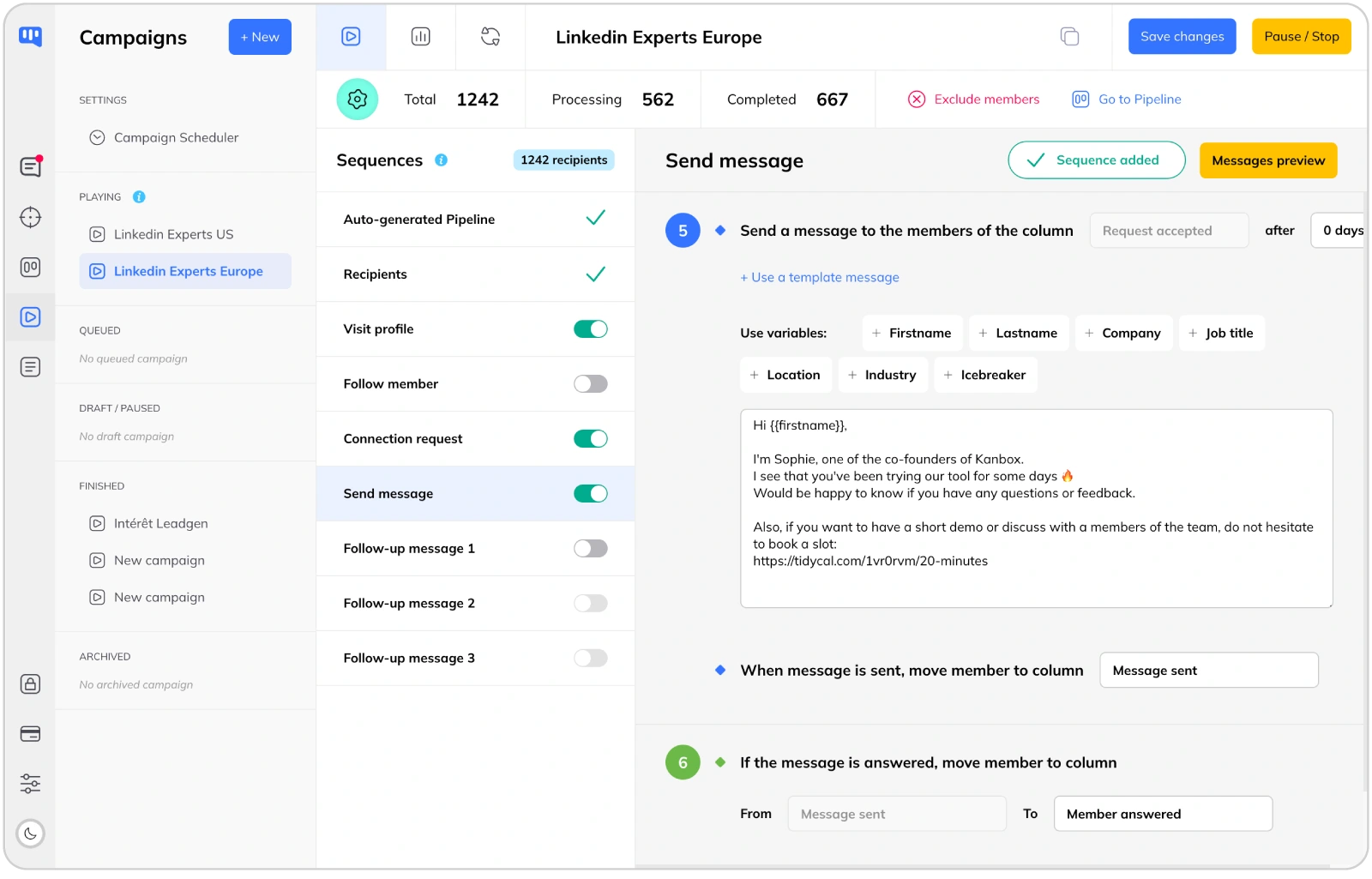
Cloud Automation vs Browser Extension
- Runs 24/7 without your browser.
- Kanbox runs in the cloud, so your campaigns continue even when your computer is off. Octopus CRM is a Chrome extension that stops working the moment you close your browser or shut down your machine.
- Better account safety.
- Cloud-based tools like Kanbox use dedicated IPs and humanized delays, reducing the risk of LinkedIn restrictions. Browser extensions operate directly in your LinkedIn session, which can be more easily detected.
- Smart scheduling across time zones.
- Schedule campaigns during business hours in your prospects' time zones. Kanbox handles this automatically in the cloud. With Octopus CRM, you need your computer running at the right time.
AI Messages & Smart Prospecting
- AI-generated personalized messages.
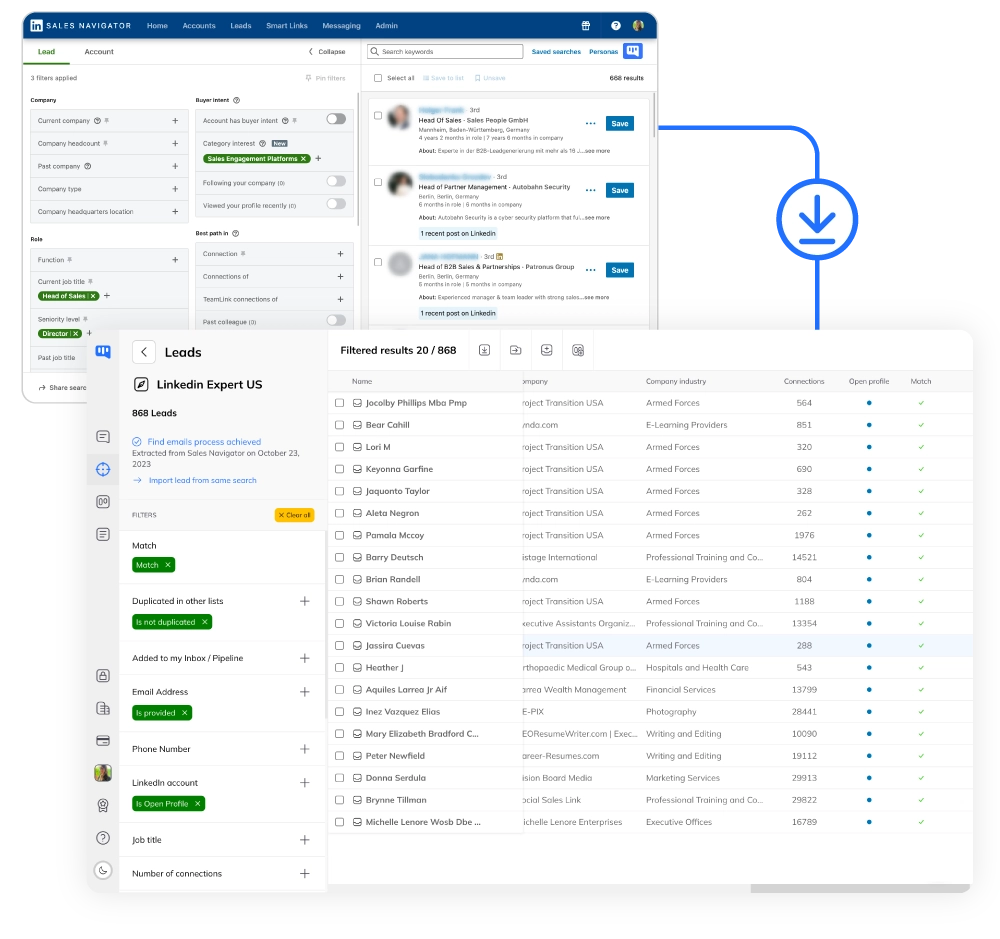
- Kanbox uses AI to craft tailored messages based on each prospect's profile. Octopus CRM relies on static templates with basic variables like first name and company. AI-powered messages get significantly higher response rates.
- ICP scoring to prioritize leads.
- Kanbox scores each lead based on your Ideal Customer Profile criteria. Focus your efforts on the prospects most likely to convert. Octopus CRM has no ICP filtering: all leads are treated equally regardless of fit.
- Dynamic imports with 24h refresh.
- Import leads from Sales Navigator searches and Kanbox refreshes your lists every 24 hours automatically. New matching profiles are added, outdated ones updated. Octopus CRM requires manual imports each time.
Lead Management: Visual Kanban Pipelines
- Visual pipeline management.
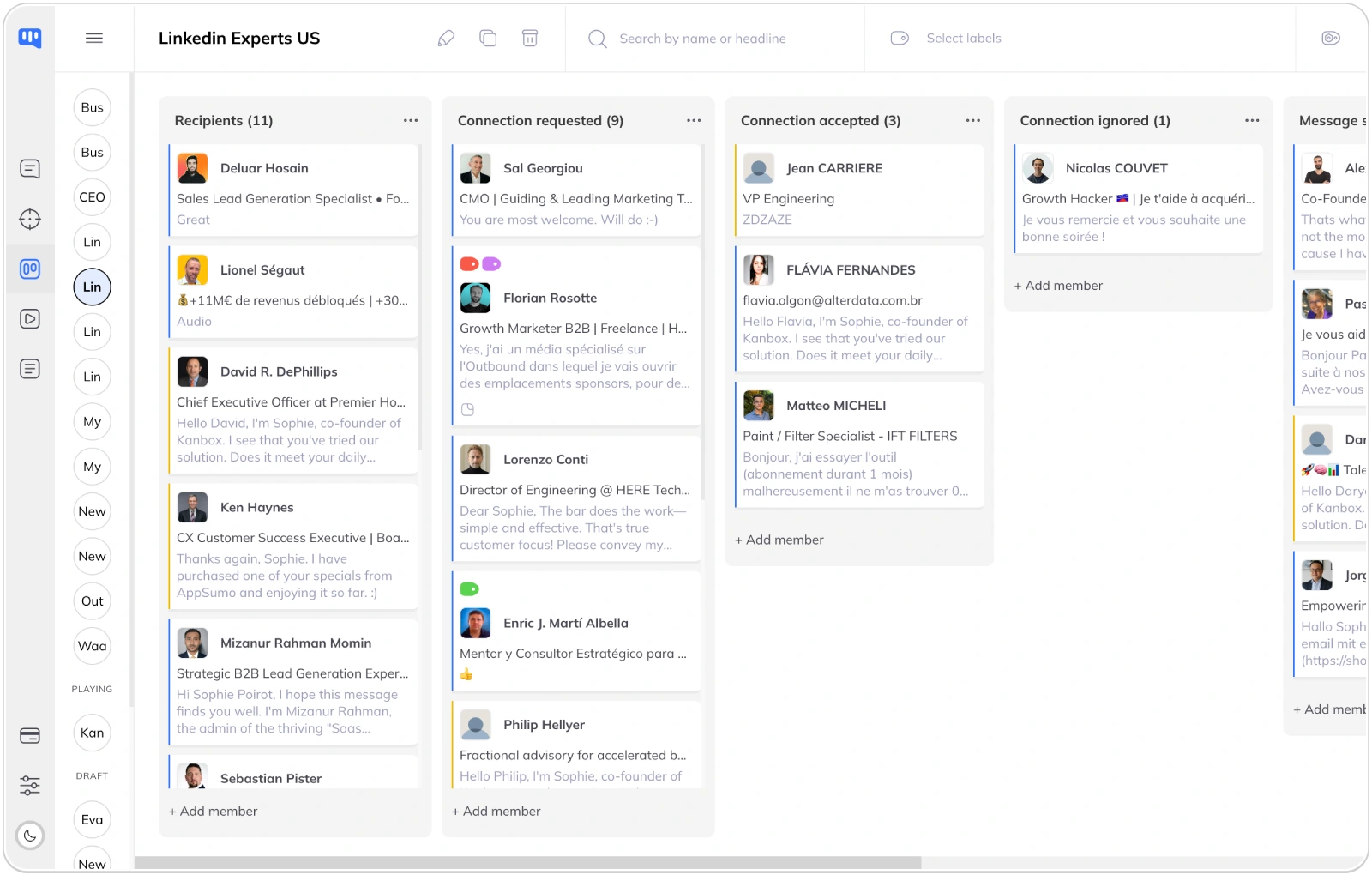
- Kanbox offers unlimited Kanban pipelines to track leads through your sales funnel. Drag and drop prospects between stages. Octopus CRM provides basic campaign stats but no visual pipeline to manage your sales process.
- Tags and advanced segmentation.
- Organize leads with custom tags, notes, and filters. Segment your prospects by industry, company size, engagement level, or any custom criteria. Octopus CRM offers basic list management without these segmentation capabilities.
- Team collaboration.
- Share pipelines across your team. Assign leads to team members, track progress, and ensure no prospect falls through the cracks. Octopus CRM is a single-user tool with no team features.
Smart Inbox: Never Miss a Conversation
- Unified fullscreen inbox.
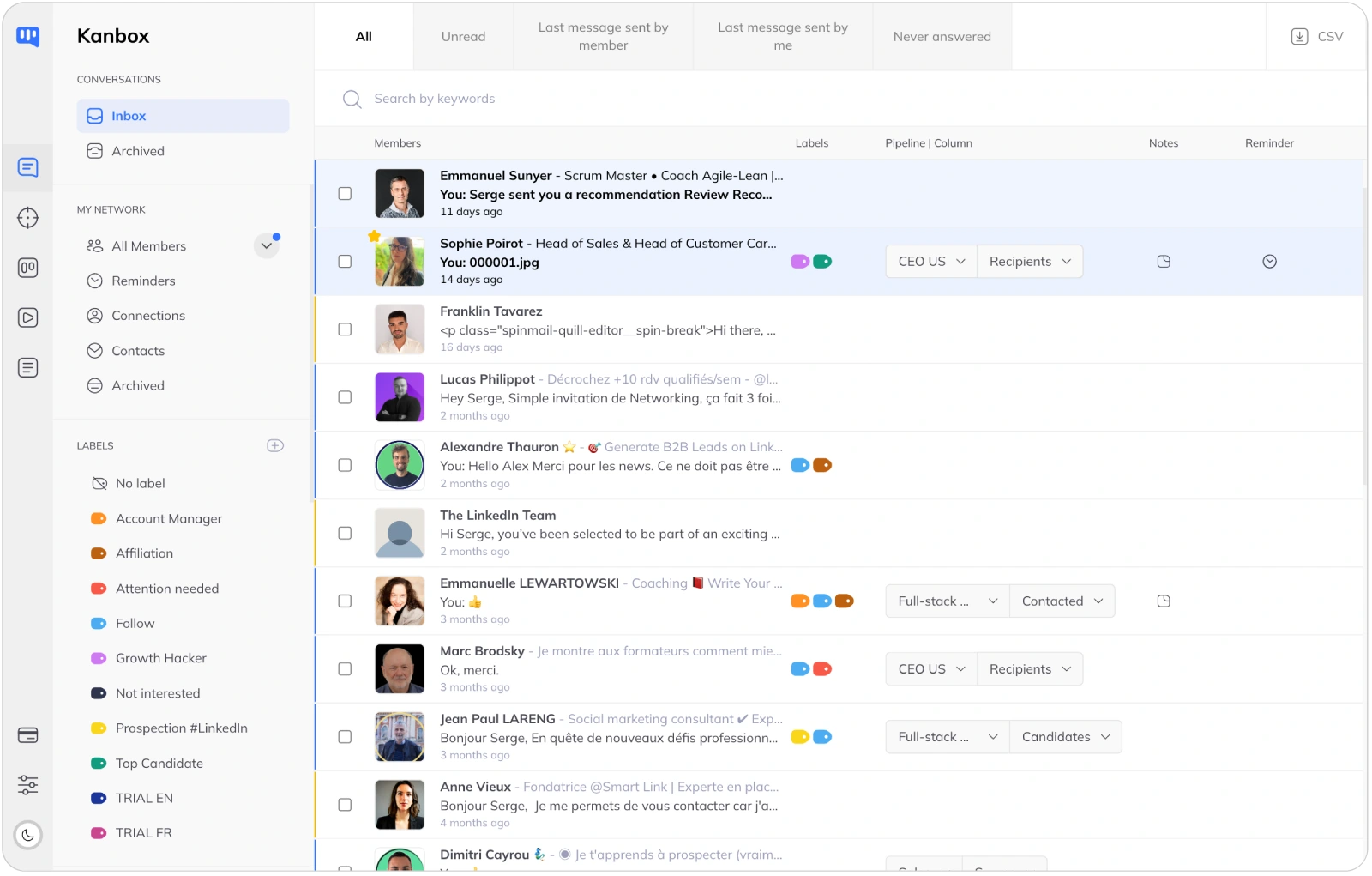
- All your LinkedIn conversations in one fullscreen interface. Quick replies, message templates, and powerful search. Octopus CRM has no inbox management: you still need to use LinkedIn's native messaging.
- Reminders and follow-ups.
- Set reminders on any conversation. Never forget to follow up with a hot prospect. Kanbox keeps you organized and on top of your outreach, all in one place.
- Email finder included.
- Find professional emails for your contacts. 98% deliverability rate with SMTP verification. No extra cost, included in all plans. Octopus CRM does not include email finding.
Why Choose Kanbox Over Octopus CRM?
If you need more than a basic browser extension for LinkedIn prospecting, Kanbox delivers cloud power, AI, and a real CRM pipeline.

"We switched from Octopus CRM to Kanbox and the difference is night and day. Cloud automation means our campaigns run while we sleep, and the AI messages get 3x more replies than our old templates."
Frequently Asked Questions
Is Kanbox better than Octopus CRM?
It depends on your needs, but for most LinkedIn prospecting use cases, Kanbox offers significantly more value.
Kanbox advantages over Octopus CRM:
- Cloud automation 24/7: Kanbox runs in the cloud, so campaigns continue even with your computer off. Octopus CRM is a browser extension that stops when you close Chrome
- AI-powered messages: Generate personalized outreach with AI. Octopus CRM only supports static templates
- Visual Kanban pipelines: Track leads through your sales funnel visually. Octopus CRM has basic stats only
- Smart Inbox: Manage all conversations in a fullscreen interface. Octopus CRM has no inbox management
- ICP scoring: Prioritize high-value leads automatically. Not available in Octopus CRM
- Email finder: Find professional emails, included in all plans. Not available in Octopus CRM
- Multi-account: Manage multiple LinkedIn accounts. Octopus CRM supports one account per license
Octopus CRM advantages:
- Lower starting price ($6.99/month yearly vs $10/month yearly for Kanbox)
- Simple setup for basic LinkedIn tasks
- Auto-endorse feature
Bottom line: Octopus CRM may suit users who just need basic LinkedIn actions at the lowest price. For serious prospecting with AI, cloud automation, pipeline management, and team features, Kanbox is the stronger choice.
How much does Octopus CRM cost?
Octopus CRM pricing (per user):
- Starter: $9.99/month (monthly) or $6.99/month (yearly)
- Pro: $14.99/month (monthly) or $9.99/month (yearly)
- Advanced: $21.99/month (monthly) or $14.99/month (yearly)
- Unlimited: $39.99/month (monthly) or $24.99/month (yearly)
Octopus CRM offers a 7-day trial with no credit card required.
Kanbox pricing comparison:
- Starter: $10/month (yearly) or $20/month (monthly)
- Essential: $30/month (yearly) or $45/month (monthly)
- Pro: $50/month (yearly) or $80/month (monthly)
Kanbox offers a 15-day trial with no credit card required.
While Octopus CRM has a lower entry price, Kanbox includes cloud automation, AI messages, Kanban pipelines, Smart Inbox, ICP scoring, and email finder. The Octopus CRM Unlimited plan at $24.99/month (yearly) is closer in price to Kanbox Essential at $30/month (yearly), but Kanbox provides far more features at that tier.
Does Octopus CRM have AI messaging?
No, Octopus CRM does not offer AI messaging.
Octopus CRM uses static message templates with basic personalization variables (first name, company name, job title). You write the template once and it gets sent to everyone with only those variables swapped in.
Kanbox AI messaging works differently:
- AI analyzes each prospect's profile (experience, skills, interests, recent activity)
- Generates a unique, contextually relevant message for each person
- Creates natural conversation starters that feel personal, not templated
- Significantly higher response rates compared to static templates
This is one of the biggest differentiators between the two tools. In a world where LinkedIn users receive dozens of automated messages daily, AI personalization helps your outreach stand out and get replies.
Is Octopus CRM cloud-based?
No, Octopus CRM is not cloud-based. It is a Chrome browser extension that runs directly in your browser.
What this means in practice:
- Your computer must be on and Chrome must be open for campaigns to run
- If you close Chrome, shut down your computer, or lose internet, campaigns stop
- You cannot schedule campaigns to run while you sleep or travel
- Browser extensions interact directly with your LinkedIn session, which can increase detection risk
Kanbox is fully cloud-based:
- Campaigns run 24/7 from Kanbox servers, no browser needed
- Your computer can be off and campaigns continue
- Dedicated IPs reduce detection risk
- Smart scheduling across time zones
- Access your dashboard from any device
Cloud-based automation is the modern standard for LinkedIn prospecting. It offers more reliability, safety, and flexibility than browser-based tools.
Can I migrate from Octopus CRM to Kanbox?
Yes, migrating from Octopus CRM to Kanbox is straightforward.
Migration steps:
- 1. Export your data: Export your contacts and campaign data from Octopus CRM as CSV files
- 2. Import into Kanbox: Use Kanbox's CSV import to bring in your contacts with all their data
- 3. Rebuild sequences: Create your automation sequences in Kanbox (takes minutes with templates)
- 4. Set up pipelines: Organize your imported leads into visual Kanban pipelines
What you gain after migration:
- Cloud automation that runs without your browser
- AI-powered messages instead of static templates
- Visual pipeline management for your sales process
- Smart Inbox to manage all conversations
- ICP scoring to prioritize the best leads
- Dynamic imports that refresh automatically
Most users complete the migration in under 30 minutes and see improved results within the first week.
Does Kanbox work with Sales Navigator?
Yes, Kanbox has deep Sales Navigator integration across all plans.
What you can do with Sales Navigator + Kanbox:
- Scrape leads: Extract profiles from any Sales Navigator search, list, or saved search
- Dynamic imports: Connect a Sales Navigator search and Kanbox refreshes it every 24 hours, automatically adding new matching profiles
- ICP filter: Score imported leads based on your Ideal Customer Profile criteria
- Automate outreach: Run 7-step sequences with AI messages on your Sales Navigator leads
- Track in pipelines: Move Sales Navigator leads through your Kanban pipeline as deals progress
Octopus CRM also works with Sales Navigator but lacks dynamic imports, ICP scoring, and AI messaging on those leads.
What is ICP scoring?
ICP scoring (Ideal Customer Profile scoring) is a feature that automatically rates each lead based on how well they match your target customer criteria.
How it works in Kanbox:
- Define your ideal customer criteria (job title, industry, company size, location, seniority, etc.)
- Kanbox scores each lead from 0 to 100 based on how closely they match
- Filter and sort leads by score to focus on the highest-value prospects
- Run targeted campaigns only to leads that meet your threshold
Why it matters:
- Stop wasting time on prospects who will never convert
- Focus your automation credits on high-potential leads
- Improve conversion rates by contacting the right people first
- Reduce LinkedIn activity (fewer actions, better safety)
Octopus CRM does not offer ICP scoring. All imported leads are treated equally, regardless of their fit with your target profile.
Does Kanbox offer a Kanban pipeline?
Yes, Kanban pipelines are a core feature of Kanbox.
Kanbox Kanban pipeline features:
- Unlimited pipelines: Create as many pipelines as you need for different products, markets, or campaigns
- Custom stages: Define your own pipeline stages (e.g., New Lead, Contacted, Interested, Meeting Booked, Proposal Sent, Won/Lost)
- Drag-and-drop: Move leads between stages with a simple drag gesture
- Pipeline analytics: See conversion rates between stages and identify bottlenecks
- Team sharing: Share pipelines with team members for collaborative selling
- Automation triggers: Automatically move leads between stages based on their responses
Octopus CRM provides campaign statistics (connection rate, reply rate, etc.) but does not offer a Kanban pipeline for managing your sales process visually.
For teams that rely on visual deal tracking and structured sales processes, Kanbox's Kanban pipelines are a significant advantage.
Which tool is better for agencies?
For agencies managing multiple client accounts, Kanbox is the clear winner.
Kanbox agency advantages:
- Multi-account management: Manage all client LinkedIn accounts from a single dashboard
- Separate pipelines: Create dedicated Kanban pipelines per client
- Cloud automation: Run all client campaigns 24/7 without managing multiple browsers
- AI messages: Generate unique, personalized outreach for each client's targets
- Dynamic imports: Keep client lead lists fresh with 24h auto-refresh
- Team access: Give team members access to specific client accounts
Octopus CRM limitations for agencies:
- One account per license: you need separate browser profiles for each client
- Browser must be open for each account's campaigns to run
- No multi-account dashboard
- Basic reporting makes client presentations harder
Agencies using Octopus CRM typically face a workflow nightmare managing multiple browser windows and profiles. Kanbox centralizes everything in one cloud-based platform.
How long is the Kanbox trial?
Kanbox offers a 15-day trial with no credit card required. You get full access to all features from day one.
What is included in the Kanbox trial:
- Cloud automation with all sequence steps
- AI-powered message generation
- Visual Kanban pipelines
- Smart Inbox with fullscreen chat
- ICP scoring filter
- Email finder
- LinkedIn and Sales Navigator scraping
- Dynamic imports
Comparison with Octopus CRM trial:
- Octopus CRM: 7-day trial, no credit card required
- Kanbox: 15-day trial, no credit card required
Kanbox gives you twice the time to evaluate the platform and see real results from your campaigns before committing.
Verified reviews from Kanbox users

UI, Kanban function. Attachments for emails make the process more efficient and structured.
Capterra
Kanbox is a game-changer. Connected to LinkedIn, we can run campaigns, track responses, and manage candidate engagement seamlessly.
Capterra
Clean interface, and the pipeline feature is unlike anything I've used before.
Capterra
Excellent pipeline management and campaigns. Everything is well-structured and streamlined.
Capterra
Kanbox's Kanban-style interface makes organizing leads incredibly easy. Custom pipelines make tracking outreach seamless.
Capterra
Seamless integration with LinkedIn and Sales Navigator. The intuitive inbox makes managing conversations easy and efficient.
Capterra
The best part? The Kanban board and filters make it easy to label and prioritize my leads effectively.
Capterra
Kanban is an excellent tool for anyone who uses LinkedIn for sales. It streamlines collecting, organizing, and interacting with potential clients.
CapterraReady to upgrade from Octopus CRM?
15-day trial · No credit card required
15 days · No credit card required · Full access from day one