Your LinkedIn AI Agent: From Prospect Import to Booked Meeting
Kanbox AI agent handles your entire LinkedIn prospecting chain autonomously. Dynamic imports feed fresh leads every 24h, ICP scoring filters the best matches, AI crafts personalized messages, and the response agent continues conversations until a meeting is booked. No manual work needed.
15-day free trial - No credit card required










Why Kanbox AI Agent Is the Future of LinkedIn Prospecting
A fully autonomous AI agent that imports leads, qualifies them, writes personalized messages, handles responses, and books meetings for you

"The Kanbox AI agent changed everything. We set our ICP, connected our sources, and within a week the AI was booking meetings for us. Completely autonomous prospecting."
How it works
How the LinkedIn AI Agent Works in 4 Steps
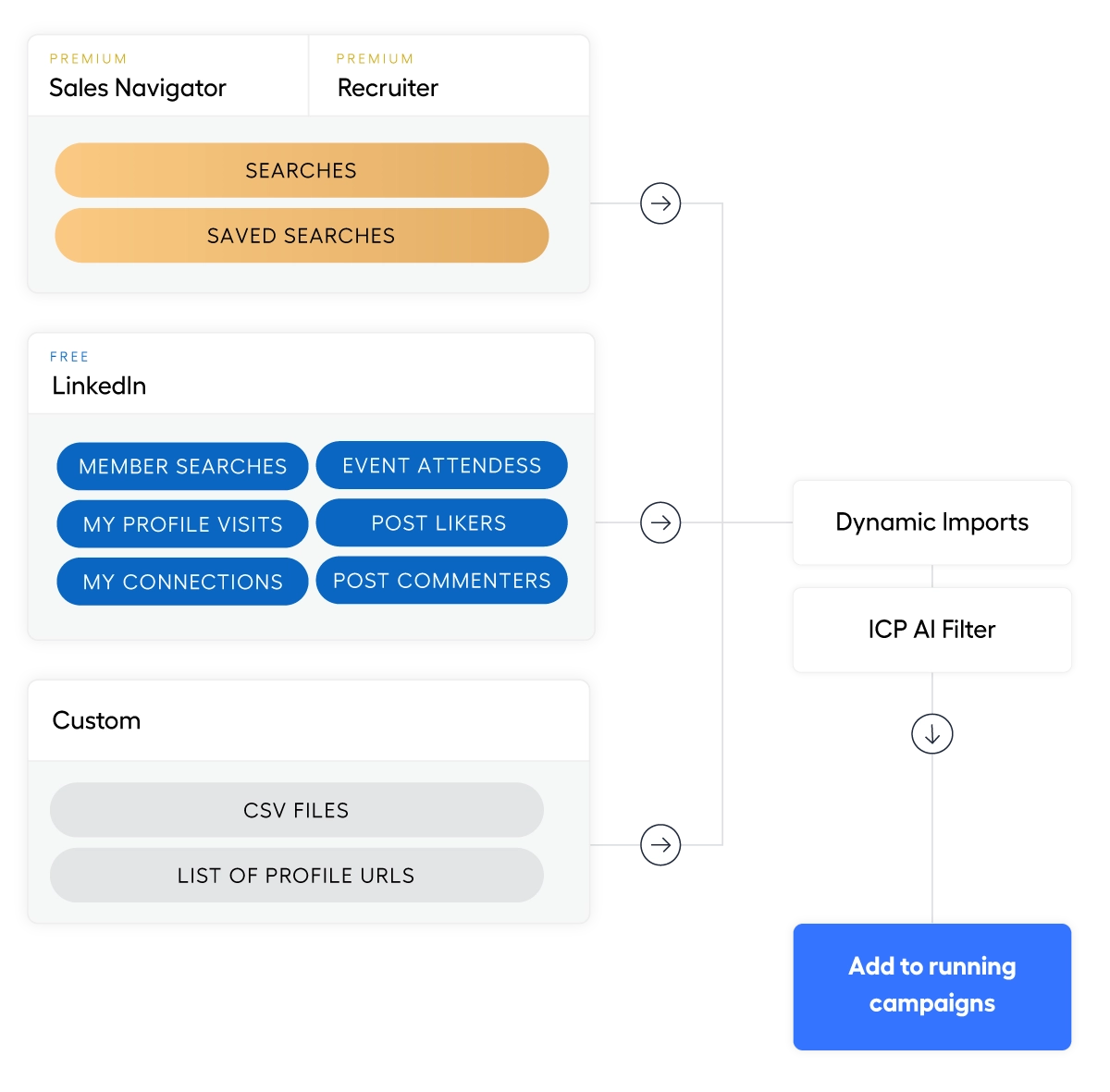
Step 1: Connect Your Lead Sources
- Sales Navigator searches.
- Connect saved searches and the AI agent auto-imports new matching leads every 24 hours.
- Profile visitors.
- People who visit your LinkedIn profile are automatically captured and added to your campaign.
- Post commenters.
- Monitor any LinkedIn post for comments. New commenters are auto-imported into your pipeline.
Step 2: Set Your ICP Criteria
- Define your ideal customer.
- Set target industries, job functions, locations, company sizes, and seniority levels. The AI agent knows exactly who to contact.
- Exclude keywords.
- Block unwanted industries, companies, or job titles. Zero wasted outreach on irrelevant contacts.
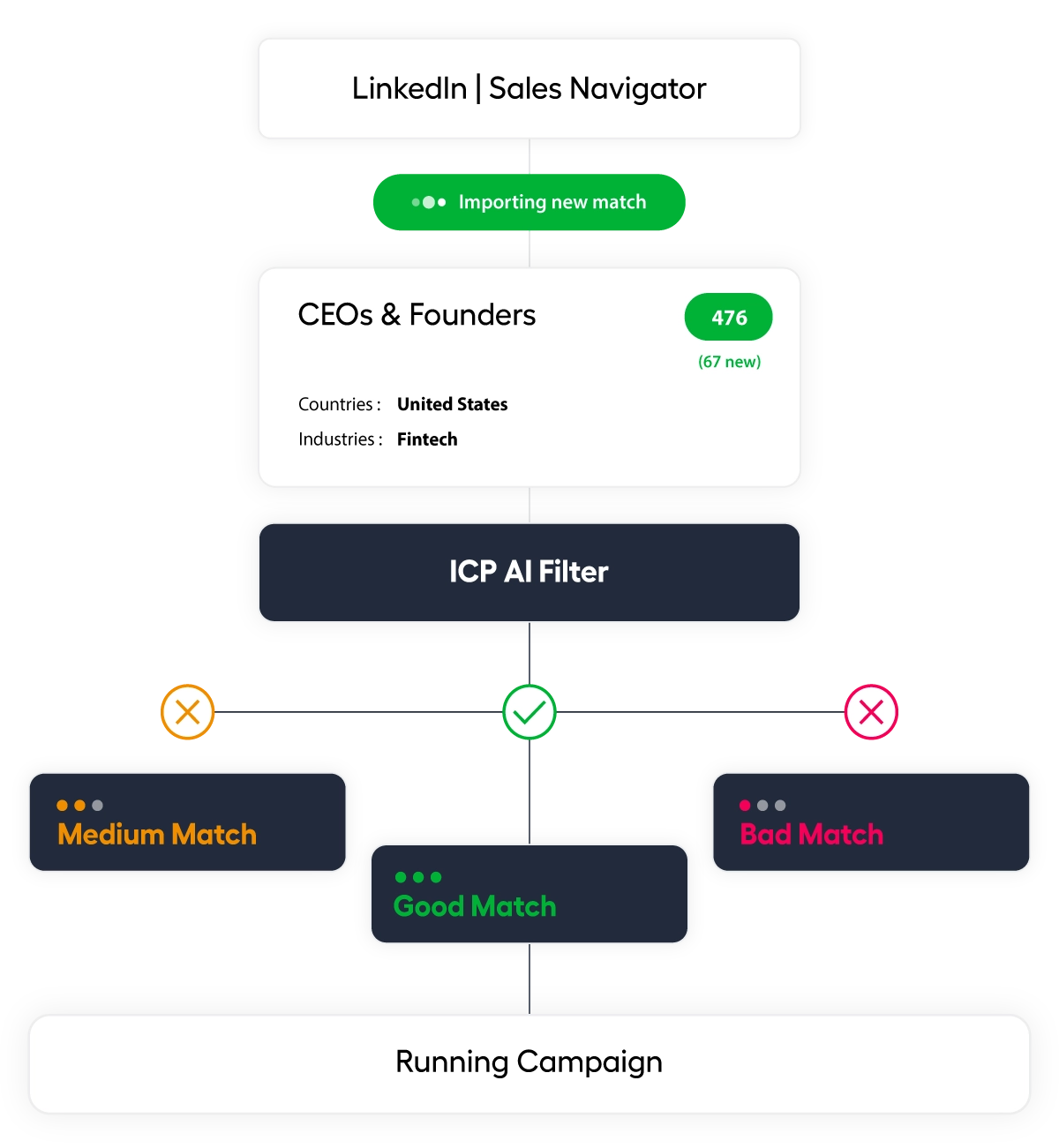
- AI scoring preview.
- Test your ICP criteria on a sample list. Review Good/Medium/Bad scores before launching the agent.
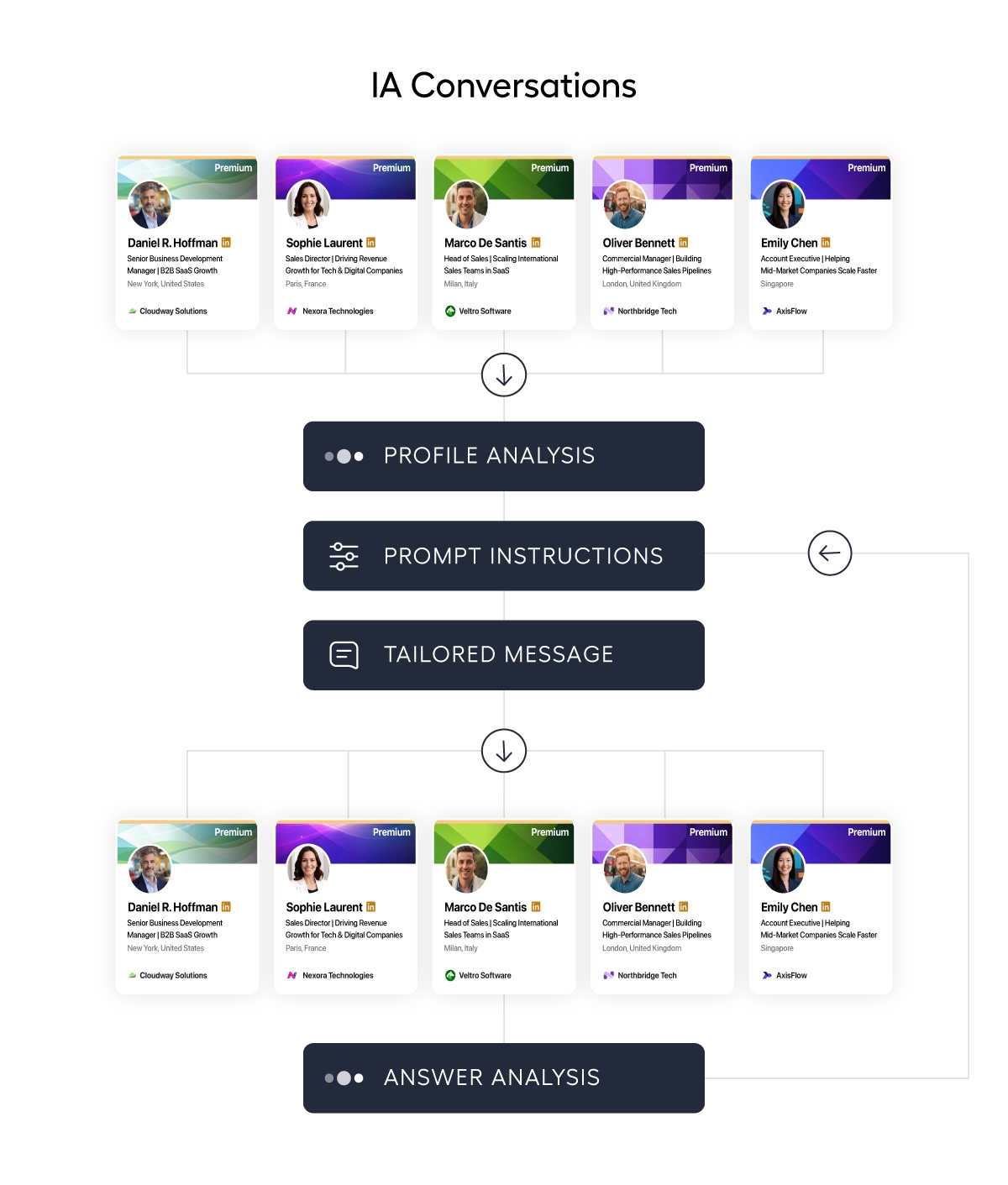
Step 3: Let the AI Agent Work
- AI-personalized messages.
- The agent writes unique messages for each lead using profile data, company info, and your knowledge base. No two messages are the same.
- Automated follow-ups.
- Up to 7 follow-up steps with smart delays. The agent handles the entire sequence automatically.
- AI auto-responses.
- When leads reply, the AI agent continues the conversation. It handles objections and steers toward booking a meeting.
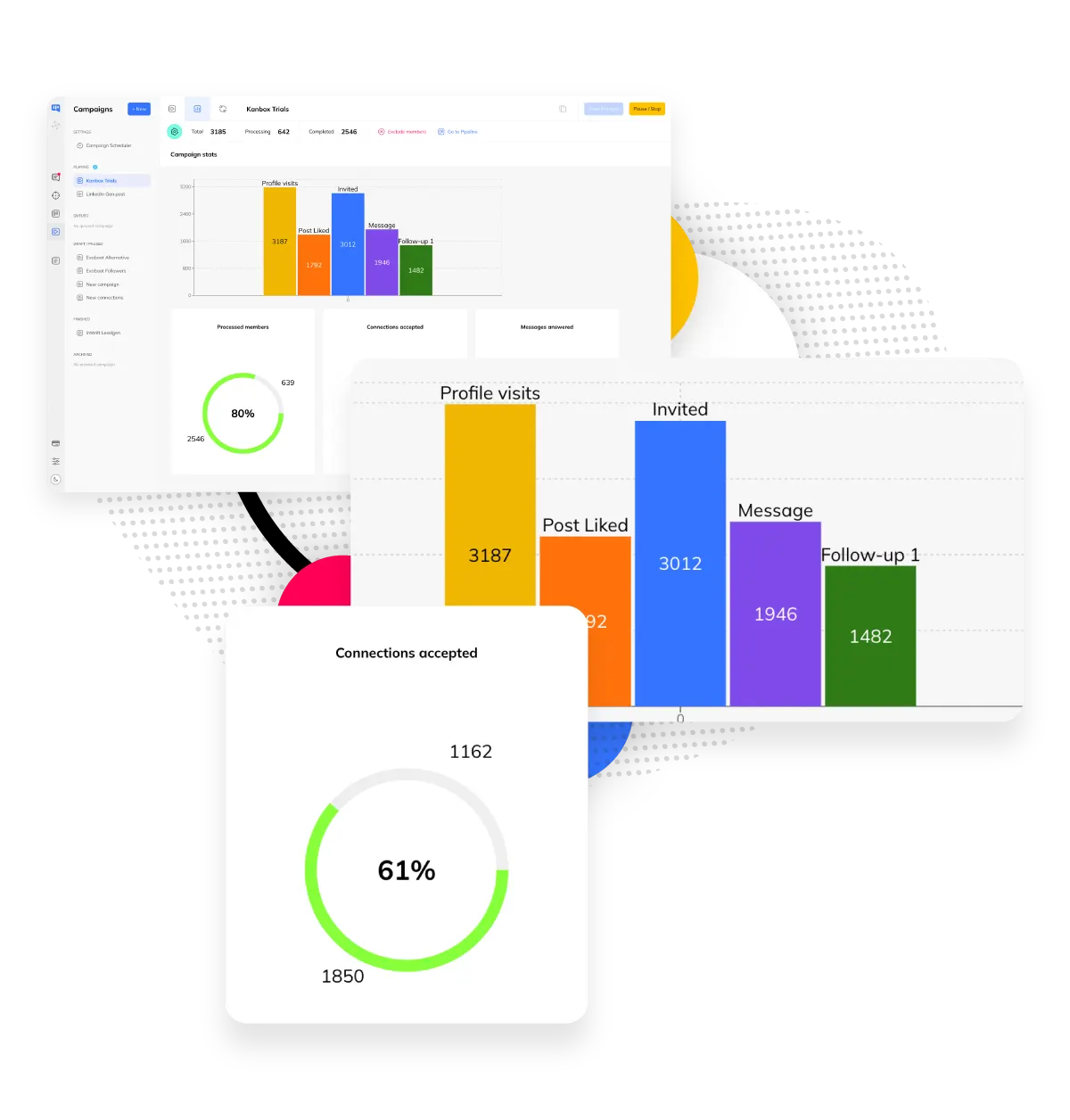
Step 4: Review Meetings and Close Deals
- Auto-managed pipeline.
- The AI agent moves leads through your Kanban pipeline stages automatically. From first contact to meeting booked.
- Campaign analytics.
- Track response rates, conversion rates, and meetings booked. See exactly how your AI agent performs.
- Meeting booking.
- The AI agent works toward scheduling calls and meetings. You focus on closing deals, not chasing leads.
Core Features
AI Agent Capabilities That Drive Results
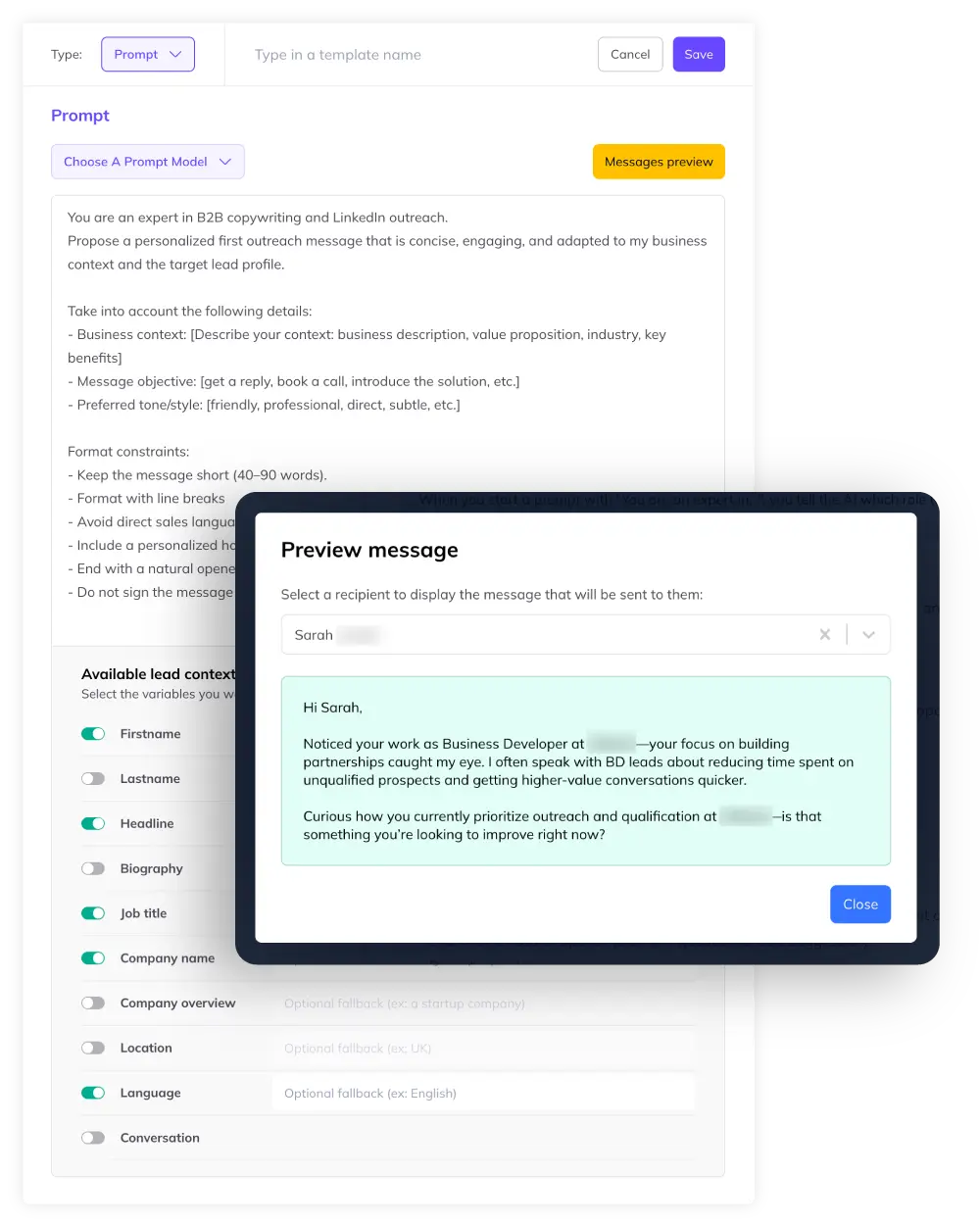
AI Message Generation
- Per-lead AI prompts.
- Write a prompt and the AI agent crafts a unique message for each lead using their profile data: name, headline, company, job history.
- PDF knowledge base.
- Upload PDF or text files as context. The AI agent references your product details, case studies, or pricing to write relevant messages.
- Context variables.
- Combine AI generation with variables like {{firstname}}, {{company}}, {{job_title}} for hybrid personalization at scale.
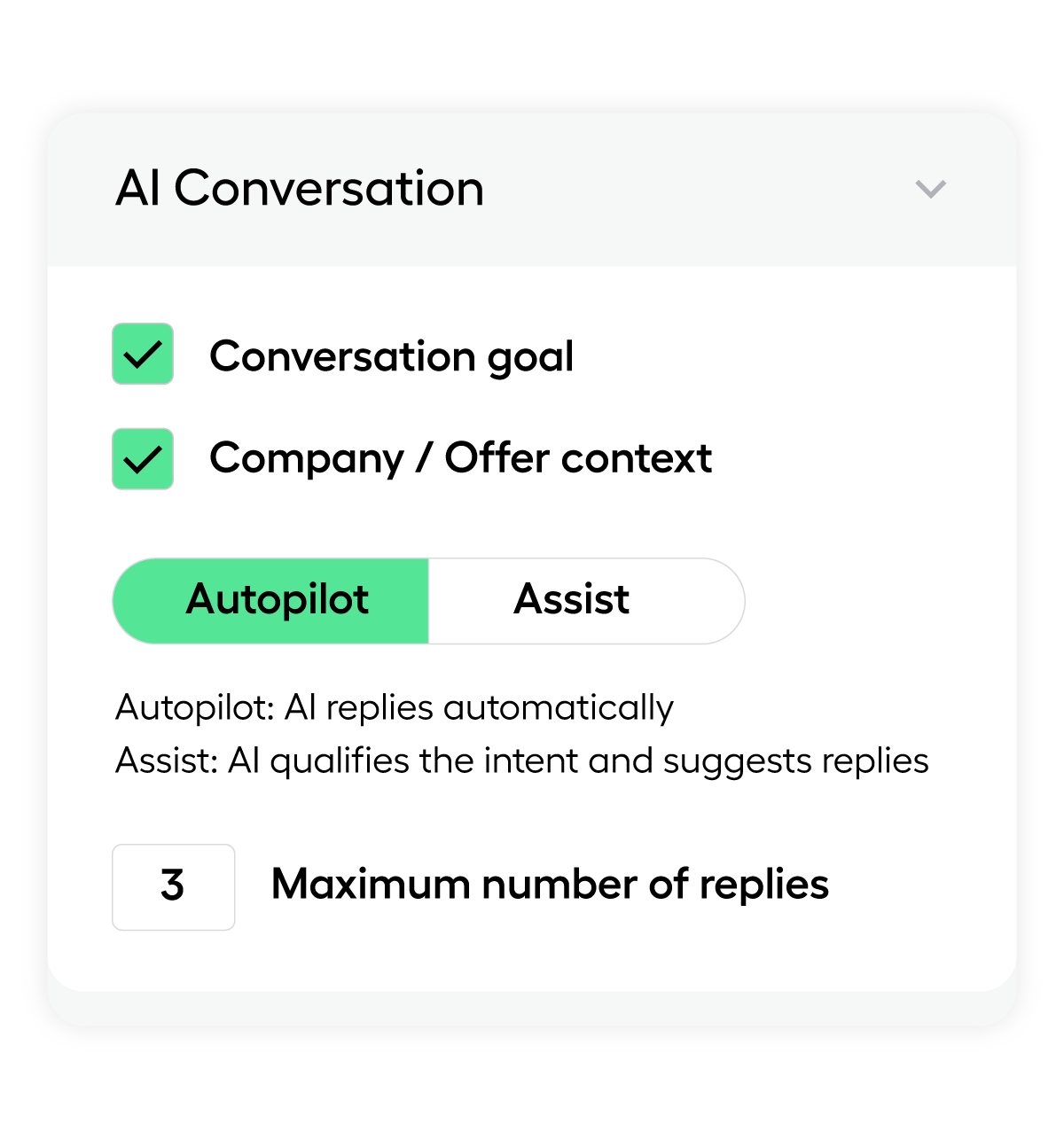
AI Response Agent
- Autonomous conversation handling.
- When a lead replies, the AI agent reads the message, classifies intent (interested, not interested, needs info), and responds accordingly.
- Pipeline automation.
- The AI agent moves leads through pipeline stages based on their responses. Interested leads advance, others are parked.
- Meeting scheduling.
- The AI agent can share your calendar link and work toward booking a meeting. Full autopilot from first message to booked call.
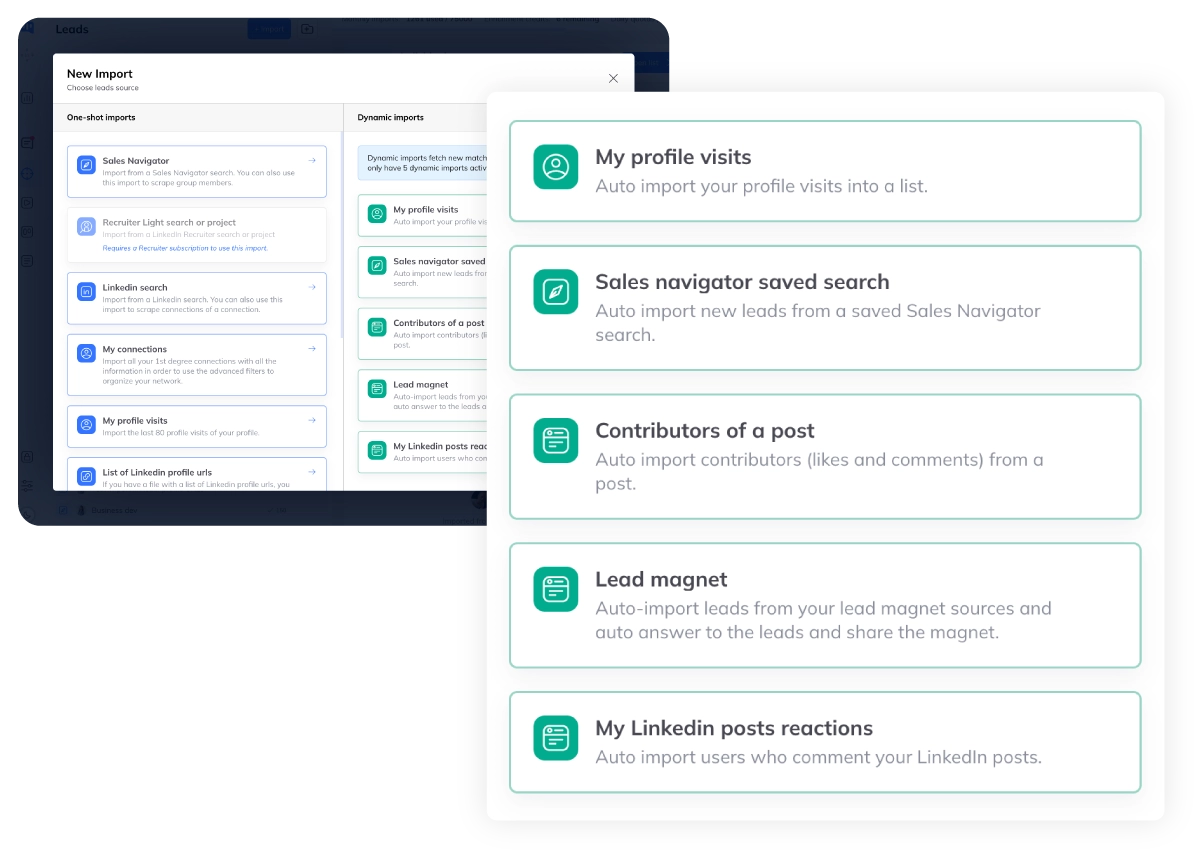
Dynamic Imports
- 3 sources, 24h auto-refresh.
- Sales Navigator saved searches, profile visitors, and post commenters are imported automatically every 24 hours.
- Never run out of leads.
- Dynamic imports keep your campaigns fed with fresh prospects. No manual list building needed.
- Duplicate prevention.
- The AI agent deduplicates leads across campaigns. Each prospect only enters your pipeline once.
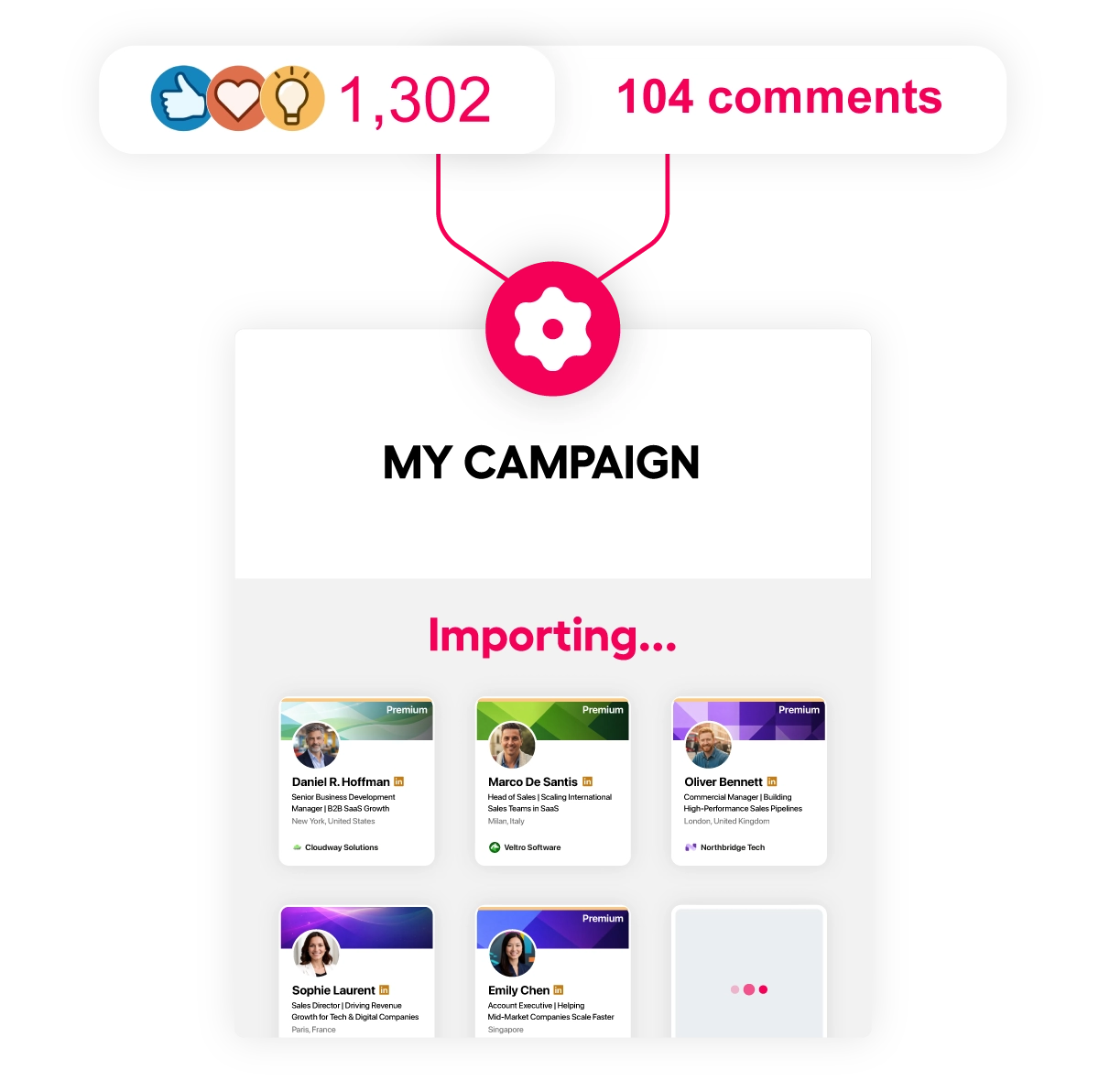
Lead Magnet Mode
- Keyword detection on posts.
- Monitor any LinkedIn post for comments containing a specific keyword (e.g., "guide", "interested"). The AI agent captures these leads.
- Auto-comment and auto-DM.
- The agent auto-replies publicly to boost engagement, then sends a personalized direct message with your lead magnet link.
- Pipeline entry.
- Every captured lead enters your Kanban pipeline for tracking and follow-up. No lead falls through the cracks.
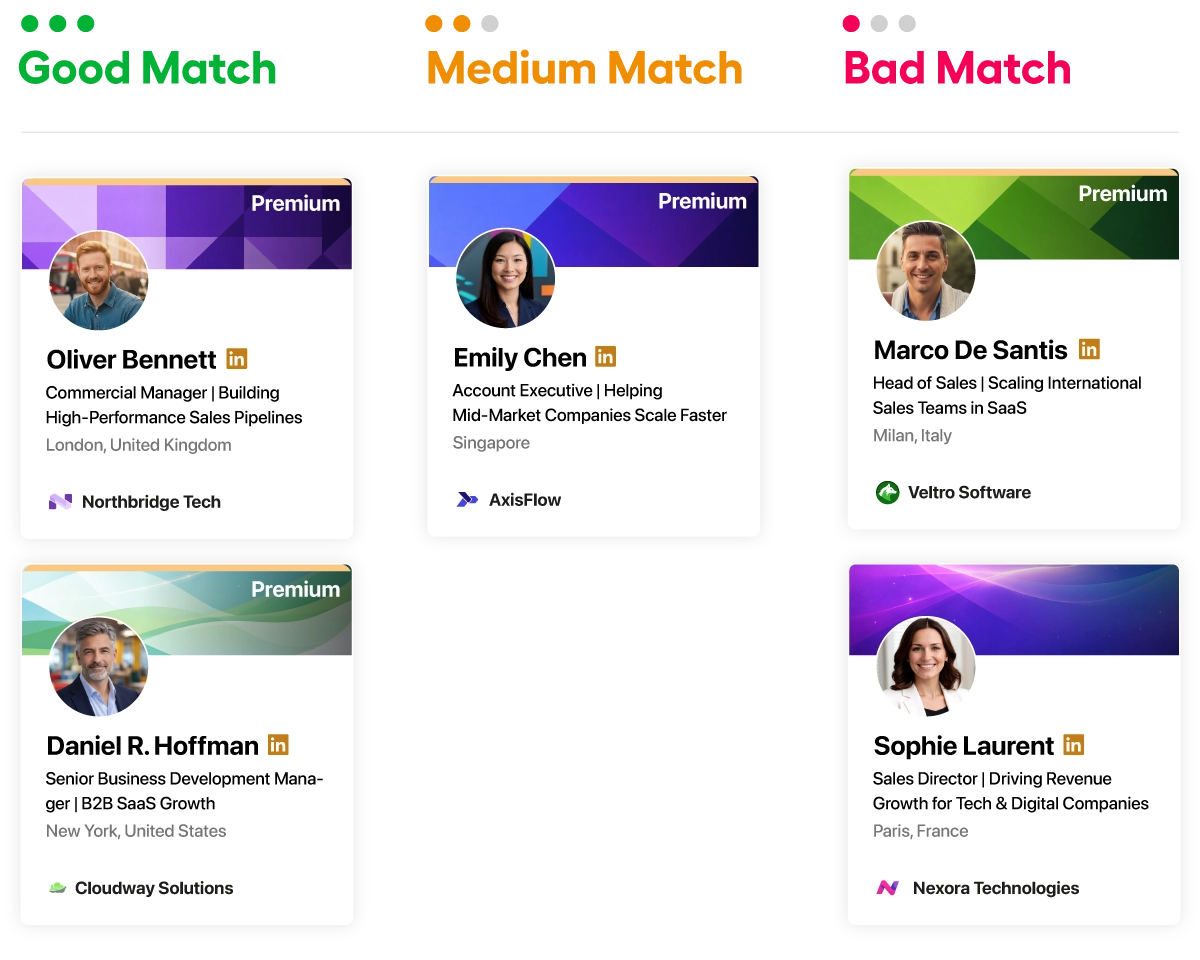
ICP Scoring
- AI-powered lead scoring.
- Score each lead 1-10 based on your Ideal Customer Profile before they enter your outreach sequence.
- Good / Medium / Bad ratings.
- AI categorizes leads with a commentary explaining the match level. Only qualified leads get messaged.
- Auto-filter unqualified leads.
- Set a minimum score threshold. The AI agent skips leads that do not match your ICP. Zero wasted outreach.
MCP Integration (Coming Soon)
- Connect to Claude, GPT, and more.
- MCP (Model Context Protocol) integration will let you connect Kanbox to external AI models for advanced orchestration and custom workflows.
- Custom AI pipelines.
- Build multi-step AI workflows that combine Kanbox data with your own AI agents. Full control over the prospecting logic.
- Extensible automation.
- Use MCP to trigger Kanbox actions from any compatible AI platform. The future of AI-driven sales prospecting.
Ready to Let AI Handle Your LinkedIn Prospecting?
Set up your AI agent in minutes. From lead import to booked meeting, everything runs on autopilot. No credit card required.
Start FreeKanbox AI Agent vs Manual Prospecting vs Basic Automation
| Feature | Manual / Basic Tools | Kanbox |
|---|---|---|
| ICP scoring before outreach | AI-scored 1-10 | |
| AI-personalized messages | Manual or templates | Unique per lead |
| AI auto-response agent | ||
| Dynamic imports (3 sources, 24h) | ||
| Lead magnet automation | ||
| Cloud 24/7 (no browser needed) | Browser required | |
| Auto-created Kanban pipeline | Per campaign | |
| Starting price | 50-100 EUR/month | 15 EUR/month (yearly) |
What Users Say About the Kanbox AI Agent
Verified reviews from Kanbox users

UI, Kanban function. Attachments for emails make the process more efficient and structured.
Capterra
Kanbox is a game-changer. Connected to LinkedIn, we can run campaigns, track responses, and manage candidate engagement seamlessly.
Capterra
Clean interface, and the pipeline feature is unlike anything I've used before.
Capterra
Excellent pipeline management and campaigns. Everything is well-structured and streamlined.
Capterra
Kanbox's Kanban-style interface makes organizing leads incredibly easy. Custom pipelines make tracking outreach seamless.
Capterra
Seamless integration with LinkedIn and Sales Navigator. The intuitive inbox makes managing conversations easy and efficient.
Capterra
The best part? The Kanban board and filters make it easy to label and prioritize my leads effectively.
Capterra
Kanban is an excellent tool for anyone who uses LinkedIn for sales. It streamlines collecting, organizing, and interacting with potential clients.
CapterraPricing
Simple, Transparent Pricing
All plans include LinkedIn automation. Upgrade for AI agent capabilities, ICP scoring, and auto-responses.
Starter
- Simultaneous Campaign: 1
- Lead Import: 300 /month
- Cloud-based
- Email Finder
- Smart Linkedin Inbox with Tags and Filters
Essential
- Simultaneous Campaign: 3
- Lead Import: 600 /month
- Cloud-based
- Email Finder
- Smart Linkedin Inbox with Tags and Filters
- Team / Multi-account
- Unlimited account managers
Pro
- Simultaneous Campaign: 5
- Lead Import: 75K /month
- Cloud-based
- Email Finder
- Smart Linkedin Inbox with Tags and Filters
- Unlimited AI Prompts and Prompt Templates
- Team / Multi-account
- Unlimited account managers
- Webhooks / API
Agency
- Simultaneous Campaign: Unlimited
- Lead Import: 75K /month
- Cloud-based
- Email Finder
- Smart Linkedin Inbox with Tags and Filters
- Unlimited AI Prompts and Prompt Templates
- Team / Multi-account
- Unlimited account managers
- Webhooks / API
- Unlimited account managers
- Bring your own Proxies
Frequently Asked Questions About the LinkedIn AI Agent
1. What is a LinkedIn AI agent?
A LinkedIn AI agent is an autonomous system that manages your entire prospecting workflow on LinkedIn without manual intervention. Unlike simple automation tools that just send templated messages, an AI agent:
- Imports leads automatically: From Sales Navigator searches, profile visitors, and post commenters every 24 hours
- Qualifies leads with AI: Scores each prospect 1-10 against your Ideal Customer Profile before any outreach
- Writes unique messages: AI generates a personalized message for each lead based on their profile, company, and your knowledge base
- Handles responses: When leads reply, the AI agent continues the conversation, handles objections, and works toward booking a meeting
- Manages your pipeline: Leads move automatically through your Kanban stages from first contact to booked meeting
The Kanbox AI agent handles the full chain: import, qualify, message, respond, and book. You focus on closing deals.
2. How does the AI personalize messages?
The Kanbox AI agent uses multiple data sources to write truly personalized messages for each lead:
- Profile data: Name, headline, job title, company, location, industry, and career history are all available as context
- Company information: Company size, description, and industry are used to tailor the message angle
- Your knowledge base: Upload PDF or text files (product info, case studies, pricing) so the AI can reference relevant details
- Custom prompts: Write specific instructions like "Reference their industry and explain how our solution helps companies of their size"
- Context variables: Combine AI generation with dynamic variables like {{firstname}}, {{company}}, {{job_title}} for hybrid personalization
Result: every message is unique, relevant, and feels hand-written. No two leads receive the same message.
3. What are dynamic imports?
Dynamic imports automatically refresh your lead lists every 24 hours from 3 sources, so your AI agent always has fresh prospects to contact:
- Sales Navigator saved searches: When new leads match your saved search criteria, they are automatically added to your campaign
- Profile visitors: People who visit your LinkedIn profile are auto-imported and entered into your pipeline
- Post commenters: People who comment on specific LinkedIn posts are captured and added to your campaign
This means your AI agent never runs out of leads. Instead of manually importing lists, the system keeps your pipeline full on autopilot. Deduplication ensures each lead only enters once across all campaigns.
4. Can the AI respond to leads?
Yes, this is one of the most powerful features of the Kanbox AI agent. The AI Response Agent works as follows:
- Intent classification: When a lead replies, the AI reads the message and classifies the intent as interested, not interested, or needs more information
- Automated response: Based on the intent, the AI agent responds appropriately: answering questions, sharing your calendar link, or handling objections
- Pipeline automation: The lead is automatically moved to the appropriate stage in your Kanban pipeline based on their response
- Meeting booking: For interested leads, the AI agent works toward scheduling a call or meeting
The AI Response Agent runs 24/7, so leads get prompt replies even when you are offline. This dramatically improves response rates and conversion to meetings.
5. Is it safe for my LinkedIn account?
Yes, Kanbox prioritizes account safety with multiple built-in protections:
- Cloud-based execution: No browser extension or local software that could trigger LinkedIn security alerts. The AI agent runs on Kanbox servers
- Configurable daily quotas: Set limits for connections (0-200), messages (0-200), and visits (0-200) to stay within LinkedIn's acceptable range
- Human-like delays: Random intervals between actions prevent bot detection and mimic natural behavior
- Smart scheduling: Messages are sent during business hours in the prospect's timezone for natural engagement patterns
- Gradual ramp-up: Start with conservative limits and increase gradually as your account activity builds credibility
Kanbox is designed for professional outreach, not spam. The AI agent respects LinkedIn's guidelines while maximizing your prospecting efficiency.
6. What is lead magnet automation?
Lead magnet automation lets your AI agent capture leads from LinkedIn post engagement and convert them into pipeline entries:
- Keyword monitoring: Set a keyword to watch for on any LinkedIn post (e.g., "guide", "PDF", "interested")
- Auto public reply: When someone comments with that keyword, the AI agent automatically replies publicly to boost engagement and visibility
- Personalized DM: Simultaneously, the AI agent sends a personalized direct message with your lead magnet link or content
- Pipeline entry: The captured lead enters your Kanban pipeline for tracking, follow-up, and further nurturing
This turns any LinkedIn post into a lead generation machine. The AI agent captures engaged prospects and starts conversations automatically, 24/7.
7. Does it work with Sales Navigator?
Yes, Sales Navigator integration is a core part of the AI agent's dynamic import system:
- Saved search imports: Connect your Sales Navigator saved searches and the AI agent auto-imports new matching leads every 24 hours
- Rich profile data: Sales Navigator provides more detailed profile information, which means better AI message personalization
- Advanced filters: Use Sales Navigator's 25+ filters (company size, industry, seniority, geography) to define your target audience precisely
- InMail alternative: Instead of expensive InMail credits, the AI agent sends connection requests with notes and follow-up messages at a fraction of the cost
Sales Navigator is not required but highly recommended for B2B prospecting. The AI agent also works with standard LinkedIn and LinkedIn Premium accounts.
8. What is ICP scoring?
ICP (Ideal Customer Profile) scoring is the AI agent's lead qualification system that evaluates prospects before any outreach:
- Define your criteria: Set target industries, locations, job functions, company sizes, seniority levels, and exclusion keywords
- AI-powered scoring: The AI agent scores each lead from 1 to 10 with a detailed commentary explaining the match level
- Three categories: Good (green), Medium (yellow), Bad (red). Only leads above your threshold enter the outreach sequence
- Preview before launch: Test the ICP filter on your lead list and review results before activating the AI agent
- Auto-filter: Unqualified leads are automatically skipped, saving your daily quotas for high-value prospects
Result: higher response rates and more booked meetings because your AI agent only contacts people who match your target profile.
9. Will Kanbox support MCP?
Yes, MCP (Model Context Protocol) integration is on the Kanbox roadmap. This will enable:
- External AI connection: Connect Kanbox to Claude, GPT, or any MCP-compatible AI model for advanced prospecting workflows
- Custom orchestration: Build multi-step AI pipelines that combine Kanbox data and actions with your own AI agents
- Bidirectional integration: Trigger Kanbox actions from external AI platforms, and send Kanbox data to your custom AI workflows
- Advanced personalization: Use specialized AI models to enrich lead data, generate hyper-personalized messages, or score leads with custom criteria
MCP integration will make the Kanbox AI agent fully extensible, letting you build the exact prospecting workflow your business needs.
10. How much does the AI agent cost?
Kanbox offers affordable pricing well below market average:
- Starter: 10 USD/month (yearly) or 20 USD/month (monthly): includes LinkedIn automation, templates, and pipeline
- Essential: 30 USD/month (yearly) or 45 USD/month (monthly): adds AI messages, ICP filter, and higher quotas
- Pro: 50 USD/month (yearly) or 80 USD/month (monthly): full AI agent suite with AI Response Agent, dynamic imports, lead magnet automation, advanced analytics, and API access
All plans include a 15-day trial with full access to all features. No credit card required to start.
Ready to Deploy Your LinkedIn AI Agent?
Join thousands of sales professionals who let the Kanbox AI agent handle their LinkedIn prospecting from start to finish. From lead import to booked meeting, on autopilot.
15 days free · No credit card required · Full access from day one